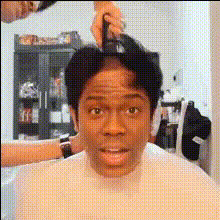
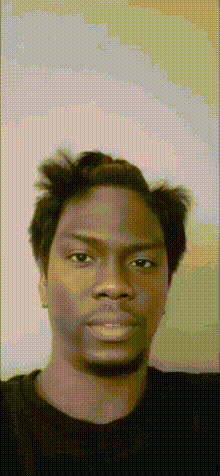
The Power of Hair

Magic Hour Profile Picture
by Anonymous

face-swap

1 clip
138 uses

Any aspect ratio

The Power of Hair – AI Face Swap Video Template

The Power of Hair is an AI-powered face swap video template on Magic Hour that lets you instantly put any face into a high-impact hair-focused video. It’s built for creators, marketers, and founders who want to prototype concepts, test visual narratives, or generate social-ready clips in minutes instead of hours of manual editing.

This template is powered by Magic Hour’s AI Face Swap engine and can be remixed, customized, and extended with other Magic Hour tools.

What This Template Does

The Power of Hair is designed around one simple idea: show how dramatically hair transforms a face and a character. You drop in a face, and the template places it into a stylized hair-focused scene (for example: dramatic slow-motion hair, salon-style glamour, or character transformation), keeping facial identity while matching lighting, pose, and expression.

Use it to:

  • Prototype beauty, haircare, or fashion concepts without full shoots
  • Test campaign ideas and audience reactions quickly
  • Create portfolio pieces, character reveals, or meme-ready transformations
  • Generate short social clips for TikTok, Instagram Reels, YouTube Shorts, or ads

The template is built on the same technology that powers Magic Hour’s core Face Swap and Face Swap GIF products, but packaged into a ready-to-remix flow.

How AI Face Swapping Works (In Plain Language)

Modern AI face swapping uses deep learning models (often based on convolutional neural networks and transformer architectures) to:

  1. Detect and track faces across video frames, including pose changes, partial occlusions, and expressions.
  2. Extract a “face embedding” – a high-dimensional representation of a person’s identity, separate from expression or lighting.
  3. Reconstruct a new face that preserves the target identity while matching the original shot’s pose, lighting, and perspective.
  4. Blend the new face into the scene by matching color, grain, motion blur, and other video characteristics to keep the swap natural.

Because The Power of Hair template is hair-centric, the model focuses on preserving hair outline, volume, and motion around the swapped face, which is often where traditional face swap tools break immersion.

For a more technical background, see discussions of deepfake and face reenactment research (e.g., “First Order Motion Model for Image Animation” by Siarohin et al.) and modern diffusion-based video generation. Magic Hour applies similar ideas in a production-ready interface.

Key Features of “The Power of Hair” Template

  1. High-Fidelity Face Swaps
    Powered by Magic Hour’s AI Face Swap, the template maintains identity while respecting the original video’s camera angle, lighting, and hair motion. It’s optimized for realistic, not cartoonish, results—ideal for brand-facing work, creator content, or rapid prototyping.

  2. Hair-Focused Composition
    The template’s shots and framing are built to highlight hair: movement, length, color, and style. That makes it especially useful for:

    • Haircare product mockups
    • Salon and stylist portfolios
    • Character design and visual identity explorations
    • Before/after storytelling and transformation content

  3. Creator-Friendly Workflow
    You don’t need video-editing experience. The template handles scene structure, timing, and transitions for you. Swap the face, export, and you have a polished clip ready to post or share.

  4. Social & Campaign Ready
    The Power of Hair is structured for short-form attention: tight runtime, clear transformation moment, and a strong focal point (the hair). It works as:

    • An organic TikTok or Reels post
    • A concept-test ad creative
    • A teaser for a larger campaign or launch

  5. Compatible With Other Magic Hour Tools
    You can chain the template with other products to build more complex flows:

How to Remix This Template in Magic Hour

You can use The Power of Hair as-is, or treat it as a starting point and build your own variant. Here’s a practical workflow for creators and teams:

  1. Start from a Face Swap Video
    Go to the Face Swap Video Creator. Choose The Power of Hair template (if shown) or a similar close-up/medium-shot hairstyle-focused video. This will be your “base clip.”

  2. Choose or Generate Your Face
    Use:

    Then swap that face into the Power of Hair template via the Face Swap product or directly in the Face Swap Video Creator flow.

  3. Iterate Visual Style
    To create your own version of the template:

    This gives you a family of related “Power of Hair” templates tailored to your brand or project.

  4. Optional: Add Motion Variants
    If you want the same face and hair concept in multiple scenes:

    • Use Video-to-Video to stylize or re-interpret the original Power of Hair clip (e.g., different lighting, mood, or environment) while preserving motion.
    • Incorporate lip movement or talking shots with the Lip Sync Creator or AI Talking Photo for ad hooks, testimonials, or UGC-style intros.

  5. Export, Test, and Iterate
    Once you have a version you like:

    • Upscale with the Video Upscaler if you need higher resolution for ads or landing pages.
    • Auto-caption your clips using the Auto Subtitle Generator for social-friendly, sound-off viewing.
    • Test multiple faces or hair “archetypes” for performance and iterate on the best performers.

Use Cases for Creators, Marketers, and Builders

1. Beauty & Haircare Brands

  • Show how a hairstyle or product might look across different faces and demographics.
  • Create “same hair, different person” or “different hair, same person” narratives to emphasize transformation.
  • Rapidly prototype ad angles (“power bob,” “curly glow-up,” “color reveal”) before commissioning full shoots.

2. Influencers & Content Creators

  • Produce high-quality transformation reels without daily salon sessions.
  • Experiment with extreme looks (vibrant colors, fantasy styles, period hair) using AI and keep only the winning concepts.
  • Build recurring formats around hair identity (e.g., “What if I had X hair?” series).

3. Founders & Product Teams

  • Validate creative ideas for beauty, avatar, or virtual try-on products using quick video mockups.
  • Generate pitch video snippets that clearly communicate how hair transforms brand perception, character, or persona.
  • Combine with AI Voice Generator and AI Voice Cloner for fully synthetic demos of “virtual brand ambassadors.”

4. Character Design, Games, and Fiction

Advanced Tips for Better Results

  • Use Clean, Well-Lit Source Faces
    Faces with clear lighting and minimal obstructions (no heavy shadows or large sunglasses) produce more consistent swaps. If needed, enhance images first with:
  • Match Angle and Expression When Possible
    Source faces that roughly match the angle (front, 3/4, side) of the template’s main shots will blend more naturally. While the face swap model handles variation, good input always helps.
  • Think in Personas, Not Just Faces
    For campaigns, define 2–4 “hair personas” (e.g., “executive sleek,” “creative curls,” “festival color”) and produce one Power of Hair variant per persona. This makes A/B testing and messaging alignment much easier.
  • Pair Hair With Outfits and Backgrounds
    Use: Coordinated style, outfit, and environment are what make the template look “production-grade.”
  • Repurpose Across Formats
    After generating your Power of Hair clip:

Ethics, Rights, and Responsible Use

AI face swapping is powerful and should be used responsibly. Before using a person’s likeness:

  • Get explicit permission from the person whose face you’re using, especially for commercial work.
  • Avoid misleading contexts (e.g., implying someone endorses a product when they don’t).
  • Respect platform policies and local regulations around synthetic media and deepfakes.

For brand, agency, or enterprise use, build internal guidelines around consent, disclosure, and storage of facial data. Many teams treat AI face swaps as concepting tools first, then move to fully consented, production shoots once ideas are validated.

Get Started

To try or remix The Power of Hair:

  • Open the Face Swap Video Creator.
  • Select a hair-focused base video (or the Power of Hair template, when available).
  • Upload your face, swap, and iterate.

From there, you can expand into talking versions with Lip Sync, stylized variants with Video-to-Video, or animated spins with Animation Creator.

The Power of Hair is a fast, practical way to explore how identity, style, and storytelling change when you change one thing: the hair.

More Like This