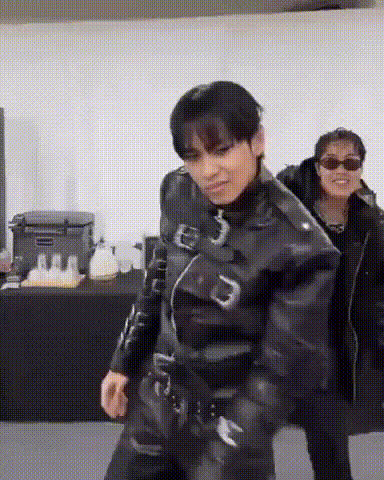
#TWICE #ONESPARK Dance
face-swap
Any aspect ratio
Tags
kpopmusic videoTWICE “One Spark” Dance Face Swap Video Template
Recreate the “One Spark” Dance With AI Face Swap
Turn the TWICE “One Spark” dance into your own performance using AI-powered face swap. This Magic Hour template lets you automatically replace the dancer’s face in the original choreography video with your face (or a friend’s), while keeping the lighting, motion, and camera work intact.
It’s ideal for:
- K‑pop creators making fast, high-quality dance edits
- Marketers and social teams riding TWICE / K‑pop trends
- Developers and founders prototyping AI video content workflows
This template is built with Magic Hour’s AI Face Swap engine and the Face Swap Video template flow, so you can remix it, customize it, and plug it into your own content pipeline.
What Is the TWICE “One Spark” Dance?
“One Spark” is a song by the K‑pop group TWICE, known for its bright hook and performance-focused choreography. TWICE’s official dance practice and performance videos have inspired:
- Thousands of fan covers on YouTube, TikTok, and Instagram Reels
- Choreography breakdowns and mirrored tutorials
- Trend-style edits where fans swap themselves into the group’s performance
By combining the “One Spark” choreography with AI face swap, you can insert yourself into the dance while preserving the original staging and moves.
What This Template Does
This TWICE “One Spark” Dance Face Swap Template lets you:
- Upload a reference face (a selfie or portrait of you, a friend, or a fictional character)
- Apply it to the dancer in the “One Spark” performance video
- Generate a new video where the dancer’s face is replaced, but the body, choreography, and camera motion stay the same
Under the hood, this uses the same technology as Magic Hour’s AI Face Swap and Face Swap GIF, optimized here for dance footage and expressive motion.
How to Remix This Template in Magic Hour
You can either use this template as‑is or turn it into your own variation in a few steps:
-
Start from the Face Swap Video flow
Open the Face Swap Video creation page. This is the base flow used by this template. -
Use the “One Spark” dance as your base video
Import the TWICE “One Spark” choreography or dance practice clip you’re allowed to use (for example, an official performance, a fan cam you own, or your own cover). -
Add your source face
Upload a clear photo of the person whose face you want to swap into the performance. Front-facing, well-lit portraits work best. -
Generate the face-swapped dance video
Run the swap and preview the output. You’ll see the new face synced with the original movements, expressions, and angles. -
Export and repurpose
Download the video and adapt it for TikTok, YouTube Shorts, Instagram Reels, or other platforms in your workflow.
From there, you can duplicate your project inside Magic Hour, replace the base dance video, and quickly turn this into your own “series” of K‑pop dance swaps.
Advanced Use Cases for Creators & Teams
- Trend amplification: Swap multiple team members into the same “One Spark” performance for a internal challenge or campaign rollout.
- Content testing: Run A/B tests across markets by swapping in localized influencers or mascots, then measure engagement per region.
- Prototyping digital idols: Combine this template with Magic Hour’s AI Face Generator or AI Character Generator to test stylized or fictional faces in real dance footage.
- Creator pipelines: Pair with Video Upscaler, Auto Subtitle Generator, and AI Voice Generator to turn raw fan edits into polished, ready‑to‑publish assets.
How to Create Your Own K‑Pop Dance Face Swap Template
To build your own dance template (for TWICE, another group, or your own choreography), follow a similar pattern:
-
Choose a clear performance video
Use a high-quality, stable clip where the dancer’s face is visible for most of the routine. Official dance practices and high‑res fancams work well. -
Set up your base project
In Face Swap Video, import your chosen dance clip as the base video. -
Test with multiple faces
Try several faces (your own, friends, brand characters) to ensure the video works across a range of expressions, skin tones, and angles. -
Standardize your “inputs”
Document for your collaborators: recommended face photo type, video length, and dance framing. This makes it easier for others to remix your template. -
Scale with other Magic Hour tools
Use:- AI Image Editor or AI Face Editor to fine‑tune reference photos
- AI Image Upscaler or Unblur Image to clean low‑res sources
- Video Upscaler to improve final output quality
Combine Face Swap With Other Magic Hour Flows
For more complex K‑pop or idol-style edits, you can chain this template with other Magic Hour creation tools:
- Talking intros or outros: Use AI Talking Photo with the same face to create short spoken intros, then cut to your “One Spark” dance swap.
- Character-driven edits: Design stylized idols with the AI Anime Generator or Animated Characters Generator, and test how they look when swapped into live action dance.
- GIF highlights: Turn your favorite moments into shareable GIFs using AI GIF Generator or the dedicated Face Swap GIF product.
- Image‑only derivatives: Capture still frames from your video and enhance them with the AI Image Editor, AI Art Generator, or AI Background Generator for thumbnails, posters, or cover art.
Best Practices for High‑Quality K‑Pop Face Swaps
- Use high‑resolution, front‑facing photos for the source face; avoid heavy filters or extreme angles.
- Match lighting and mood: pick reference photos with similar lighting to the “One Spark” video for more natural results.
- Keep the choreography visible: edits work best when the dancer’s face is not constantly blocked by hair, hands, or props.
- Respect copyright and likeness rights: use videos and faces you have permission to use, especially for commercial projects or brand campaigns.
Who This Template Is For
- Content creators & K‑pop editors: Fast way to join TWICE trends with polished, on‑brand edits.
- Marketing teams: Experiment with culture‑driven content and influencer “cameos” without complex video shoots.
- Developers & startup builders: Prototype AI video experiences or internal tools using Magic Hour’s modular products (face swap, image, voice, and video utilities).
Next Steps
To start creating your own TWICE “One Spark” dance face swaps:
- Open the Face Swap Video template.
- Import your “One Spark” dance clip.
- Upload your reference face and generate your edit.
From there, you can duplicate the project, swap in new faces, or connect it with other Magic Hour tools to build a complete K‑pop content pipeline—without leaving your browser.