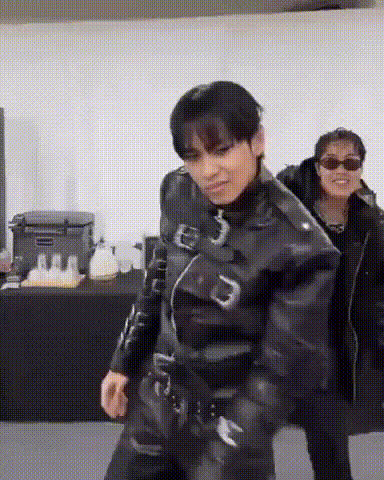
Kpop Group Dance
face-swap
Any aspect ratio
Tags
kpopmusic videoK‑Pop Group Dance Face Swap Video Template
Overview
This K‑Pop Group Dance template lets you drop your face into a high‑energy K‑pop style group performance using Magic Hour’s AI Face Swap technology. In a few minutes, you can appear as a member of a synchronized dance crew, ready for TikTok, Reels, YouTube Shorts, or any short‑form platform.
It’s built for creators, marketers, and teams who want studio‑quality K‑pop visuals without hiring dancers, choreographers, or a video team.
What This Template Does
- AI Face Swap on Group Dancers
Seamlessly replace multiple dancers’ faces with your own (or friends, team members, influencers, or characters). The template uses Magic Hour’s core face swap engine to maintain expressions, angles, and lighting so your swapped faces stay consistent across the performance. - Authentic K‑Pop Group Choreography
The dance is inspired by modern K‑pop stage performances—tight formations, synchronized moves, and dynamic camera framing similar to routines popularized by groups like BTS, BLACKPINK, and EXO. The focus is on clear, readable moves that look great on vertical short‑form video. - Social‑Ready, Short‑Form Format
Optimized for quick, loopable clips suitable for TikTok challenges, music promos, brand reveals, and fan content. The template works well for 9:16 vertical, but can also be adapted for feeds and stories across platforms. - Multiple Faces, One Performance
Turn the group into:- a full team performance (each dancer is a different colleague or friend)
- a “clone dance” (all dancers share the same face for comedic or surreal effect)
- a fan edit (your face plus your friends alongside your favorite style of performance)
- High Visual Fidelity
Because this template is built on video‑native face swap, it keeps motion, perspective, and lip shapes aligned frame‑by‑frame, unlike static image edits. For higher clarity on faces, you can pair your exports with Magic Hour’s video upscaler or AI image upscaler for thumbnails.
How to Remix This Template in Magic Hour
You can use this template directly, or quickly build your own variation using Magic Hour’s creation tools.
- Start from Face Swap Video
Go to the Face Swap Video creation flow. This is where you’ll upload your base dance video and your face images. - Use the K‑Pop Group Dance as Your Base
Select the K‑Pop Group Dance template from the template library. This gives you a pre‑built group performance with camera moves and choreography already in place. - Upload the Faces You Want to Swap
Add:- your own selfie or headshot (clean, front‑facing photos tend to work best)
- friends, teammates, or influencers for multi‑person collabs
- AI‑generated portraits from tools like Magic Hour’s AI face editor, avatar generator, or AI character generator
- Assign Faces to Dancers
Map each face to one or more dancers in the group to control who appears where. You can create:- “All‑me” clone dances
- split‑team dances (half your team vs. half your customers, characters, or mascots)
- multi‑influencer collaborations
- Generate and Review
Generate the video and review:- face alignment and expressions
- how recognizable each person is at different angles
- overall energy and loopability of the clip
- Export and Distribute
Export your final video for:- TikTok & Reels: short, high‑energy loops, great for challenges and sounds
- YouTube Shorts: teasers for full music videos or dance practice content
- Brand & campaign use: intros, interstitials, and social ads
Advanced Remix Ideas
If you want to push beyond the base template, you can combine it with other Magic Hour tools:
- Turn the Group into Animated Characters
Create stylized faces (anime, comic, or fantasy) using: Then use those outputs as face sources in Face Swap Video for a fully stylized group performance. - From Still Photo to Dancing Idol
If you’re starting from photos only, you can:- Create a polished portrait with the AI headshot generator or AI selfie generator.
- Use that portrait as your source face in this K‑pop group template.
- Change Outfits or Styling
Generate alternate costumes or fashion concepts with: Then create a series of K‑pop group videos with different “era” looks for campaigns or album‑style drops. - Spin‑Off Content: GIFs, Memes, and Clips
After exporting your main video:- Turn standout moments into GIFs using the AI GIF generator or face swap GIF tool.
- Create reaction memes from still frames with the AI meme generator.
- Generate thumbnails or cover art with the thumbnail maker or album cover generator.
Use Cases for Creators, Teams, and Brands
- Creators & Influencers
- Join the “dance challenge” meta without learning the choreography.
- Produce high‑volume, consistent K‑pop edits tied to trending sounds.
- Collaborate with fans by swapping their faces into your group and reposting.
- Startups & Marketing Teams
- Launch campaign intros where your entire team appears as a K‑pop group.
- Run A/B tests on creative concepts by quickly swapping different personas or brand mascots into the group.
- Create localized versions (e.g., regional teams dancing to the same track) with minimal extra production time.
- Music, Entertainment & Fandom
- Generate fan edits and fancams with personalized line‑ups.
- Tailor content for fan clubs, Discord communities, or Patreon/Tier perks.
- Promote releases with stylized K‑pop visuals using text‑to‑video for intros and this template for performance segments.
Best Practices for Realistic K‑Pop Face Swaps
- Use Clear, Well‑Lit Face Photos
Neutral expressions and unobstructed faces (no heavy shadows, large sunglasses, or extreme angles) generally produce the most stable swaps across fast dance moves. - Match Style and Age Where Possible
For the most natural look, use source faces with similar age range and general style to the dancers in the base video. This keeps proportions and vibe aligned. - Keep a Consistent Look Across a Series
If you plan multiple episodes or campaigns, consider generating a reusable image set with the AI headshot generator or avatar generator. Reuse these faces across templates for brand consistency. - Create Supporting Visual Assets
Complement your K‑pop group video with:- stylized posters using the book cover generator or AI illustration generator
- social avatars from the avatar generator
- behind‑the‑scenes style graphics using the AI image editor
Why K‑Pop Works So Well for AI Video
K‑pop is known for tight synchronization, distinct visual identities, and iconic group formations—elements that translate extremely well to AI‑assisted video. Research on music and social video shows that structured choreography, repeated motifs, and clear group dynamics increase completion rates and shares on short‑form platforms. By combining that with AI face swap, you get:
- High recognition (your face or brand consistently on screen)
- High reusability (one choreography, many face combinations and concepts)
- High production leverage (no need for a shoot each time you want a new version)
Related Magic Hour Tools Worth Exploring
- Lip Sync – Turn your K‑pop personas into singing or talking clips synced to audio.
- Video to Video – Apply stylistic transformations (e.g., anime, comic, fantasy) to existing dance footage.
- Animation – Build animated intros, transitions, or character‑driven cutaways between dances.
- AI Talking Photo – Create “idol greeting” messages or fan shout‑outs with your K‑pop persona.
- AI Voice Generator and AI Voice Cloner – Pair your visual persona with a consistent audio identity.
Use this K‑Pop Group Dance Face Swap template as your base, then remix, stack tools, and iterate quickly. It’s designed to help serious creators and teams test more ideas, publish faster, and bring K‑pop‑level production value into everyday content workflows.