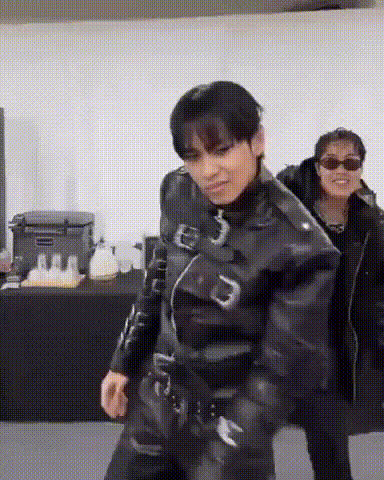
Kpop prom dance

face-swap

1 clip
62 uses

Any aspect ratio

Tags

kpopmusic video

K‑Pop Prom Dance Face Swap Template

Create a high‑energy K‑pop prom dance video starring you or your friends in a few clicks. This K‑Pop Prom Dance Face Swap Template uses Magic Hour’s AI Face Swap technology to place any face into a choreographed K‑pop style dance clip—ideal for promos, memes, social campaigns, and shareable content.

Use it as‑is, or remix it into your own branded template with Face Swap Video on Magic Hour.

What You Can Make With This Template

  • Prom & event promos – Announce school dances, company parties, or launch events with a fun “K‑pop MV” featuring your team or guests.
  • Social media content – Turn any selfie into a dance performance for TikTok, Instagram Reels, or YouTube Shorts.
  • Campaigns & UGC – Let fans star in your dance video by swapping their faces into your base clip for contests or interactive campaigns.
  • Memes & reaction clips – Quickly generate on‑trend, dance‑based memes using celebrity faces (where legally permitted) or internal team photos.
  • Creator experiments – Prototype music video concepts, character tests, or branded dance formats without a production crew.

Key Features of the K‑Pop Prom Dance Face Swap Template

  • High‑quality face swapping
    Built on Magic Hour’s AI Face Swap engine, this template accurately maps facial structure, expression, and lighting to the dancer’s body. The result is a more realistic, less “cut‑out” look than traditional overlays.
  • Pre‑choreographed K‑pop style routine
    The base video is designed around K‑pop group choreography: synchronized moves, camera framing optimized for faces, and dynamic transitions. You get the recognizably “K‑pop” energy without having to shoot anything.
  • Multiple use cases in one template
    Use a single face for a solo performance or generate variations for multiple friends, teammates, or characters. Remixable content makes it easy to A/B test different versions for engagement.
  • Optimized for social formats
    The template is built to work well across vertical and square formats commonly used on TikTok, Instagram, and Shorts. You can generate different exports for different channels inside Magic Hour.
  • Works with images or existing content
    Start from a selfie, a professional headshot, or stylized art. Combine with:

How to Use and Remix This Template in Magic Hour

  1. Open the base template
    Go to Face Swap Video and select a K‑pop dance or prom dance style template. Use the K‑Pop Prom Dance Face Swap Template as your starting point.
  2. Upload your face (or multiple faces)
    Use a clear, front‑facing photo with good lighting. Upload:
    • Your own selfie for a personal prom dance clip.
    • Friends, classmates, or colleagues for group edits.
    • Stylized faces generated with the AI Character Generator or AI Anime Generator for fictional idols.
    Magic Hour’s AI will automatically align facial features to the dancer in the template video.
  3. Remix the visual style
    To turn this into your own reusable template:
  4. Add audio and lip‑synced performances (optional)
    If you want the dancer to sing along:
  5. Polish visuals for share‑ready quality
    Before exporting, you can:
  6. Export and distribute
    Export your face‑swapped K‑pop prom dance clip in your preferred format and publish to:
    • Short‑form platforms (TikTok, Reels, Shorts).
    • Event pages, landing pages, or internal Slack/Discord channels.
    • Campaign microsites and UGC experiences.
    For recurring campaigns, save your remixed version as your own internal template and reuse it with new faces.

Best Practices for High‑Performing K‑Pop Face Swap Videos

  • Start with high‑quality faces
    Use sharp, front‑facing images with neutral expressions and minimal occlusion (no heavy shadows, large sunglasses, or hands covering the face). Tools like Unblur Image and Old Photo Restoration can help rescue older or lower‑quality photos.
  • Match tone and persona
    For brand work, define a consistent “idol persona”:
  • Align audio, motion, and context
    Combine this dance template with:
    • AI Talking Photo for intro/outro segments where the “idol” speaks directly to camera.
    • Text‑to‑Video to build narrative segments around the dance (e.g., invitations, countdowns, or story chapters).
    • Auto Subtitle Generator for karaoke‑style captions or multilingual versions.
    This creates a cohesive, campaign‑ready experience rather than a one‑off meme.
  • Optimize for engagement and iteration
    For marketers and creators:
  • Respect rights and privacy
    When using real people’s faces:
    • Obtain consent from anyone whose face you upload.
    • Avoid impersonation or misleading uses, especially with public figures.
    • Use fictional or AI‑generated characters when in doubt, via tools like the AI Face Generator or AI Character Generator.

Who This Template Is For

  • Creators & influencers – Quickly spin up recurring “dance drop” formats featuring fans, patrons, or channel mascots.
  • Marketers & growth teams – Build high‑shareability assets for event promotion, product launches, or fan engagement campaigns without a production studio.
  • Founders & startup teams – Prototype branded video concepts for landing pages and socials before investing in traditional production.
  • Education & student groups – Promote prom, homecoming, festivals, or club events with personalized, low‑lift K‑pop dance videos.

Advanced Remix Ideas

Get Started

The K‑Pop Prom Dance Face Swap Template lets you turn any face into a polished, high‑impact K‑pop dance performance with minimal time and no production overhead. Open the template in Face Swap Video, upload your faces, and start remixing—then reuse your customized version as a plug‑and‑play format for future events, campaigns, and content drops.

More Like This