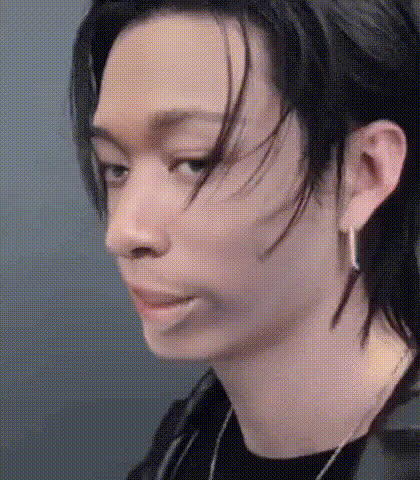
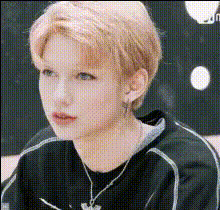
#straykids #skz #hyunjin edit

Magic Hour Profile Picture
by kpop_stan

face-swap

1 clip
71 uses

Any aspect ratio

Tags

kpopmusic video

Stray Kids Hyunjin Edit – Face Swap Video Template

Create Your Own Hyunjin Fan Edit in Minutes

Turn yourself (or anyone) into Stray Kids’ Hyunjin with this face swap video template on Magic Hour. This template uses Magic Hour’s AI Face Swap to map your face onto Hyunjin in a smooth, high‑quality edit – ideal for K‑pop fans, editors, and creators who want to make fast, professional‑looking #straykids #skz #hyunjin edits without advanced VFX skills.

You can remix this template directly in Magic Hour using the Face Swap Video Creator. Simply drop in your own footage or images, swap faces, customize the look, and export.

What You Can Do With This Hyunjin Face Swap Template

  • Fan edits & tributes: Place yourself in Hyunjin’s iconic scenes, choreo, or concept aesthetics for TikTok, Reels, Shorts, and YouTube compilations.
  • Dance covers: Film your own dance and map Hyunjin’s face (or yours onto Hyunjin clips) to create high‑impact performance edits.
  • Concept & teaser videos: Build promo clips for fan projects, fanfiction trailers, or K‑pop‑inspired storylines.
  • Memes & reaction content: Use Hyunjin’s face in short, meme‑style videos or GIFs for Twitter/X, Discord, and fandom communities.
  • Profile & brand content: Create stylized edits for fan accounts, edit pages, or K‑pop‑themed brands.

Key Features of the Template

1. High‑Quality AI Face Swap

This template is powered by Magic Hour’s AI Face Swap engine, designed for realistic, frame‑consistent swaps:

  • Preserves lighting, head movement, and perspective across the clip.
  • Minimizes common artifacts like “floating faces” or mismatched skin tones.
  • Works on short clips, edits, and longer vertical videos for platforms like TikTok and Instagram.

If you want to build a custom variant, start from the generic Face Swap Video template and simply replace the source video or reference face with your own.

2. Flexible Visual Customization

You can easily remix the Hyunjin edit to fit your style:

3. Optimized for K‑Pop & Fandom Content

The template is tailored to common K‑pop fan edit patterns:

  • Works well with fast cuts, transitions, and lyric overlays.
  • Supports vertical or horizontal formats for TikTok, Reels, Shorts, and YouTube.
  • Ideal for pairing with audio from official tracks, dance practices, or remixes (respecting platform and copyright rules).

To expand beyond Hyunjin, you can generate other idols’ stylized portraits using the Avatar Generator or AI Character Generator and then face swap those into video using Face Swap Video.

How to Remix This Template in Magic Hour

You can recreate or customize this Stray Kids Hyunjin edit in a few steps:

  1. Start from Face Swap Video
    Open the Face Swap Video creator. This gives you the same underlying technology used in this template.
  2. Add your base video
    Use:
    • A clip of yourself dancing or acting (self‑recorded).
    • A stylized clip generated via Image to Video or Video to Video if you want an animated or highly edited look.
  3. Choose the face to swap
    Upload a clear Hyunjin reference image (frontal, good lighting). For alternative concepts, you can first enhance or stylize photos using:
  4. Generate the face swap
    Let Magic Hour process the video. The model will track the face across frames, apply the swap, and blend it into the original lighting and movement.
  5. Refine the edit
  6. Export & share
    Download the video and post it on TikTok, Instagram Reels, YouTube Shorts, or Twitter/X with tags like #straykids, #skz, #hyunjin, #faceswap, and #magichourai to reach similar audiences.

Advanced Remix Ideas for Creators & Developers

Best Practices & Considerations

  • Use high‑quality reference images: Clear, front‑facing photos significantly improve the realism of the swap.
  • Respect rights & platforms’ policies: When editing public figures or idols, follow fan community norms, platform guidelines, and copyright rules (especially when using music or commercial assets).
  • Credit your tools: Many editors now tag “AI edit” or “Made with Magic Hour” so viewers and collaborators know how the video was created.

Explore Related Magic Hour Tools for K‑Pop Edits

If you like this Stray Kids Hyunjin template, you can build more advanced pipelines with:

  • AI Lip Sync – sync mouth movements to any song or dialogue for performance edits.
  • Video to Video – restyle existing dance practices or fancams into new visual aesthetics.
  • Animation Creator – turn Hyunjin concepts into animated character edits.
  • Auto Subtitle Generator – add karaoke lyrics, translations, or captions to your edits.
  • AI Headshot Generator – create high‑quality portraits for cover art, posters, and thumbnails.

Get Started

To create your own Stray Kids Hyunjin face swap edit, open the Face Swap Video creator, upload your clip and Hyunjin reference, and start remixing. You can save multiple versions, experiment with different concepts, and build a full library of K‑pop‑inspired edits – all within Magic Hour.

More Like This