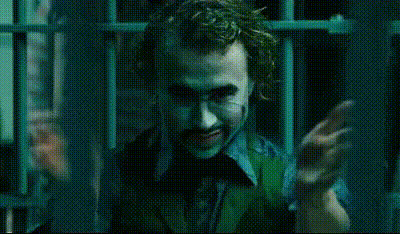
"No I'm Not" - Joker - Dark Knight

Magic Hour Profile Picture
by kpop_stan

face-swap

1 clip
175 uses

Any aspect ratio

Tags

movies

“No I’m Not” Joker – The Dark Knight Face Swap Video Template

Step into one of the most iconic villain performances in modern cinema with the “No I’m Not” Joker – The Dark Knight face swap video template on Magic Hour. This template uses Magic Hour’s AI Face Swap technology to let you appear as Heath Ledger’s Joker in a re-creation of his famous mob negotiation moment.

Perfect for short-form content, memes, character studies, fan edits, and marketing experiments, this template is built to be fast to remix and easy to share across TikTok, Reels, YouTube Shorts, Discord, and more.

What This Template Does

  • Uses Magic Hour’s Face Swap Video engine to replace the Joker’s face with yours (or any face you provide).
  • Preserves the original performance: expressions, timing, framing, and lighting from The Dark Knight–inspired scene are kept intact.
  • Outputs a ready-to-share video you can download, post, or further edit in your own workflow.

This template focuses on the “No I’m not” exchange from the Joker’s meeting with Gotham’s mob bosses, a key scene that showcases his mix of control, menace, and dark humor.

How to Remix This Template in Magic Hour

You don’t need to start from scratch. You can either use this template directly or create your own variation by remixing it in Magic Hour.

  1. Start with Face Swap Video
    Go to Face Swap Video. This is the core tool powering the template and lets you drop in your own face on top of the Joker’s performance.
  2. Upload Your Source Face
    Use a clear photo of your face (or your actor’s / character’s face). For best results:
    • Use a front-facing image with good lighting.
    • Avoid heavy filters, sunglasses, or extreme motion blur.
    • Use a single, consistent identity if you plan to create a series of videos.
  3. Apply It to the Joker Clip
    When you load the “No I’m Not” Joker template, Magic Hour automatically applies your face to the Joker in the pre-configured scene. You don’t have to manually align anything—the AI handles tracking, expression mapping, and blending.
  4. Download, Edit, or Chain Into Other Tools
    After generation, you can:
    • Download the video and cut it into shorts, memes, or ads.
    • Feed the output into AI Video Upscaler if you need higher resolution.
    • Generate alternative versions by swapping in other characters or teammates.

Creating Your Own Joker-Style Template from Scratch

If you want to build a custom Joker-inspired sequence (different lines, angles, or settings), you can assemble your own pipeline inside Magic Hour:

  1. Design the Joker Look
    Use AI Image Generator or AI Photo Generator to create a Joker-style character reference (makeup, suit, lighting). This helps keep your character visually consistent across shots.
  2. Create the Base Performance
    Record or source a human performance (yourself or an actor) delivering your custom lines inspired by the “No I’m not” moment. Then:
    • Turn a still image of your Joker-style character into a moving clip with AI Talking Photo or Image to Video.
    • Or, if you already have live-action footage, keep that as your base and just apply face swap.
  3. Face Swap into Your Custom Scene
    Use Face Swap Video again, but this time:
    • Source video = your Joker-style actor or AI-driven performance.
    • Target face = you, a teammate, or a fictional persona built via AI Face Generator or Avatar Generator.
  4. Optional: Turn It Into an Animated or Stylized Version
    If you want an animated Joker or comic-book feel:

Ideas for Creators, Marketers, and Builders

  • Short-form hooks & memes: Use the “No I’m Not” beat as a punchline for product objections (“Is this really AI-generated?” “No I’m not.”), brand reveals, or persona-driven campaigns.
  • Character-driven content: Build a recurring “chaotic strategist” persona that comments on startup culture, security, pricing, or growth tactics using the Joker-style performance.
  • A/B testing creative: Quickly swap different team members or influencers into the same Joker template to test which performer or persona converts better.
  • Fan edits & commentary: Combine this template with Lip Sync to dub in new lines for analysis, satire, or cultural commentary while keeping the Joker’s visual presence.
  • Developer demos: If you’re building AI-driven products, this template is a concrete, visual demo of deepfake-style face swapping you can show in decks or product walkthroughs.

The Joker Scene: Why It Works So Well for Face Swap

In The Dark Knight (2008), Heath Ledger’s Joker is defined by controlled, deliberate chaos. The “No I’m not” line comes during his negotiation with Gotham’s mob bosses, when Gambol calls him crazy and Joker calmly rejects the label. This moment is powerful for AI face swap because:

  • Clear, expressive close-ups: The camera lingers on Joker’s face, giving the model rich data for expression mapping.
  • Strong emotional contrast: He shifts between stillness, menace, and mocking humor, which tests and showcases the quality of the face swap.
  • Recognizable line and posture: Viewers instantly recognize the scene, making your swapped performance more engaging and shareable.

If you’re doing deeper character work, the Joker here isn’t just “insane”—he’s intentionally performing madness. That blend of performance, control, and chaos translates extremely well into meme formats, branded satire, and narrative shorts.

Related Magic Hour Tools You Can Chain With This Template

For more advanced workflows around this Joker template, you can combine it with:

Best Practices for High-Quality Face Swap Results

  • Use high-quality input faces: Clear, well-lit, front-facing images consistently produce sharper, more realistic swaps.
  • Stay consistent across a series: If you’re building a recurring Joker persona, stick to the same identity photo for brand recognition.
  • Plan for captions and context: Pair the visual with on-screen text or subtitles that explain the joke, the product, or the narrative beat.
  • Respect IP and platform policies: When you’re working with recognizable characters or actors, ensure your usage aligns with local laws, fair use guidelines, and the policies of the platforms where you publish.

Who This Template Is For

  • Creators who want a fast, high-impact way to appear as a legendary villain with minimal setup.
  • Marketers & founders testing narrative-driven or meme-driven campaigns that lean on cultural references.
  • Developers & AI builders who need a clear, visual example of real-time face swapping for demos, pilots, or investor decks.

The “No I’m Not” Joker – The Dark Knight template is a compact, high-signal way to explore AI face swapping, storytelling, and character-driven content. Remix it, chain it with other Magic Hour tools, and use it as a building block for more complex AI-native video workflows.

More Like This