AI product video prompts: 8 shots for product photos


Quick answer
Turn a product photo into a short video by asking for one camera move or one small environmental change while keeping the product recognizable. Start with a locked-camera shot when labels or fine details matter. Below are eight copyable image-to-video prompts, the source photo each needs, and the defects to check before using the result.
For a multi-shot ad, prompts are only part of the solution. Use the product-consistency workflow to preserve SKU shape, labels, color and materials across separate generations.
Open Magic Hour Image-to-Video, upload your own product photo, and paste one prompt below. Select duration, aspect ratio, and an available model in the tool. The prompts are starting points to adapt; the cover is an editorial illustration, not a set of measured model outputs.
Want to inspect recorded attempts before choosing a model? The commercial image-to-video benchmark includes the source images, fixed prompts and full output gallery for skincare, footwear, coffee and interior scenes. Its completion and credit figures are historical measurements, not quality scores or a promise that these recipes will pass your brief.
Animate your product photo
Upload your product photo, choose one restrained motion prompt from this guide, and inspect the label, shape, material and complete clip before generating variations.
Try Image-to-VideoChoose a shot for the photo you have
Your source photo | Start with | Inspect closely |
|---|---|---|
Front-facing packaging with readable text | 1. Locked camera and light movement | Label letters and packaging shape |
Bottle, jar, or simple product hero | 2. Gentle push-in | Product proportions and reflections |
Side view of a shoe or accessory | 3. Sideways camera slide | Stitching, sole, straps, and edges |
Close view of fabric or material | 4. Texture detail | Weave, grain, seams, and color |
A hot drink or hot food | 5. Steam above a still product | Ingredients, container, and believable motion |
Furniture already shown in a room | 6. Small pull-back | Scale, legs, corners, and room geometry |
Product with space behind it | 7. Background motion | Foreground outline and label stability |
A clean composition with empty space | 8. End-card hold | Space for copy and consistent product details |
1. Locked camera and moving light
Use for: packaging where the front label must remain recognizable. Start with an evenly lit photo in which the full label is legible.
Keep the camera fixed on the product in the uploaded photo. The product remains completely still in its original position. A soft studio highlight moves slowly across the background. Preserve the product's silhouette, label lettering, cap, color, and contact shadow. One continuous shot with calm, restrained motion.
Check: compare the label at the beginning, middle, and end. If lettering changes, keep the real product photo as a fixed layer in your editor and animate the background separately.
2. Gentle product push-in
Use for: a simple hero shot of a bottle, jar, or box. Leave room around the product so the closer framing does not cut it off.
Use the uploaded product photo as the starting frame. The camera makes a very slow, small push toward the stationary product. Keep the entire product visible throughout the shot. Preserve its proportions, label, surface finish, color, and placement. The existing background and lighting stay consistent. A single smooth shot.
Check: watch for a cap changing size, a label bending, or the object growing independently of the camera move. Reduce movement if these appear.
3. Sideways slide for shoes and accessories
Use for: a side-view product image with space on both sides. This prompt requests a small change in viewpoint, not a full rotation.
The camera slides a short distance to the right, moving slowly and parallel to the product in the uploaded image. The product remains stationary. Keep its visible shape, stitching, edges, material, and colors consistent. Maintain the original lighting and surface. Finish while the same side of the product is still visible.
Check: inspect laces, straps, handles, and the sole or base. A single photo cannot establish what the hidden side of a real product looks like. Use additional real views or filmed footage for a full rotation.
4. Material and texture detail
Use for: an existing close-up of fabric, leather, wood, or another material. The source needs enough detail for the area you want to show.
Begin with the uploaded close-up. Move the camera very slowly along the visible material, maintaining the same angle and distance. Keep the original weave or grain, seams, surface texture, and color consistent. Soft, steady lighting. Show a restrained detail shot of the existing surface.
Check: reject invented seams, changing grain, or texture that looks like a different material. Generation does not verify the product's actual construction.
5. Steam above a still drink or dish
Use for: a photograph of a product that is genuinely served hot. Avoid this treatment if it would misrepresent the item.
Keep the cup or dish and every visible ingredient in the uploaded photo still and unchanged. The camera remains fixed. A small amount of delicate steam rises slowly above the hot product and fades naturally. Preserve the container, label, food shape, portion size, lighting, and background.
Check: the steam should be the change. Reject extra ingredients, a moving logo, a melting container, or a different portion. Use the clip to illustrate presentation, not to prove a product claim.
Recorded coffee example: source, prompt and output
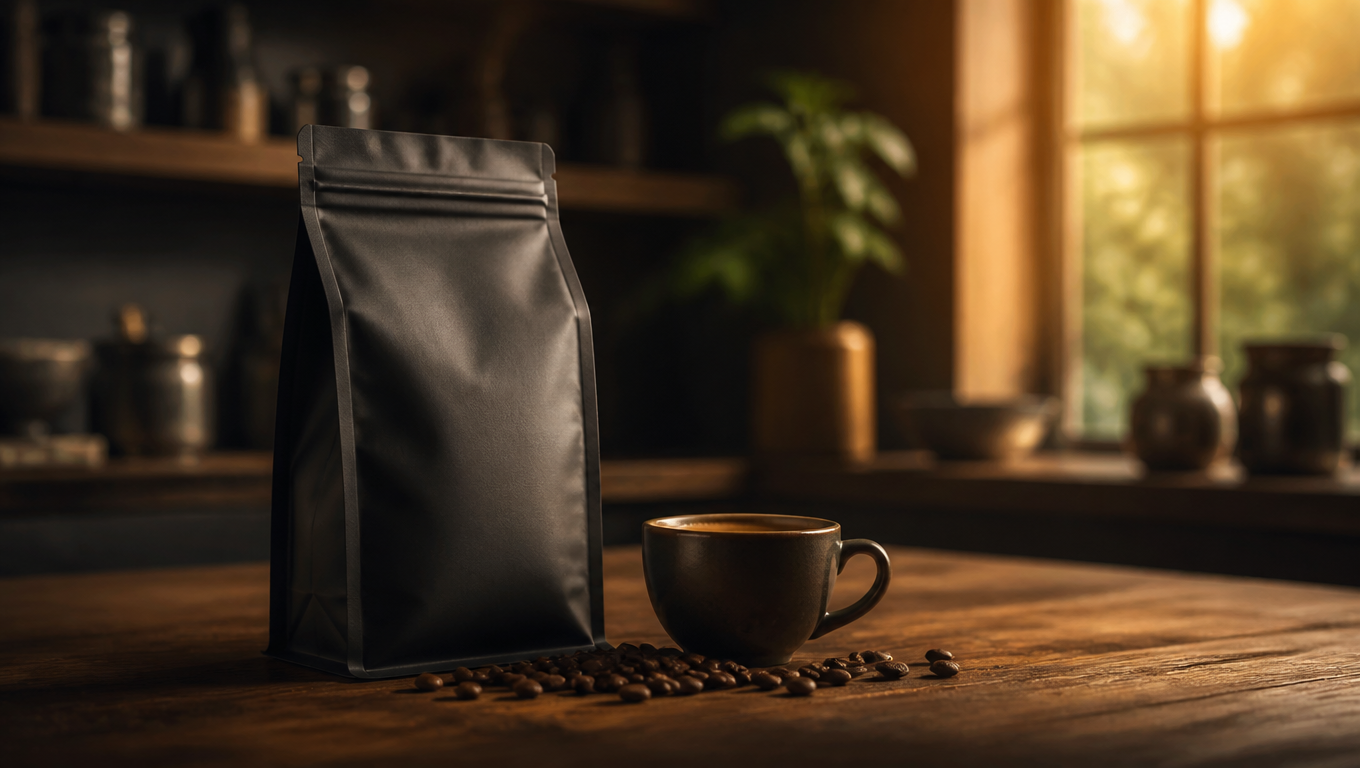
This AI-generated, unbranded scene is a retained study input, not a customer product or a test of the eight suggested prompts in this guide. Download the original source image and download the LTX 2.5 clip (MP4), then play the complete clip to inspect the motion.

A gentle dolly-in toward the coffee bag and espresso. Thin realistic steam rises from the cup and curls in the warm window light while the beans and packaging remain fixed. Preserve the bag shape, charcoal color, cup geometry, counter, and composition. Premium coffee advertisement, natural physics, no extra objects, no text.
Recorded September 10, 2026 UTC through Magic Hour’s API: LTX 2.5, requested eight seconds, 720p, audio off. The file returned 1278 × 722 pixels at 24 fps; the final charge was 384 account credits. These are historical API-run settings and charges, not the guest offer or a current quote. Inspect all fifteen coffee attempts. Watch the bag, cup and beans throughout; completion alone does not establish an acceptable ad.
6. Small furniture pull-back
Use for: furniture already photographed in a room with enough surrounding space. A tight crop gives the model little evidence about the wider scene.
Start from the uploaded room photograph. The camera pulls back slightly and slowly while keeping the furniture centered. Preserve the furniture's dimensions, upholstery, legs, corners, and position in the room. Maintain the visible room layout, lighting, and perspective. One continuous, stable shot.
Check: compare leg count, straight edges, scale, and nearby objects. If the move reveals invented room details, use a wider source image or a fixed-camera shot.
7. Move the background, hold the product
Use for: a product with a simple background and a clean outline. Name the exact background element that should move.
The product in the uploaded photo stays fixed in the foreground. Only the soft out-of-focus light in the background shifts gently. Keep the camera still and preserve the product's label, outline, color, material, and contact shadow. The product remains the clear focal point throughout.
Check: inspect the outline and translucent surfaces for background changes bleeding into the product. For strict packaging fidelity, compositing the original product over a separately animated background gives you direct control over that layer.
8. End-card hold with space for copy
Use for: a photo already composed with empty space beside or above the product. Add your final price, offer, and call to action in an editor after generation.
Hold the composition of the uploaded photo. The product remains still, fully visible, and unchanged. Keep the existing empty space clear. Use only subtle background light movement, then settle into a calm final hold. Preserve all product details and the original framing throughout the shot.
Check: make sure the generated motion leaves enough stable space for your message. Add readable text yourself rather than depending on generated lettering for an offer or legal disclosure.
Turn three shots into a simple product video
Use one establishing shot, one detail shot, and one end-card hold. For example: show a shoe with the sideways slide, show its material using a real close-up, then finish with the original product composition and a clear next step. Assemble the accepted clips in your video editor. Reuse the same product references so the shots describe the same item.
For the spoken message or on-screen sequence, choose a product-video script template. For choosing the source image, use the reference-image workflow. These solve different parts of the job: the script determines what you communicate; the shot prompt requests how an image moves.
The five checks before export
- Identity: shape, label, color, material, and visible features still match the real product.
- Continuity: inspect the whole clip for flicker, morphing, duplicate parts, and sudden camera changes.
- Truthfulness: the video does not invent a product function, ingredient, included accessory, or observed result.
- Delivery: the crop, readable copy, audio, and export match the destination's requirements.
- Cost: include rejected completed generations and editing time when comparing usable-output cost. Use the video-cost worksheet.
Do these prompts work with every model?
They describe a shot rather than an API request, so you can adapt them to an image-to-video interface that accepts an image and a text prompt. Results, controls, and supported inputs differ by model and provider. Follow the selected tool's documented settings; writing a duration or resolution in the prompt does not change the actual output setting.
Choose the camera movement you actually mean
A gentle push-in is not automatically a zoom. Runway’s camera-direction guide distinguishes a dolly, where the viewpoint moves and perspective changes, from lens magnification. For recipe 3, a sideways slide means the camera trucks parallel to the product; a pan swivels from a fixed position. An arc is a partial curved move, while an orbit travels around the subject. If one approved product photo shows only the front, keep the requested move inside the visible evidence rather than asking a full orbit to reveal an unverified back.
Keep camera controls and prompt direction consistent. When the selected tool offers a path control or motion preset, check it before copying a recipe. A locked-camera prompt paired with an orbit preset gives conflicting direction. Runway’s guide calls this double-directing: use one source of truth for the path, and use the prompt for the action, purpose or visual treatment. Where the interface provides only text, describe the move directly. This is a preparation check, not a promise of an exact camera trajectory.
Magic Hour's model reference documents supported output options. Runway's camera-direction guide explains common camera terms. Product access and source links were checked September 9, 2026.
What if the product must match perfectly?
Keep the real product photograph or filmed product as a fixed source layer and use AI for surrounding motion where appropriate. Inspect the composite too. A prompt asking for an unchanged label is a request to the model, not a guarantee of exact preservation.
To try one of these shots, upload a product photo to Magic Hour Image-to-Video and start with the simplest movement that serves your message.
For a current platform shortlist, compare the best AI video generators by inputs, output limits and production cost.
Frequently asked questions
They describe a shot rather than an API request, so you can adapt them to an image-to-video interface that accepts an image and a text prompt. Results, controls, and supported inputs differ by model and provider. Follow the selected tool's documented settings; writing a duration or resolution in the prompt does not change the actual output setting.
Magic Hour's model reference documents supported output options. Runway's camera-direction guide explains common camera terms. Product access and source links were checked September 9, 2026.
Keep the real product photograph or filmed product as a fixed source layer and use AI for surrounding motion where appropriate. Inspect the composite too. A prompt asking for an unchanged label is a request to the model, not a guarantee of exact preservation.
To try one of these shots, upload a product photo to Magic Hour Image-to-Video and start with the simplest movement that serves your message.
Continue Reading

7 best AI tools to turn product photos into videos

Product video script templates: 12 formats you can adapt


How to edit product photos with AI: workflow and prompts

Best AI video generation workflow for cinematic commercials
