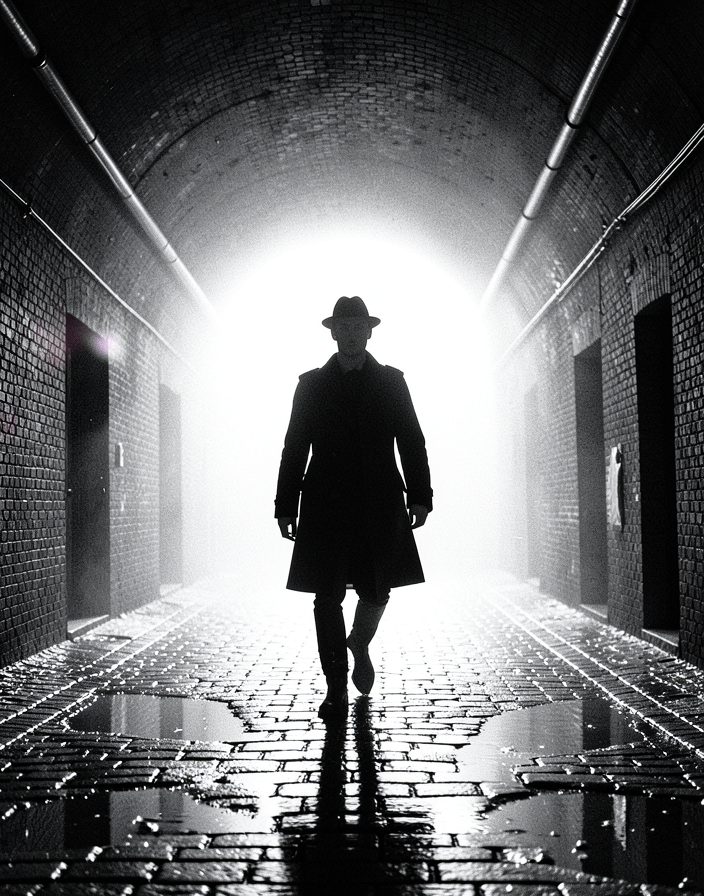
The Last Walk Through the Tunnel
- Model
- Flux 2 Klein
- Image
- 704 × 896 px
Prompt
A solitary 25-year-old Caucasian subject with light skin walks purposefully toward the camera as a striking black silhouette at the mouth of a rain-soaked brick tunnel, wearing a dark wool trench coat, fedora, and leather boots, the coat flaring gently with each step while an elongated shadow stretches dramatically across wet cobblestones. A powerful white backlight floods through the tunnel entrance, transforming the dense fog into a glowing halo that crisply outlines the subject's silhouette and fills the arched brick passage with atmospheric depth. The tunnel features weathered brick walls, inset doorways, exposed pipework, reflective puddles pooled between cobblestones, and heavy moisture that amplifies every highlight and reflection. The composition is a perfectly symmetrical wide shot from a low knee-height camera angle, using strong converging architectural lines to draw the eye toward the silhouetted figure while emphasizing the monumental scale and deep spatial recession of the tunnel. Captured as a cinematic live-action still inspired by classic 1940s Film Noir, German Expressionism, and modern noir revival, the image is photographed on an ARRI Alexa Mini LF with a vintage Cooke-style 35mm anamorphic prime lens, featuring moderate depth of field, subtle horizontal anamorphic flares, gentle elliptical bokeh, mild vignetting, and pronounced Kodak Tri-X-inspired black-and-white film grain. High-contrast low-key lighting is dominated by the intense backlight, with faint reflective fill bouncing from puddles below, while volumetric fog, drifting dust particles, and subtle water ripples enhance the sense of realism. Rendered entirely in rich monochrome with deep crushed blacks, luminous whites, dramatic chiaroscuro, crisp wet brick textures, matte fabric detail, and authentic analog film tonality, the image evokes a tense, brooding, mysterious atmosphere that feels like the final unforgettable frame before a noir mystery reaches its revelation.
Any aspect ratio
Overview
"The Last Walk Through the Tunnel" template encapsulates the striking depth and atmospheric tension of classic Film Noir, using the AI Image Editor powered by the flux-2-klein model. Create a cinematic black-and-white scene that captures the essence of high-contrast, brooding monochromes and architectural symmetry. This template empowers creators to bring to life the dramatic style of vintage cinema with contemporary image editing capabilities.
What It Does
This template processes your image by adding the aesthetic trademarks of noir cinema, including deep shadows, bright highlights, and the stunning interplay of light and shadow. Utilizing a high-quality simulation of classic film stock characteristics, such as Tri-X-inspired grain and subtle lens effects like elliptical bokeh, the template also enhances the atmospheric depth with volumetric fog and other effects. The result is an evocative scene that boasts both filmic authenticity and artistic flair, suitable for use cases like storyboarding or moody visuals in media projects.
Who It's For
This template is ideal for filmmakers, photographers, and creative directors who want to infuse their work with a noir aesthetic. Artists looking to create impactful visuals for video-to-video projects, such as music videos or classic-themed ads, will find this tool particularly beneficial. It's also a perfect fit for those producing promotional materials for product demo videos or for anyone aiming to achieve a retro-classic look without extensive editing knowledge.
Summary
"The Last Walk Through the Tunnel" brings the mystique and depth of noir cinema into your creative projects with advanced AI editing tools. By enhancing details such as the tunnel's weathered textures and the subject's silhouette, this template offers a comprehensive solution for creating film-quality images. Its suitability for a wide range of applications makes it a valuable asset for any creative professional looking to achieve a nostalgic yet modern cinematic look.
How to Use
Choose Your Template

Customize Your Scene

Generate Your Image

Use Cases
Cinematic Storyboarding
Promotional Material
Music Video Production
Best Practices
Maintain the Noir Aesthetic
Use high-contrast settings and deep blacks to emphasize the film noir style, ensuring that your edits stay true to the intended atmospheric tension.Leverage Symmetry
When setting up your shot, focus on balanced composition and symmetric elements to guide the viewer's eye intuitively through the frame.Experiment with Textures
Highlight the textures of bricks and puddles by adjusting the image detail sliders, offering a tactile feel that's essential to noir-style visuals.