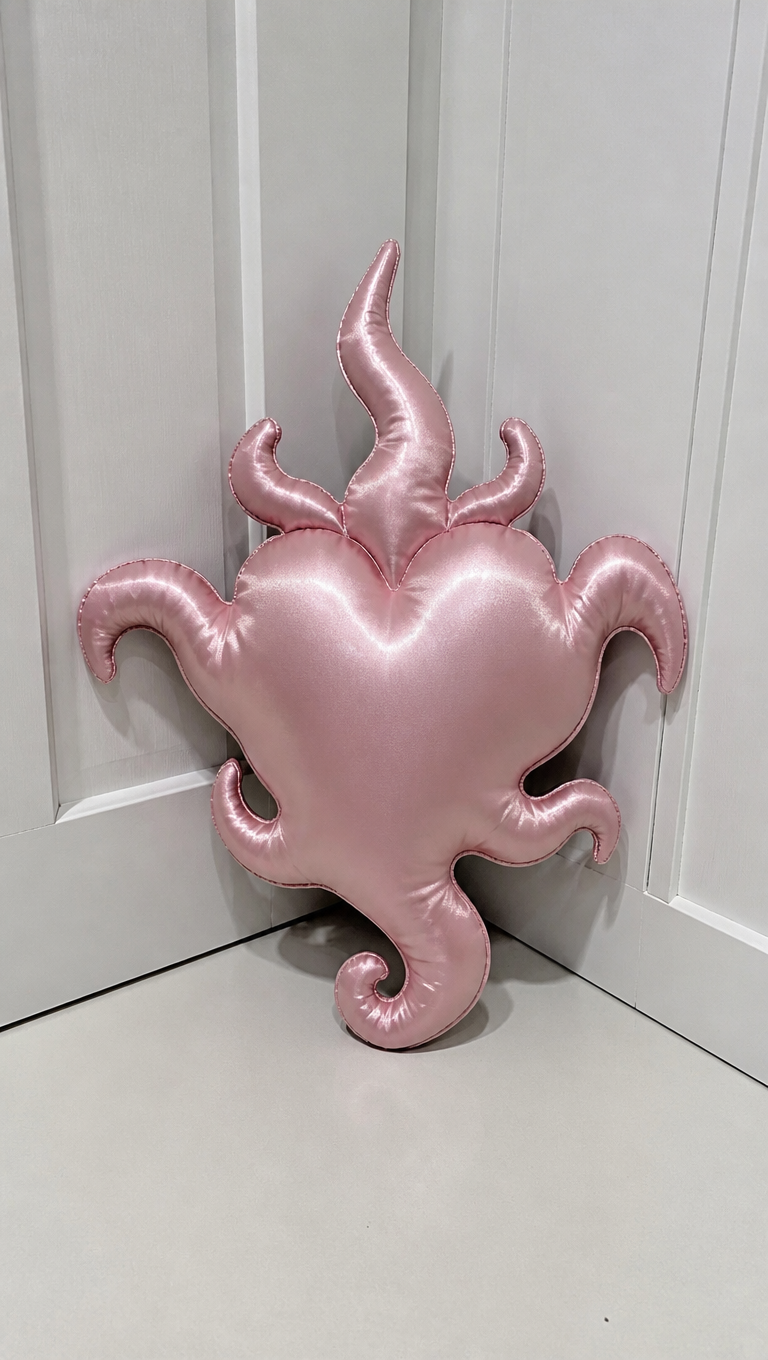
Fire heart pillow
- Model
- GPT Image 2
- Image
- 768 × 1360 px
Prompt
A straightforward, eye-level shot captures a uniquely shaped cushion placed upright against a white paneled wall in a corner. The cushion is designed in the form of a stylized heart with extended, curling protrusions, reminiscent of flames or tendrils. It is crafted from a shiny, satin-like fabric in a soft pink hue, reflecting light and giving it a glossy appearance. The seams are visible, adding a slightly textured feel to the otherwise smooth material. The setting is minimal, with white walls and flooring, offering a clean, sterile backdrop that highlights the cushion's ornate shape and pastel coloring. The ambient lighting is bright and direct, casting soft, diffuse shadows behind and below the cushion, enhancing the texture and creating subtle highlights on the fabric. The color palette is limited to the pale pink of the cushion and the neutral white of the background. Captured with a smartphone camera, the image appears sharp, with moderate contrast and a neutral atmosphere. HEX VALUES: ["#999795", "#a09c9b", "#948f8d", "#a9a4a2", "#7f7875", "#8b8481", "#715056", "#b3aeac", "#7c6266", "#bfbaba", "#5f3f45", "#8d6f75"]
Any aspect ratio
Overview
The Fire Heart Pillow template leverages the capabilities of our AI Image Editor to craft a visually striking image of a stylized heart-shaped cushion. Utilizing the gpt-image-2 model, this template ensures that the unique design elements such as shiny satin fabric and intricate flame-like protrusions are captured with precision.
What It Does
This template allows you to create a polished image of a heart-shaped cushion with flame-like tendrils. It highlights details such as the satin-like texture and the pastel pink color against a minimalist white backdrop. The AI Image Generator ensures that ambient lighting and texture nuances are accurately represented, providing a professional-grade visual ready for use in a variety of settings.
Who It's For
This template is perfect for content creators, e-commerce businesses, and designers who need high-quality product visuals. It offers an easy way to present unique cushion designs in catalogs, promotional materials, or social media posts. Whether you're a marketer or a craftsman, this template provides the tools you need to showcase your products vividly on platforms like Image to Video campaigns.
Summary
The Fire Heart Pillow template is a comprehensive solution for visualizing unique cushion designs. By focusing on texture, color, and minimalistic setting, it provides a clean and impactful image output. Ideal for those looking to emphasize product aesthetics, this tool ensures that your visuals are both captivating and true-to-life.
How-To
Choose

Customize

Generate

Use Cases
E-commerce Product Display
- Highlight shiny, satin-like textures to attract customers.
- Showcase product uniqueness with fine details and color accuracy.
Interior Design Portfolio
- Visualize how unique cushions fit into minimalist settings.
- Create detailed mockups for client presentations.
Social Media Marketing
- Use alluring product images to boost engagement.
- Combine with video tools for dynamic content.
Best Practices
Highlight Textures
Focus on enhancing the texture of the satin fabric for a more realistic appearance. Utilizing the AI Image Editor, you can adjust the lighting to emphasize these details.Maintain Contrast
Ensure there's a balance between the bright cushion and the white background to maintain visibility without overwhelming the viewer.Use Minimalist Backgrounds
Stick to minimalist settings to make the cushion the focal point, reducing distractions and emphasizing the product's details.