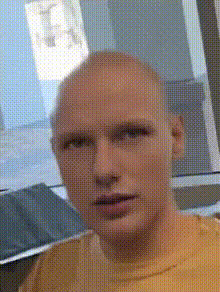
Template preview

smiling-lizard-face-closeup

face-swap

1 clip
0 uses

Any aspect ratio

Tags

transformations

AI Face Swap Video Template: Turn Any Clip Into a High-Impact, On‑Brand Visual

Use this Face Swap template to instantly replace a face in any video with your own, your spokesperson, or a character—without reshoots, complex VFX, or manual masking. It’s built on Magic Hour’s production‑grade Face Swap engine and optimized for realistic, frame‑accurate results.

This template is ideal for:

  • Creators localizing the same video for multiple personal brands
  • Marketers A/B‑testing different presenters in the same ad
  • Startups personalizing outreach videos at scale
  • Developers prototyping AI‑driven character or avatar experiences

What You Can Create With This Template

Use this Face Swap template as a starting point to build:

  • Creator / Influencer variants

    • Put multiple creators into the same hero video
    • Reuse one ad concept with different faces for each market or niche
    • Keep visual continuity while rotating personalities and CTAs
  • Personalized sales & onboarding videos

    • Swap in each rep’s face for outbound campaigns
    • Localize presenter identity for different regions or segments
    • Maintain one core script and motion design while updating the face
  • Character & storytelling content

    • Turn yourself into a recurring character across episodes
    • Map a single actor’s performance to different fictional faces
    • Combine with AI Talking Photo or Text to Video for fully synthetic spokespeople
  • Memes, reaction clips, and social edits

    • Drop your face into viral formats without manual editing
    • Remix trending clips while preserving timing and pacing
    • Pair with AI Meme Generator or AI GIF Generator for rapid content cycles

If you only need short loops or stickers, you can also use the dedicated Face Swap GIF flow.


How This Face Swap Template Works

This template is powered by the same underlying technology as the core Face Swap product:

  • Face detection & tracking across every frame in your source video
  • Identity transfer that maps your provided face onto the original subject
  • Lighting and expression matching for natural‑looking results
  • Temporal coherence to avoid jitter or “flicker” frame‑to‑frame

You don’t need motion tracking, rotoscoping, or 3D skills. Upload your assets, select your swap, and the model handles alignment, blending, and frame consistency.

For deeper background on AI face replacement and responsible use, see:

  • IEEE’s guidance on synthetic media and transparency
  • Ongoing discussions around deepfakes and content authenticity from organizations like WITNESS and the Partnership on AI

(If you publish high‑stakes or commercial content, consider adding labels or disclosures so viewers understand AI was used.)


How to Remix This Template in Magic Hour

You can treat this template as a “blueprint” and quickly spin up your own version inside Magic Hour. At a high level:

  1. Open the Face Swap Video creator

  2. Upload or select your base video

    • Use your original shoot footage, UGC, stock, or a clip generated elsewhere.
    • Pick a video where the subject’s face is visible and reasonably stable in frame for best results.
  3. Provide the face to swap in

    • Upload a clear, front‑facing image of the person or character you want to appear in the video.
    • For marketing or brand use, align with your visual guidelines (lighting, style, grooming) to minimize post‑work.
  4. Preview and iterate

    • Generate a preview from this template.
    • If something feels off (angle, expression, or style), try a different reference image or a slightly different base video.
    • Save successful setups as your own remix so you can re‑use them for future campaigns.
  5. Export and plug into your workflow

    • Download your final video for editing in tools like Premiere, Final Cut, or DaVinci Resolve.
    • Optionally, upscale or refine using Video Upscaler or enhance still frames with the AI Image Upscaler.

You can duplicate this exact flow whenever you need another variant—swap in a new face, reuse the same base footage, and generate a fresh version in minutes.


Going Further: Combine Face Swap With Other Magic Hour Tools

For more advanced creators and teams, this template is just one component in a larger synthetic media stack:


Best Practices for High‑Quality, Responsible Face Swaps

To get strong, commercially usable results:

  • Use high‑quality inputs

    • Clear, well‑lit faces in both the base video and the reference image.
    • Minimal heavy motion blur or extreme occlusions across the face.
  • Keep identity and context aligned

    • Ensure you have rights and consent to use the person’s likeness, especially in commercial or public content.
    • Avoid misleading use cases that could be mistaken for real‑world footage when that’s not your intent.
    • Consider labels like “AI‑generated” or “synthetic media” for transparency.
  • Stay consistent across a campaign

    • Once you find a setup that works, save this template as your own remix inside Magic Hour.
    • Reuse the same base footage and reference face to maintain visual continuity across ads, languages, or platforms.

For teams working across multiple brands or markets, you can treat each remix of this template as a “brand profile”: same script and edit, different identity and language layer.


When to Use This Template vs. Other Flows

Use this Face Swap video template when:

  • You already have a strong base video and want to change who appears in it.
  • You’re optimizing performance content (UGC ads, product demos, explainers) and need rapid variants.
  • You want maximum control over timing and motion while swapping only the face.

You might also consider:


Use this Face Swap template as the backbone of a repeatable, AI‑driven video pipeline: one master concept, many faces, tailored for each audience. Once you’ve remixed it for your brand, you can duplicate and adapt it in minutes whenever you need the next variant.

More Like This

Insufficient credits