Overview
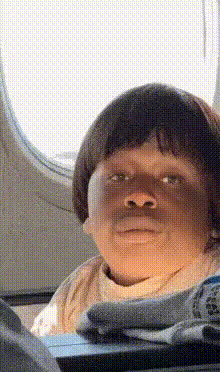
Inject some humor into your video creations with the "Child on Airplane" template. Designed for Video Face Swap magic, this tool allows you to replace a child's face on an airplane with any face of your choice, yielding comical results. It's ideal for creating laugh-out-loud moments to share with friends.
What It Does
This template facilitates a video face swap, focusing on a child's face in an airplane setting. By utilizing advanced facial recognition algorithms, it seamlessly maps a new face onto the child's, maintaining natural movements and expressions.
For broader creative opportunities beyond hilarious clips, consider exploring the AI Image Editor to refine images or the AI Video Generator for a variety of video styles.
Who It's For
The “Child on Airplane” template is tailored for content creators, social media enthusiasts, and anyone looking to add a lighthearted twist to their video collection. It's an excellent fit for family videos, meme makers, and influencers aiming to engage their audience with amusing content.
Explore how other tools like the Body Swap can further enhance your creative projects with immersive alterations.
Summary
Effortlessly create funny content that stands out with the Video Face Swap "Child on Airplane" template. Perfect for viral content, this tool is part of a larger suite designed to give creators the flexibility to push boundaries in digital storytelling. Check out the AI GIF Generator for additional options in creating shareable media.
How To
Choose Your Template

Customize Your Inputs

Generate the Final Video

Use Cases
Fun Social Media Clips
- Perfect for TikTok and Instagram Reels
- Ideal for meme generation
Family Video Highlights
- Keep your family entertained
- Make special events memorable
Light-hearted Marketing Campaigns
- Great for brands targeting young audiences
- Adds a playful element to your promotions
Best Practices
Choose High-Quality Inputs
Upload high-resolution images for the best face swapping results.Mind the Lighting
Ensure consistent lighting between the source and uploaded face for a more realistic swap.Experiment with Different Angles
Try swapping faces with various angles to see which yields the best comedic effect.