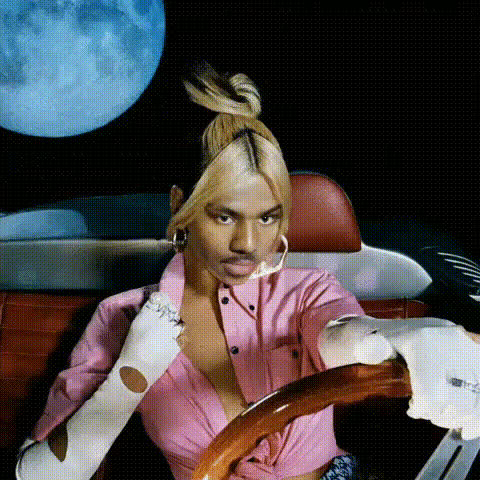
"These roads of flames" - Girl in Car

face-swap

1 clip
30 uses

Any aspect ratio

These Roads of Flames – Girl in Car Face Swap Video Template

Transform the Driver Into Anyone With AI Face Swap

The “These Roads of Flames – Girl in Car” template lets you drop a new face into a cinematic, high-intensity driving scene in just a few clicks. Built on Magic Hour’s AI Face Swap technology, this template is ideal for:

  • Creators and editors looking to test character ideas or storyboards
  • Marketers producing fast, personalized ad variants
  • Founders and growth teams prototyping video concepts without a full shoot

Use it as-is, or remix it into your own version using Magic Hour’s Face Swap Video template workflow.

What You Get With This Template

  • Cinematic “girl in car” shot in a tense, flame-lit environment – perfect for thriller, cyberpunk, dystopian, or action-driven narratives.
  • AI-powered face replacement powered by Magic Hour’s Face Swap engine, designed for realistic expressions and lighting.
  • High-resolution export suitable for social media, teasers, performance creatives, pitch decks, and promo reels.
  • Remix-ready structure so you can quickly swap in new faces, new narrative hooks, or pair it with other Magic Hour tools for more complex workflows.

How to Remix This Template in Magic Hour

You can recreate or customize this scene without touching a timeline-based editor. Here’s a practical workflow for busy creators and teams:

  1. Start from Face Swap Video
    Go to the Face Swap Video template. This is the core tool used to power “These Roads of Flames – Girl in Car.”
  2. Use the “Girl in Car” clip or import your own
    • If this template is available in your account, select it as your base clip.
    • Or upload your own driving or car-interior footage to recreate a similar mood (nighttime, strong contrast, limited light sources work best).
  3. Upload the face you want to swap in
    Use:
  4. Generate the face swap
    Magic Hour’s AI analyzes angles, lighting, and motion in the scene to blend the new face into the existing performance.
  5. Download and repurpose
    Export your video and plug it into:
    • Ad campaigns (Meta, TikTok, YouTube)
    • Trailers, highlight reels, or concept tests
    • Internal pitches, decks, or user-testing experiments

Advanced Remix Ideas for Builders and Marketers

To push this template further, combine it with other Magic Hour tools in a modular workflow:

Best Practices for High-Quality Face Swaps

For realistic, production-ready results in this specific “girl in car” setting:

  • Use clear, front-facing reference photos
    Photos with good lighting, visible eyes, and minimal occlusion (no heavy sunglasses, masks, or extreme tilt) typically produce the most consistent swaps.
  • Match the mood and lighting
    For a flame-lit, high-contrast scene, choose source faces that aren’t heavily filtered or overexposed. Natural skin tones and neutral expressions adapt best to the dramatic lighting.
  • Keep identity consistent across scenes
    If you’re building a longer narrative, generate a small set of consistent character images with AI Headshot Generator or Avatar Generator and reuse them for continuity.
  • Polish details where needed
    Clean up or refine images going into the pipeline with:

Lore, Positioning, and Use Cases

These Roads of Flames – Girl in Car” is modeled on the kind of scene you’d find in thriller and neo-noir cinema: a lone driver surrounded by danger, moving toward (or away from) something critical. By swapping the face, you can instantly reposition the story:

  • Product storytelling – The driver becomes your ideal customer avatar or your founder racing toward a launch.
  • Character testing – Writers, game designers, or DnD worldbuilders can prototype how a character reads on screen using tools like the DnD AI Art Generator or Fantasy Map Generator alongside this template.
  • Brand worlds – Fashion or automotive brands can test creative directions: pair with AI Fashion Generator, AI Outfit Generator, or AI Clothes Changer to visualize different looks inside the same high-stakes setting.

Enhancing Output for Distribution

Once your face-swapped version of the “girl in car” scene is ready, you can optimize it for multiple channels:

Why Teams Use Magic Hour for Face Swap Video

Magic Hour is built for fast experimentation and iteration. For teams shipping content weekly or daily, the key advantages are:

  • Speed – Go from concept to testable creative in minutes without a full shoot or complex timeline editing.
  • Modularity – Plug the Face Swap Video template into workflows that also use Text to Video, Animation, and AI Voice Generator.
  • Consistency – Generate a coherent visual identity across multiple campaigns using the same character and face assets.

Get Started

To create your own version of “These Roads of Flames – Girl in Car”:

  1. Open the Face Swap Video template.
  2. Load the “girl in car” scene or upload a similar driving clip.
  3. Upload the face you want to feature and generate the swap.
  4. Optionally enhance it with tools like Video Upscaler, Auto Subtitle Generator, or AI Meme Generator for distribution.

From there, you can duplicate, iterate, and A/B test as many variants as you need across channels—without reshoots, complex VFX, or heavy post-production.

More Like This