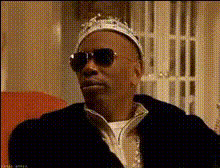
My Money Don't Jiggle Jiggle
face-swap
Any aspect ratio
“My Money Don’t Jiggle Jiggle” Face Swap Video Template
Overview
This template lets you drop yourself (or anyone) into the viral “My Money Don’t Jiggle Jiggle, It Folds” meme using AI face swap. It’s built for fast, repeatable content creation on TikTok, Instagram Reels, YouTube Shorts, and shorts-style ads — no video editing background required.
Under the hood, it uses Magic Hour’s AI Face Swap to map your face onto a pre-choreographed “Jiggle Jiggle” performance, while keeping the original movement, timing, and expressions. You get a polished, meme-native clip in minutes that you can reuse, remix, and iterate.
What You Can Do With This Template
- Turn the meme into a branded asset
Add your (or your team’s) faces to the meme and export on-brand shorts for launches, campaigns, or announcements. - Create fast character-based content
Swap in fictional characters, avatars, or AI-generated faces to turn the sound into a recurring series (e.g., “Founders when runway is low,” “Marketers when the budget hits,” etc.). - Localized or team-wide variations
Have every team member record a version with their face swapped in, then stitch them into a compilation or run A/B tests by persona. - Experiment with storytelling formats
Combine this template with other Magic Hour tools like AI Talking Photo or Text to Video to build narrative sequences around the meme.
Key Features
- AI Face Swap (Core of this template)
The template uses Magic Hour’s Face Swap Video workflow to:- Swap a source face (your selfie, headshot, or character art) onto the performer in the “Jiggle Jiggle” clip.
- Preserve lip movement, head motion, and lighting for a believable result.
- Generate output optimized for vertical video platforms.
- Background flexibility
Start from the built-in background of the meme or pair this template with:- Image Background Remover to isolate your subject.
- AI Image Editor or AI Background Generator to create or tweak backdrops (brand colors, office scenes, fantasy worlds, etc.).
- Short-form optimized audio
The template is built around the viral “My Money Don’t Jiggle Jiggle, It Folds” sound by Louis Theroux (remixed by Duke & Jones), which has been used in millions of TikTok and Instagram videos and is widely recognizable as a humorous, money/finance/awkward-flex meme.
Origin of the “My Money Don’t Jiggle Jiggle” Meme
The meme comes from a short rap performed by journalist Louis Theroux in a segment originally recorded for the BBC, later remixed by producer duo Duke & Jones. After the remix was shared on TikTok, it became a staple audio for comedic videos about money, confidence, and awkward flexes.
For creators and marketers, this matters because:
- The sound has strong cultural recognition — people understand the joke format instantly.
- It naturally fits content about money, hustle culture, startups, frugality, or “balling on a budget.”
- Face-swapped versions feel native to the meme, so they’re more likely to be watched to completion and shared.
How to Remix This Template in Magic Hour
You can either use this template directly in the library or recreate your own variant by combining Magic Hour tools. Here’s a practical way to replicate and iterate on it:
- Start from a Face Swap Video flow
Go to Face Swap Video and choose or upload your base “Jiggle Jiggle” performance video (or a similar clip that matches the beat). - Prepare your face source
Use a clear, front-facing photo or headshot. If you don’t have one:- Generate a face or character with AI Face Generator or Avatar Generator.
- Enhance low-res images with AI Image Upscaler or fix blur via Unblur Image.
- Run the face swap
In the Face Swap Video flow, apply your source face to the clip. The system automatically handles alignment, expression transfer, and motion to keep the meme’s original performance intact. - Adjust visuals and setting
If you want a different environment:- Use AI Image Editor or AI Background Generator to design a custom backdrop (e.g., startup office, luxury set, dungeon, anime world).
- Generate an animated environment using Video to Video to stylize the entire clip (cartoon, anime, comic-book look, etc.).
- Refine and repurpose
After you have one working version:- Create multiple variants with different faces (founder, CFO, mascot, influencer partners).
- Use Video Upscaler if you need higher resolution for ads or YouTube.
- Add subtitles using Auto Subtitle Generator to increase watch time and accessibility.
Advanced Remix Ideas for Creators & Marketers
- Founders & startup teams
Use the meme for light-hearted updates: “Runway don’t jiggle jiggle,” fundraising announcements, or hiring posts. Face swap the CEO, the whole founding team, or your lead investor into the performance. - Creators & influencers
Turn this into a recurring series: every week, face swap a new character (your followers, subscriber avatars, or AI-generated personas) and frame it around money, side hustles, or financial glow-ups. - Brands & agencies
A/B test different faces and concepts for ad creatives. Combine with AI Voice Cloner and AI Voice Generator to localize narration or intros around the same meme. - Content series & storytelling
Chain multiple meme templates: for example, start with a “Jiggle Jiggle” clip, then cut to a Talking Photo of your product, and close with a stylized Animation or Video to Video segment that visualizes your value prop.
Related Magic Hour Tools to Explore
To extend or customize this template, consider combining it with:
- Face Swap GIF – create looping “Jiggle Jiggle” GIFs for Slack, Discord, and email.
- AI GIF Generator – turn the best frames into shareable reaction GIFs.
- AI Meme Generator – spin out static memes based on screenshots from your video.
- AI Image Generator or AI Art Generator – design custom characters to swap into the template.
- Image to Video – animate still images of characters or founders to match the meme’s energy.
- AI Headshot Generator – create consistent, on-brand faces for your team that also work well as face-swap sources.
Best Practices for High-Performance “Jiggle Jiggle” Videos
- Use clean, well-lit face photos
Clear, forward-facing images with visible eyes and minimal occlusion (no heavy shadows, large sunglasses, or extreme angles) produce more realistic swaps. - Anchor the meme to a clear message
Pair the humor with a sharp on-screen caption (e.g., “When the quarterly budget review hits” or “Founders when the MRR chart finally bends up”). This increases saves, shares, and brand recall. - Stay within platform terms
When posting, ensure your usage of audio and likenesses respects each platform’s policies and any applicable rights or agreements. - Iterate quickly
The value of a meme is often in timing. Use this template to ship multiple variants fast, then double down on the ones that perform best.
Why Use a Template Instead of Editing from Scratch?
- Consistency – maintain a repeatable format across campaigns and creators.
- Speed – generate new content in minutes instead of manually editing in traditional NLEs.
- Scalability – use the same underlying setup to create dozens or hundreds of personalized meme videos.
This “My Money Don’t Jiggle Jiggle” Face Swap template is a practical starting point for anyone who wants to tap into a widely recognized meme format while keeping production lightweight and repeatable. Use it as-is, or remix it with tools like Face Swap Video, AI Image Editor, and Video to Video to build your own custom variant that fits your brand, story, or character universe.