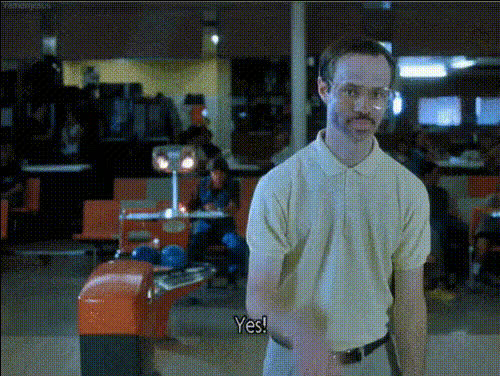
Napoleon Dynamite Jon Heder Dance
face-swap
Any aspect ratio
Tags
moviesNapoleon Dynamite Dance – Face Swap Video Template
Recreate the iconic Napoleon Dynamite talent show dance with your own face (or a friend’s) using Magic Hour’s AI Face Swap. This template is built on our Face Swap Video workflow, so you can instantly remix it into your own high‑quality meme, promo, or social clip—no editing skills required.
What This Template Does
This template lets you:
- Swap Napoleon’s face with yours (or any reference face) while preserving the original dance performance, lighting, and motion.
- Generate a ready‑to‑share dance clip you can post to TikTok, Instagram Reels, YouTube Shorts, or send in Slack/Discord.
- Remix the concept into other character dances, reaction memes, or promo videos using the same Face Swap pipeline.
The scene is inspired by the cult‑classic 2004 film Napoleon Dynamite, whose talent show dance has been widely cited in pop culture, parodies, and meme compilations. This template captures the energy of that moment while giving you full control over the face and identity on screen.
How to Remix This Template in Magic Hour
You can build your own version of this template in a few steps using Magic Hour’s tools:
- Start from Face Swap Video
Go to Face Swap Video. Upload the Napoleon dance clip (or any other dance/performance video you have rights to use). - Add your source face
Upload a clear photo or short video of the face you want to appear on the dancer. For best results, use:- Frontal or 3/4 view
- Good lighting, minimal shadows
- Neutral or slightly expressive face
- Generate the face‑swap video
Run the face swap. Magic Hour will keep the body, movement, and styling from the original clip while replacing the face with your chosen identity. - Polish the visuals (optional)
If you want to push production quality further:- Fix or enhance any still frames in the dance using the AI Image Editor or AI Image Upscaler.
- Turn individual frames into stylized art with the AI Image Generator or AI Art Generator for thumbnails and cover images.
- Export and share
Download your finished clip and post it anywhere you share video. You can create multiple versions quickly by swapping in different faces.
Example Use Cases
- Creators & streamers: Turn the Napoleon dance into channel memes, subscriber rewards, or reaction content.
- Marketing & growth teams: Create fast, recognizable, meme‑driven assets for campaigns, product launches, or culture‑driven social posts.
- Startups & teams: Swap your founder, mascot, or team members into the dance for internal events, all‑hands jokes, or launch celebrations.
- Developers & product teams: Prototype “AI face + motion” experiences without building an in‑house video synthesis stack.
Key Features of This Face Swap Template
- High‑fidelity Face Swap
Powered by Magic Hour’s Face Swap engine, which is designed to preserve:- Facial expressions and lip movement
- Lighting and shading consistency
- Head turns and fast motion
- Production‑ready video
The output is optimized for short‑form platforms, so you can drop it directly into:- Reels, Shorts, TikTok
- Presentations or product demos
- Meme compilations and reaction videos
- Fast iteration
Because it is based on the Face Swap Video template, you can quickly:- Test multiple faces (e.g., team, clients, fictional characters).
- Swap in different performances by using other dance or talent‑show clips.
- Combine with other Magic Hour tools for more complex workflows.
Advanced Remixes With Other Magic Hour Tools
If you want to go beyond a simple face swap, you can chain this template with other Magic Hour products:
- Animate still photos first
Use AI Talking Photo or AI Selfie Generator to create a stylized face, then use that generated face as your source in the Napoleon dance. - Turn images into full dance videos
If you start from an image instead of a video, animate it with Image to Video, then apply Face Swap Video to that animation. - Style the scene as anime, comic, or illustration
Generate branded or stylized versions of key frames with: Use those as thumbnails or cut‑ins in your edit. - Create GIF versions
Loop the best part of the dance and export as a GIF using the AI GIF Generator or pair with Face Swap GIF flows for lighter‑weight reactions. - Clean and enhance source material
If you’re working with older or low‑resolution footage, improve it first with:- Unblur Image and AI Image Upscaler for stills.
- Video Upscaler for the dance clip.
- Watermark Remover or Remove Object from Photo where appropriate.
Best Practices for High‑Quality Face Swaps
- Use clean, high‑resolution source faces
Avoid heavy motion blur, occlusions (hands, glasses covering eyes), or extreme angles. - Match lighting and vibe
A face photo with similar lighting and style to the dance scene will usually produce the most convincing results. - Think about identity and brand
For startups and creators, consider generating a consistent brand avatar using the Avatar Generator or AI Headshot Generator, then reusing that avatar across multiple face‑swap templates. - Respect rights and consent
Always ensure you have the right to use the faces and footage you upload, and get consent from real people whose likeness you swap into a video.
Related Magic Hour Templates & Tools
If you like this Napoleon Dynamite dance template, you may also want to explore:
- Lip Sync – Make characters or people sing along to audio tracks or voiceovers.
- Video to Video – Restyle existing footage (e.g., turn the dance into anime, comic, or stylized 3D).
- Animation – Animate static art or characters, then combine with face swap for advanced character videos.
- Text to Video – Generate entirely new scenes from text prompts, then optionally swap faces into them.
- AI Voice Generator and AI Voice Changer – Add custom voiceovers or character voices to your meme edits.
- Auto Subtitle Generator – Add subtitles or captions to make your dance clips instantly accessible and social‑ready.
Why This Template Works for Busy Creators & Teams
For creators, marketers, and founders, this Napoleon Dynamite Face Swap template offers:
- Speed: Go from idea to shareable video in minutes instead of hours of manual compositing.
- Consistency: Reuse the same face or brand avatar across multiple memes and templates.
- High impact: Leverage a culturally recognizable dance scene to grab attention in feeds and campaigns.
Remix this template, experiment with different faces, or plug it into your broader AI video workflow. With Magic Hour’s Face Swap Video and related tools, you can turn any iconic scene—not just this one—into a reusable, on‑brand asset for your audience.