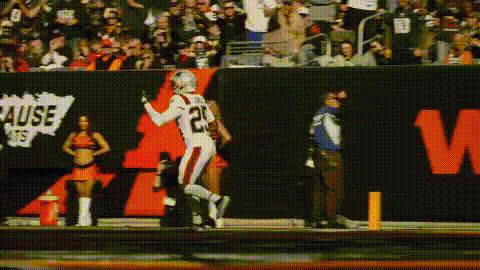
Kid Making Juke in Flag Football
face-swap
Any aspect ratio
Tags
sportsKid Making Juke in Flag Football – Face Swap Video Template
Turn a simple highlight into a share‑worthy sports reel. This “Kid Making Juke in Flag Football” template uses Magic Hour’s AI Face Swap technology to drop any face into a crisp, action-packed flag football clip—perfect for youth sports creators, coaches, brands, and parents who want fast, professional‑looking content.
What This Template Does
This template centers on a clean, high‑energy clip of a kid executing a sharp juke in flag football: a quick lateral move that fakes out the defender and creates open field. Using Magic Hour, you can automatically replace the player’s face with:
- Your child, teammate, or yourself
- A full roster of players for team promos
- A mascot or fictional character for fun edits or campaigns
The result is a personalized highlight video you can share on social, embed on your site, or reuse in reels, ads, and training content.
Powered by Magic Hour Face Swap
Magic Hour’s AI Face Swap models are designed for realistic, frame‑by‑frame swaps that preserve lighting, camera motion, and facial orientation. Instead of manually masking frames in a video editor, the model handles alignment and blending for you—making it practical for busy creators and marketers.
If you want to go beyond this single clip, you can explore:
- Face Swap Video Creator – turn any clip into a face‑swapped highlight
- Face Swap GIF – generate short looping GIFs from your sports moments
- Video‑to‑Video – stylize or re‑interpret your flag football footage in different visual looks
Who This Template Is For
- Youth sports organizations & leagues – produce quick highlight reels for social, websites, and sponsor decks.
- Parents & players – turn a single play into a “hero moment” clip that actually looks edited, not just recorded.
- Creators & social managers – spin up themed content (team intros, “player of the week,” challenge videos) without a full edit session.
- Startups & brands – prototype sports‑themed campaigns and concepts using AI face swap instead of bespoke shoots.
How to Remix This Template in Magic Hour
You can either use this template directly or treat it as a blueprint and remix it into your own version. A typical workflow looks like:
- Open the Face Swap video tool
Go to the Face Swap Video creator. This is where you’ll upload the base flag football clip and the face you want to swap in. - Use the “Kid Juke” template as your base
Select the “Kid Making Juke in Flag Football” template as the starting video. This gives you a pre‑framed, action‑packed sports moment that’s already tuned for face swapping. - Add your source face
Upload a clear photo or frame of the person whose face you want on the player. For best results, use:- Good lighting, no heavy shadows
- Frontal or slight 3/4 angle
- Unobstructed face (no big sunglasses, masks, or helmets)
- Generate your face‑swapped highlight
Let Magic Hour run the swap on the full clip. The system tracks the player through movement and handles the compositing automatically. - Remix, extend, or combine
To turn one clip into a fuller piece of content, you can:- Chain multiple sports clips with Video‑to‑Video
- Add lip‑synced intros or outros with Lip Sync (e.g., the player “explaining” the juke)
- Create animated highlight explainers using Animation
Ideas for Remixes and Variations
Once you have a working face‑swapped juke clip, you can:
- Create a “highlight pack”
Use the same face source across multiple sports templates—jukes, catches, runs—then stitch them into a highlight reel. If you need more stylized visuals, generate additional frames or scenes with the AI Image Generator or AI Art Generator, then animate them using Image‑to‑Video. - Do side‑by‑side breakdowns
Turn the play into a teaching tool: export your swapped clip, duplicate it, and overlay annotations. You can also generate clean stills from the juke and draw routes or cut angles using the AI Image Editor. - Build character‑driven content
Create AI‑generated “star players” with the AI Character Generator or Superhero Generator, then put those faces into this flag football clip. This works well for gaming channels, youth brands, or merch concepts. - Turn highlights into memes
Combine the juke clip with text overlays or reaction shots using the AI Meme Generator. Swap different faces in the same play to tell a story (e.g., “when the new kid embarrasses the whole defense”).
Best Practices for Realistic Sports Face Swaps
To get results that look good enough for social, client decks, or product demos:
- Start from clean video – high resolution, stable motion, and a clear view of the player’s head will always swap better than blurry sideline phone footage.
- Match lighting and age as much as possible – swapping a very dark, grainy selfie into a bright outdoor clip will usually look worse than using a well‑lit reference shot. For realism and responsible use, avoid making kids look like adults or vice versa.
- Use sharp reference faces – if your face source is low‑res or heavily compressed, consider enhancing it with the AI Image Upscaler first.
- Clean up distractions – if there are background objects you’d rather not include in thumbnails or stills, the Remove Object from Photo and AI Remover tools can help refine promotional images of the clip.
Where This Template Works Well
Examples of practical use cases:
- Team social media: weekly “Juke of the Week” posts with a different player’s face swapped in.
- Training content: show young athletes what a proper juke looks like, then swap in their faces so they can “see themselves” executing the move.
- Brand experiments: quickly prototype sports ad concepts—drop a mascot or campaign character into the play and test audience reactions.
- Personal highlight sizzle: combine this juke with other AI‑enhanced clips, cleaned and sharpened using the Video Upscaler and captioned via the Auto Subtitle Generator.
Ethical & Practical Notes
Face swap is powerful—especially with kids and sports. When using this template:
- Make sure you have consent to use the person’s face, especially for minors.
- Label AI‑generated or face‑swapped content clearly if it could be mistaken for real game footage.
- Avoid misleading representations (e.g., implying an athlete actually performed a play they did not).
Next Steps
To start building your own version of this template:
- Open the Face Swap Video creator.
- Choose the “Kid Making Juke in Flag Football” template as your base.
- Upload the face you want to feature and generate your customized clip.
From there, you can chain in other Magic Hour tools—AI Talking Photo, Text‑to‑Video, or Thumbnail Maker—to build full campaigns, highlight reels, or educational series around a single, memorable juke.