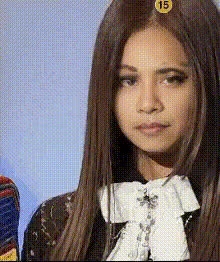
Jennie from BLACKPINK EDIT

Magic Hour Profile Picture
by kpop_stan

face-swap

1 clip
9 uses

Any aspect ratio

Tags

kpop

Jennie from BLACKPINK Face Swap Edit – Video Template

Turn Yourself into Jennie from BLACKPINK with AI Face Swap

The “Jennie from BLACKPINK Edit” template is a ready‑to‑remix AI face swap video built for creators who want K‑pop–style edits without complex VFX. Powered by Magic Hour’s AI face swap technology, this template lets you replace the original face in the clip with your own (or another face you have the right to use), while keeping Jennie‑inspired styling, motion, and transitions.

You can remix this template directly inside Magic Hour using the Face Swap Video workflow—no manual keyframing or After Effects skills required.

What This Template Is Best For

  • K‑pop style edits and BLACKPINK‑inspired aesthetics
  • Short‑form content for TikTok, Instagram Reels, YouTube Shorts, and Shorts ads
  • Fan edits, reaction intros, channel branding, and music‑adjacent visuals
  • Creative concept testing for agencies, labels, or marketers targeting K‑pop audiences

How AI Face Swap Works in Magic Hour

Magic Hour’s AI Face Swap model uses deep learning to track the original face frame‑by‑frame and synthesize a new, photorealistic face that matches:

  • Pose and movement – head turns, tilts, and expressions
  • Lighting and shadows – so the swap looks naturally integrated
  • Perspective and scale – to avoid “floating face” artifacts

Because tracking and blending are done automatically in the cloud, you can generate a high‑quality swap in minutes, even on long clips, without local GPU power.

Key Features of the “Jennie from BLACKPINK Edit” Template

1. AI‑Powered Face Swap Video

This template is built for the Face Swap Video tool. You simply provide:

  • A source face image or video you have rights to use
  • The template clip as your target video

Magic Hour handles all the tracking, blending, and rendering, giving you a stylized K‑pop edit where your chosen face appears in Jennie‑inspired scenes.

2. Multiple Outfit & Scene Variations

The template includes a sequence of shots with different outfits, environments, and camera angles, designed to echo the pacing and visual rhythm of modern K‑pop music videos. This makes it ideal for:

  • Quick, high‑impact edits under 30 seconds
  • Hook moments for ads or teasers
  • Multi‑look “style reels” that showcase different aesthetics in one video

3. Optimized for Social Platforms

The edit is structured so you can easily adapt it to:

  • Vertical formats (9:16) for TikTok, Reels, Shorts
  • Square or 4:5 for feed posts and paid social
  • Horizontal (16:9) for YouTube and web

You can also enhance or repurpose individual frames using tools like the AI Image Editor or turn stills into loops with the AI GIF Generator.

4. Ready to Remix for Your Brand or Persona

Although visually inspired by Jennie and BLACKPINK‑style edits, this template is meant to be remixed:

  • Swap in your own face, a virtual influencer, or a brand mascot (with appropriate rights)
  • Pair it with your audio, music, or voiceover generated via AI Voice Generator or AI Voice Cloner
  • Export key frames as assets for thumbnails with the Thumbnail Maker

How to Remix This Template in Magic Hour

You don’t need traditional editing software. You can create your own version entirely in the browser:

  1. Open the Face Swap Video tool
    Go to Face Swap Video. This is where all face‑swap templates and custom swaps are created.
  2. Select or upload the template video
    Choose the “Jennie from BLACKPINK Edit” template from the Magic Hour library, or upload a similar K‑pop style clip you’re allowed to use as your target video.
  3. Upload your source face
    Provide a clear photo or video of the face you want to insert. For best realism, use:
    • Good lighting and a front or ¾‑view of the face
    • Neutral expression or a range of expressions
  4. Generate the face swap
    Run the face swap. Magic Hour will track the target face across every frame and synthesize the new face to match pose, lighting, and motion.
  5. Review and refine
    Preview your result. If desired, you can:
  6. Add audio or sync to music (optional)
    If you want lips to move to your own track, you can chain this with the Lip Sync creator. You can also turn the final clip into a talking avatar using AI Talking Photo.
  7. Export and publish
    Download your final video and post to TikTok, Instagram, YouTube, or embed it in landing pages, fan communities, and campaigns.

Advanced Remix Ideas for Creators & Teams

  • Create a full K‑pop concept reel – Combine this template with stylized clips generated via AI Image Generator plus Image to Video to build a complete visual story around your persona.
  • Design artist or influencer avatars – Use the Avatar Generator or AI Character Generator to create a stylized version of yourself, then use that design as the face source for this template.
  • Campaign A/B tests – Marketers can generate multiple variants with different faces or outfits and test which edit drives better watch‑through or CTR.
  • Branded collaborations – Swap in creator or customer faces (with consent) for UGC‑style promotion, then refine stills for ads using the AI Headshot Generator or AI Outfit Generator.

Ethical & Legal Considerations

Face swap technology is powerful and sensitive. Before you publish:

  • Only use faces (your own or others) that you have clear consent and rights to use.
  • Avoid misleading viewers into believing the video is official content or actually features a public figure if it does not.
  • Review the terms of service of platforms where you post; some have specific policies around deepfakes and synthetic media.

For professional creators, agencies, and startups, building internal guidelines for AI‑generated content is strongly recommended.

Related Magic Hour Tools for K‑Pop & Fan Edits

You can extend this Jennie‑inspired edit with other Magic Hour products:

Why This Template Works for Busy Creators and Teams

  • Fast to produce – Go from idea to finished edit in a single browser session.
  • Repeatable – Reuse the same structure with different faces, outfits, or art directions for ongoing campaigns.
  • On‑trend visuals – Leverages highly shareable K‑pop aesthetics and pacing.
  • Tool‑agnostic outputs – Exported videos work seamlessly with your existing editing, analytics, or ad‑ops stack.

Remix the “Jennie from BLACKPINK Edit” in Face Swap Video, plug it into your creative workflow, and use Magic Hour’s broader AI toolset to turn a single fan‑style concept into a complete, on‑brand content system.

More Like This