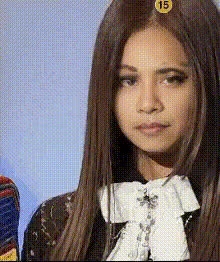
Jennie BLACKPINK Outfit Transitions

Magic Hour Profile Picture
by kpop_stan

face-swap

1 clip
42 uses

Any aspect ratio

Tags

kpoptransition

Jennie BLACKPINK Outfit Transitions – Face Swap Video Template

Create high-impact K-pop–style fashion edits in minutes. This Jennie BLACKPINK Outfit Transitions template is built on Magic Hour’s Face Swap Video workflow, so you can drop in your own face (or any photo), keep the cinematic styling, and instantly generate a polished, social-ready video.

What You Can Make With This Template

This template is designed for:

  • K-pop style edits featuring Jennie-inspired looks and transitions
  • Fashion and outfit reels for TikTok, Instagram Reels, YouTube Shorts, and stories
  • Fan content and concepts that remix BLACKPINK-style visuals with your own identity
  • Creator promos (stylized intros, channel trailers, campaign teasers)

It strings together 16 distinct outfit transitions in a single sequence, giving you a full “lookbook” style video that feels like a stylized K-pop MV cut.

Core Features

1. AI Face Swap, Optimized for K‑Pop Style Edits

The template uses Magic Hour’s production-grade face swap engine, also available in the standalone AI Face Swap and Face Swap GIF tools. You can:

  • Replace the original face with your own selfie, a client’s photo, or a stylized avatar
  • Preserve lighting, angles, and expressions to keep the video natural and watchable
  • Generate export-ready content without manual rotoscoping or masking

For higher-detail source images, you can preprocess photos with the AI Image Upscaler or clean them using the AI Remover and Remove Object from Photo tools.

2. 16 Jennie-Inspired Outfit Transitions

The template includes a curated sequence of 16 fashion-forward looks with dynamic cuts and pose changes. Each transition is designed for:

  • High visual variety (different outfits, camera angles, and backgrounds)
  • Fast-paced edits that match typical K-pop and fashion reel pacing
  • Trend-friendly framing that works well with popular audio on TikTok and Reels

If you want to go beyond the template and create more stylized shots or animated outfits, you can generate new frames with the AI Image Generator or AI Fashion Generator, then turn them into motion with Image to Video or Text to Video.

3. Social-First, Any Aspect Ratio

The sequence is designed to work in multiple aspect ratios so you can adapt it for:

  • Vertical: TikTok, Reels, Shorts, Snapchat
  • Square: Instagram feed, profile promos
  • Horizontal: YouTube, lookbook edits, portfolio reels

Because the template focuses on strong center framing, it remains usable across platforms with minimal reframing.

4. Remix-Ready in Magic Hour

You don’t need to start from scratch. This template is built to be remixed inside Magic Hour’s creation tools:

  • Swap the face while keeping all transitions, poses, and motion
  • Pair it with Lip Sync to align mouth movement with any audio track for singing or dialogue
  • Use Video to Video to restyle the footage (e.g., anime, painterly, cyberpunk)
  • Turn selected scenes into loops or GIFs with the AI GIF Generator

How to Remix This Template in Magic Hour

You can recreate or customize this Jennie Outfit Transitions experience using the Face Swap Video template flow:

  1. Start with Face Swap Video
    Open Face Swap Video. Choose this Jennie Outfit Transitions template from the library, or pick a similar multi-scene fashion template.
  2. Upload Your Face Source
    Provide a clear, front-facing photo or headshot. For best results:
    • Use a high-resolution image with good lighting
    • Avoid heavy filters or extreme color grading
    • Keep hair away from the face when possible
    If needed, enhance or fix your photo first with:
  3. Generate Your Face-Swapped Video
    Run the template to swap the original face with your uploaded one across all 16 outfits. Magic Hour automatically tracks expressions, perspective, and lighting.
  4. Refine and Extend (Optional)
    For more advanced remixes:
  5. Finalize for Distribution
    Export your video and, if needed, post-process with:

Use Cases for Creators, Marketers, and Teams

  • Creators & K-pop fans: Produce high-quality bias edits, concept videos, and fan intros that go beyond basic filters and slideshow apps.
  • Fashion & beauty brands: Prototype campaign concepts, outfit transitions, and UGC-style ads by quickly testing different faces and demographics in the same sequence.
  • Agencies & startups: Build pitch visuals and social content for clients who want “K-pop level” visuals without a full production budget.
  • Music marketing: Pair with AI Voice Generator or AI Voice Cloner to design cohesive narrative teasers, lyric snippets, or character-based promos.

Ethics, Rights, and Best Practices

Face swap technology is powerful and should be used responsibly. When working with real people or public figures:

  • Ensure you have permission to use someone’s likeness, especially for commercial or promotional content.
  • Avoid misleading content that could be interpreted as real endorsements or official campaigns.
  • Follow platform policies on AI-generated and manipulated media (TikTok, Instagram, and YouTube periodically update their guidance around synthetic content).

For safer experimentation, you can generate synthetic faces with the AI Face Generator or style-centric avatars via the Avatar Generator and use those in this template instead of real identities.

Related Magic Hour Workflows to Explore

If you like this Jennie Outfit Transitions template, these flows pair especially well with it:

  • Lip Sync – Turn your face-swapped character into a “talking” or “singing” persona synced to any voice or track.
  • Animation – Add stylized motion or character-like exaggeration on top of your transitions.
  • AI Talking Photo – Repurpose frames from the video into animated portraits for profile content.
  • AI Meme Generator – Turn specific outfits or poses into meme formats for social distribution.

Why This Template Works

This Jennie BLACKPINK Outfit Transitions template encodes a complete, proven visual structure: tight framing, fast cuts, and diverse looks. By combining that with Magic Hour’s AI Face Editor and AI Face Swap technology, it lets you:

  • Skip the shoot and complex post-production
  • Test different faces, aesthetics, and narratives quickly
  • Ship professional-looking content under real-world time and budget constraints

Remix the template, integrate it into your content system, and treat it as a reusable “visual macro” for high-performing fashion and K-pop–inspired videos.

More Like This