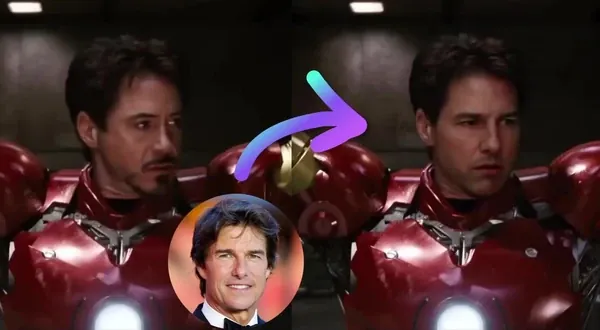
Multiple Face Swap Video
Swap multiple faces in videos. Free to try. No sign up.
Iron Man
Film Noir
Home Drama
Action Thriller
Sunset Romance
Horror Moment
Office Western
Trusted by teams at
How Multiple Face Swap Video Works
- 1

Upload Group Video
Upload the video with multiple faces — AI will detect each one automatically. - 2

Choose Faces
Choose one, multiple, or all detected faces, then upload a replacement for each selection. - 3
Swap Faces
Click "Swap Faces" to start. Once it's ready, download your high-quality video.


More face swap modes
Pick your swap
Choose single or multiple face swap for a photo, video, or GIF. Use Head Swap to replace a whole head, or Body Swap to replace a person in the scene. Inputs and controls vary by tool.
Single face swap
Replace one face in a portrait, clip, or reaction GIF — a quick single faceswap.
Multiple face swap
Swap every face in a group shot or cast scene at once.
- Open Head swap
Head swap
Replace the whole head, keep the body and pose.
- Open Body swap
Body swap
Put a new person in the scene—body, outfit, framing.
Multiple Face Swap Video Tutorial
Multiple Face Swap Video Use Cases

Swap faces in a multi-person TikTok or Reel — assign each creator's face to the right character.
Replace an entire cast in a comedy clip. Map friend A to character A, friend B to character B. To replace the full subject rather than only their face, use our AI Character Replace tool.
Generate multiple ad variants by swapping talent across group scenes — test different combos without new shoots.
Swap multiple athlete faces in team highlights — great for fan engagement content and personalized clips.
Show a client what different actors look like in the same scene, with each role mapped independently.
Why Creators Love AI Face Swap Video
Choose one, multiple, or all detected faces to swap across a video.
Skip After Effects workflows
No tracking, masking, or plugins - often saving hours vs manual workflows.
Handle motion and angles automatically
The tool aligns the face across frames so you do less cleanup and fewer re-renders.
Update content without reshooting
Swap in a new person in minutes when you need last-minute changes - no reshoot.
Test New Hooks, Creators, and Segments
Reuse the same footage with different faces to compare hooks, creators, or audience segments.
Export for Social or Client Review
Download the finished swap for short-form posts, ad drafts, or client review.
How Creators Use Face Swap
"I've tested a lot of face swap apps, and most couldn't handle movement or different angles. Magic Hour was the first tool that gave me clean, realistic swaps I felt confident using in ads. It saved hours of production time and the results actually performed."

Lindsay A.
Content Marketer
"I was having trouble getting my content to stand out on Instagram. In just a few minutes, I produced amusing posts using Magic Hour AI's face-swapping tool. One of them even gained thousands of new Instagram followers after going viral."

Divynash Chauhan
Growth at Slashy
"Magic Hour has one of the best free AI face swap tools that delivers realistic results for both images and videos in seconds."

Mimic PC
Open Source AI Platform
"Magic Hour AI is a genuinely cool and useful tool for anyone who needs to make high-quality visual content without the usual headaches of time, cost, and technical skill."

Stevia Putri
Marketing at Eesel AI
AI Face Swap Features
Swap faces in photos, videos, and GIFs — free, no sign up

High Quality
Free video output supports 480p. Creator+ subscribers can choose 720p or 1080p; 4K requires Pro+ and source support.
Multi Face Swap
Swap faces in a video with face-to-face mapping for customization. Ideal for group videos and creative projects.
Commercial Use with Plans or Credit Packs
Paid subscriptions and credit-pack purchases permit commercial use for marketing and client projects. You must have rights to the source media and every face you use.
API
Integrate seamlessly with our scalable API - fast, reliable, and built for high-volume use.
Multiple Face Swap Video FAQ
Yes, multi face swap video is free with no sign up required. You get 3 free multi face swap videos per day — no account needed. Sign up for free to unlock account-specific credits and rewards, saved projects, and access to more tools. Upgrade for watermark-free output, priority processing, and advanced features.
No. Multi face swap video works in your browser with no account, no sign up, and nothing to install. Sign up for free to unlock account-specific credits, rewards, and saved projects.
The free video tool supports up to three replacement faces. Choose which detected faces to swap and map each to a different source photo. Sign in to the Dashboard to swap more than three faces.
Regular swaps one face across the video. Multi face swap lets you map each person to a different source face.
Free tier supports standard clip lengths. Paid plans unlock longer videos.
Yes — the AI tracks each identity independently, even when faces cross or overlap.
Free tier includes a watermark on video. Paid plans and credit packs remove it.
MP4 and common video formats. After you sign in, you can also paste a YouTube URL in the editor.
We Value Your Privacy & Data Security, Always
Commercial use, no AI training, deletion controls, and feature-specific retention. Trust & privacy
Commercial use
Subscriptions and credit packs permit commercial use of outputs. Users without either purchase are limited to personal, non-commercial use.
No training
We do not use customer prompts, uploads, or outputs to train AI models. This covers free, paid, and API use.
Delete anytime
Delete saved projects or request account deletion. Retention varies by feature; account deletion has a separate 14-day restoration period.
Security
Encrypted in transit and at rest. Access is restricted for operations and support.
More Free AI Tools
These tools are part of Magic Hour's AI video generator hub—an overview of all our AI video tools, including text-to-video, face swap, lip sync, and more.