Christmas Captured in Glass
- Model
- GPT Image 2
- Image
- 1024 × 1024 px
Prompt
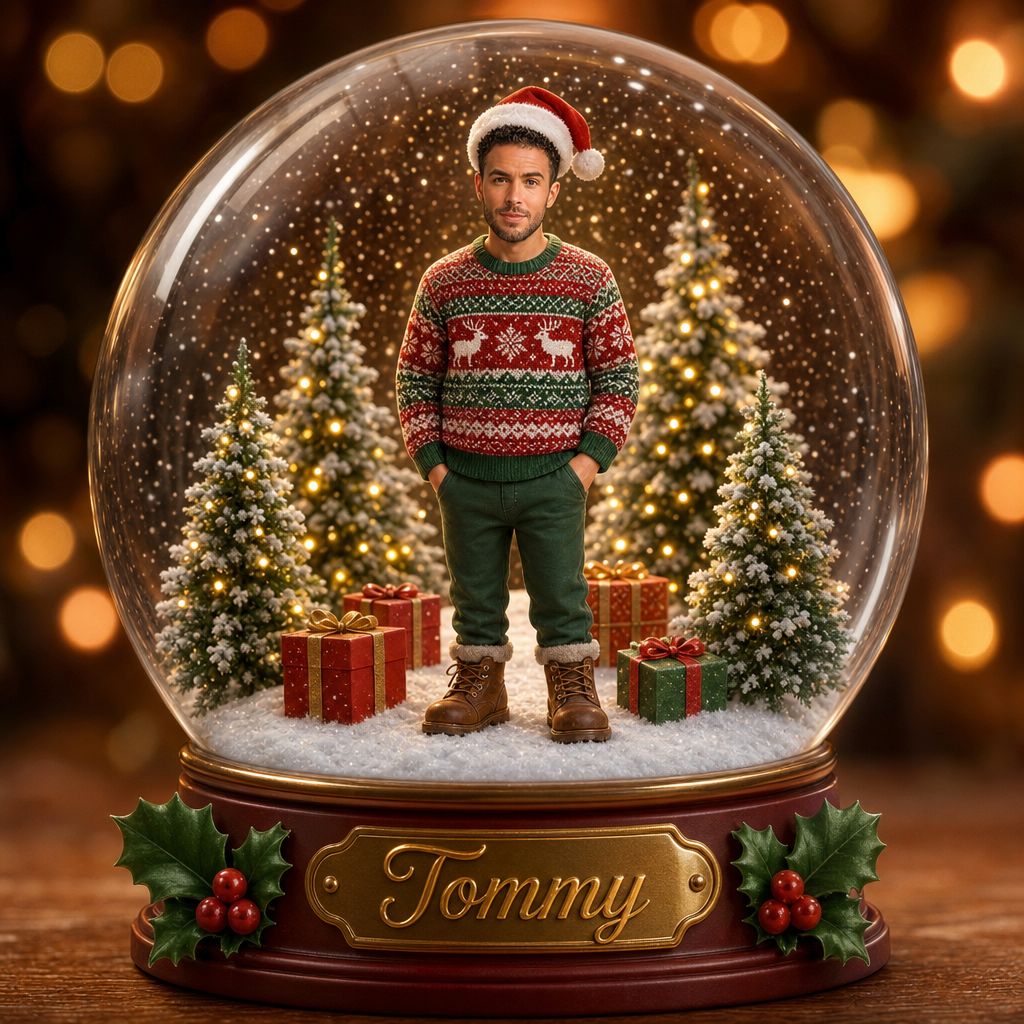
Create a high-quality, 3D-rendered digital illustration in a Pixar/Disney-style animated aesthetic. Use the uploaded person’s face strictly for exact face matching. Preserve the original facial identity, age, facial structure, skin texture, expression lines, and natural features without making the face younger or childlike. ⚠️ Important: Only the body proportions should resemble a child (8–10 years old). The face must remain the original real-world age of the uploaded person. The character stands centered inside a magical Christmas snow globe, facing forward and looking directly at the viewer with a warm, friendly smile. The head and face retain realistic adult proportions, while the body height, limb length, and posture match that of an 8–10-year-old child in a stylized animated form. The character wears a classic red Santa hat with a plush white brim and a fluffy white pom-pom. Outfit includes a festive knit Christmas sweater with a Fair Isle pattern—horizontal red and green bands, white reindeer silhouettes, and detailed snowflake motifs—paired with dark green trousers and sturdy brown leather winter boots with laces. Inside the snow globe, the character stands on pristine white snow. Behind them are three snow-dusted Christmas trees of varying heights, decorated with warm glowing yellow fairy lights. Several wrapped Christmas gifts lie near the feet, wrapped in red and green paper with gold and red ribbons. Fine white snow particles float in the air, giving the effect of a freshly shaken snow globe. The entire scene is enclosed in a perfectly spherical transparent glass globe with subtle reflections and highlights from a soft front-top light source. The globe rests on a decorative circular base featuring a golden nameplate with “Tommy” written in elegant gold cursive lettering. The base is trimmed with a dark red or wooden rim and decorated with festive holly leaves and bright red berries on both sides. Outside the globe, the background is heavily blurred with a bokeh effect, filled with warm golden, amber, and soft brown tones resembling distant Christmas lights, creating a cozy holiday atmosphere. Soft cinematic lighting, rich textures, cute stylized body proportions, realistic face preservation, ultra-clean 3D animated film quality. Aspect ratio: 4:5
Any aspect ratio
Overview
"Christmas Captured in Glass" is a delightful AI Image Editor template designed to transform your photos into a stunning 3D-rendered holiday scene. With the gpt-image-2 model, this template maintains the realistic age and features of the uploaded face while giving the body a whimsical child-like proportion.
What It Does
This template creates a magical Pixar/Disney-style illustration where the subject is placed inside a festive snow globe. It uses precise face matching to ensure the character's face retains its real-world identity, while adopting child-like body proportions. The scene includes beautifully decorated Christmas elements, enhancing the holiday aesthetic.
The image is generated with ultra-clean 3D animated quality, featuring rich textures and soft cinematic lighting to capture the essence of the holiday season. Explore other transformative tools like the AI Image Editor for more creative possibilities.
Who It's For
This template is perfect for anyone looking to create personalized holiday greetings or unique festive imagery. Photographers, graphic designers, content creators, and holiday enthusiasts will find this tool invaluable for crafting eye-catching seasonal visuals.
Discover similar creative options with our AI GIF Generator for dynamic holiday content or explore AI Image Upscaler to ensure your creations look their best.
Summary
"Christmas Captured in Glass" transforms ordinary photos into a fantastical holiday scene. It masterfully preserves the authenticity of the face while adding a touch of storytelling with child-like proportions and festive elements. This template is a must-have for creating memorable holiday visuals with a professional touch. Pair it with other tools like AI Photo Relighting for enhanced lighting effects.
How-To
Choose Your Template

Customize Inputs

Generate the Image

Use Cases
Holiday Greeting Cards
- Customize with family photos
- Unique animated style adds charisma
Social Media Content
- Enhance posts with unique visuals
- Capture attention with Pixar/Disney aesthetics
Corporate Holiday Campaigns
- Engage audiences with charming graphics
- Perfect for product promotion
Best Practices
Optimized Image Selection
Choose clear, high-resolution images with a frontal face view to ensure the best outcome.Attention to Detail
Consider using the AI Face Editor to finalize facial features pre-upload for perfect results.Creative Adjustments
Experiment with different prompts to scene settings for a personalized touch.