terry-crews-flexes-indeed
Overview
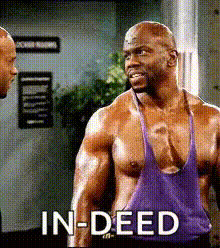
Transform ordinary clips into comedic masterpieces with the Terry Crews Flexes template. This Video Face Swap template allows you to superimpose any face onto the iconic body of Terry Crews as he flexes, ensuring laughs and viral potential. Leveraging advanced face swapping technology, this template is ideal for creators looking to make a splash on social media.
What It Does
This template swaps faces on a video clip of Terry Crews showing off his impressive muscles, creating a striking and humorous effect. It's a perfect tool for adding a fun twist to your content, using the same technology found in our Face Swap products. The result is a share-worthy video that maintains high visual quality, making it suitable for Image-to-Video transformations as well.
Who It's For
Whether you're a social media influencer, marketer, or just someone who loves making laugh-out-loud content, this template is designed for you. It's especially beneficial for those active on platforms like TikTok and Instagram, where viral content is key. Creative agencies and content creators can also utilize this tool for engaging campaigns, alongside our AI Video Generator products for additional effects.
Summary
Overall, the Terry Crews Flexes Video Face Swap template is a versatile and amusing way to create engaging content. With simple customization steps, it transforms your video into a standout piece ready for sharing and laughter, while synergizing well with our AI Meme Generator for added impact.
How To
Choose Your Template

Customize Your Inputs

Generate Your Video

Use Cases
Social Media Entertainment
- Create humorous skits
- Engage with viral trends
- Increase content engagement
Marketing Campaigns
- Boost brand visibility
- Engage potential customers
- Encourage social media shares
Personal Content Creation
- Surprise loved ones
- Spice up personal video compilations
- Have fun with creative editing
Best Practices
Choose High-Quality Photos
For the best results, use high-resolution photos with faces clearly visible and well-lit, ensuring the swapped face aligns naturally.Align and Adjust Features
Make sure the facial features on the uploaded photo align with Terry's face in the template to maintain realism in your final video.Test Different Face Angles
Experiment with different angles of the face in uploaded pictures to see which ones sync best with the template's movements.