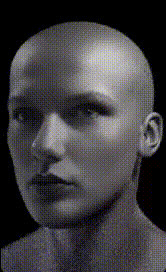
Mannequin Head Close Up
Overview
Discover a whole new way to entertain and engage your audience with the Mannequin Head Close Up template. This tool allows you to perform a Video Face Swap on a mannequin head. It's ideal for creators looking to add a fun and unique twist to their video content by making mannequin heads come to life with real facial features.
What It Does
The Mannequin Head Close Up template enables you to swap human faces onto mannequin heads in video format. By leveraging advanced AI algorithms, it creates realistic motion and expression, turning a traditional display into a lifelike figure. This template works seamlessly with common video file formats, ensuring smooth integration into your existing workflow.
Who It's For
This template is designed for video creators, marketers, and social media enthusiasts who wish to add a playful element to their videos. It's particularly valuable for those involved in fashion promotions, creative storytelling, and any campaign that benefits from eye-catching content. The ease of use makes it accessible even for beginners seeking to experiment with Video Face Swap techniques.
Summary
By using the Mannequin Head Close Up template, you can transform standard mannequin displays into intriguing video characters. This adds a personal touch to your content and elevates your video projects, appealing to audiences across various platforms. The template's compatibility with multiple AI video editing tools ensures you can further enhance and refine your creations for maximum impact.
How To
Choose the Template

Customize Your Inputs

Generate Your Video

Use Cases
Fashion Promotions
- Create dynamic store advertisements
- Enhance online fashion showcases
- Engage audiences with animated mannequins
Creative Storytelling
- Develop unexpected plotlines in short films
- Use as comedic relief in video content
- Incorporate into <a href="/use-cases/meme-videos">meme videos</a> for viral potential
Social Media Content
- Create captivating Instagram Reels or TikTok videos
- Engage viewers with interactive content
- Boost viewer retention with novel concepts
Best Practices
Light Your Scene Well
Good lighting is essential for accurate face alignment and optimal video quality.Use High-Quality Source Material
Ensure your video and face image have high resolution for the best final result.Double-Check Alignment
Take time to perfectly align the face overlay, ensuring expressions look natural.