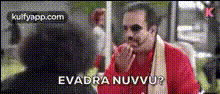
Man In Red Jacket
Overview
The "Man In Red Jacket" template is part of our Video Face Swap collection, allowing you to creatively swap faces on a character wearing a striking red jacket. It's an ideal tool for crafting both humorous and engaging video content without the complexity of manual editing.
What It Does
This template lets you execute a video face swap seamlessly, offering powerful transformation opportunities. Whether for entertainment or professional projects, this Video Face Swap tool ensures high-quality results by merging your chosen face onto the preset character with precision.
Who It's For
The "Man In Red Jacket" template is perfect for video editors, content creators, and social media enthusiasts looking to add a twist to their footage. It's especially useful for those interested in creating viral content or engaging social media stories using tools like the AI GIF Generator.
Summary
With the "Man In Red Jacket" template, you gain the ability to redefine creativity in your projects. By leveraging the face swap technology, this tool offers a dynamic way to revamp video content in a fun and innovative fashion.
How-To
Choose the Template

Customize Your Inputs

Generate Your Video

Use Cases
Social Media Content
- Instagram stories
- TikTok challenges
- Facebook posts
Marketing Campaigns
- Product launch teasers
- Brand storytelling
- Seasonal greetings
Entertainment Industry
- Short film production
- Music video content
- Comedy skits
Best Practices
Choose High-Resolution Images
Ensure the images used for face swapping are of high resolution to maintain quality.Align Faces Correctly
Carefully adjust the placement and size of the face to achieve a natural look.Experiment with Lighting
Match the lighting and shadows of the face to the target video for realistic integration.