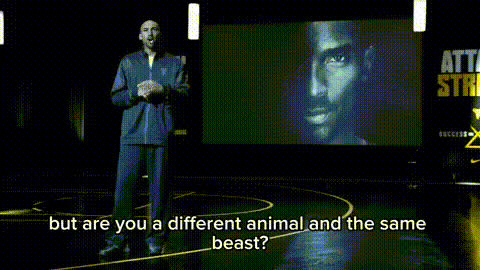
Kanye West on TV
talking-photo
Any aspect ratio
AI Talking Photo Template: Turn Any Portrait into a Speaking, On‑Brand Video in Minutes
This template uses AI Talking Photo to transform a single image into a realistic, talking video — perfect for product explainers, sales outreach, onboarding, social content, or personalized messages at scale.
Use this page as a starting point to remix your own version inside Magic Hour, then adapt it for your brand, voice, and use case.
What This Template Does
This AI Talking Photo template lets you:
- Start from any face image (photo, illustration, headshot, avatar)
- Add or paste any script you want the character to say
- Generate a natural-looking talking video with lip-sync and facial movement
- Export content for email, social, landing pages, product demos, or internal communication
It’s built on the same core technology as:
- AI Talking Photo – image → talking video
- AI Voice Generator – text → realistic voiceover
- AI Voice Cloner – clone or match brand voices
- Text to Video – script → full video with scenes
You can combine these for more advanced, fully automated video workflows.
How to Remix This Template in Magic Hour
You can recreate or customize this template in a few straightforward steps:
Choose Your Face Image
- Use a real person: upload a selfie, professional headshot, or team photo
- If you need new branded portraits, generate them first with the AI Headshot Generator or AI Selfie Generator.
- Use a character or illustration: create one with
- Use a real person: upload a selfie, professional headshot, or team photo
Polish or Edit the Image (Optional)
- Clean up or reframe the source image with:
- AI Image Editor
- AI Face Editor
- AI Image Upscaler for sharper video
- Image Background Remover or AI Background Generator to change the backdrop
- Remove Object From Photo to get rid of visual distractions
- Clean up or reframe the source image with:
Write or Generate the Script
- Draft clear, short scripts optimized for talking-head video (typically 15–60 seconds).
- For structured use cases, consider:
- Product explainer: problem → solution → key benefit → call to action
- Sales intro: personalization → relevance → value → next step
- Onboarding: welcome → what to expect → first action
- You can later repurpose this same script for:
- Captions using Auto Subtitle Generator
- Voice-only assets with AI Voice Generator
Generate the Talking Video
- Use the AI Talking Photo product with your image and script.
- For brand consistency, you can:
- Use AI Voice Generator for a specific style or accent
- Use AI Voice Cloner if you need the video to speak with a particular founder, spokesperson, or character voice
Refine and Extend
- Clean up the output:
- Improve crispness using Video Upscaler
- Add automatically generated captions with Auto Subtitle Generator
- Turn static moments or loops into short GIFs for social with the AI GIF Generator.
- If you want more complex motion or style changes, you can:
- Drive the character with Video to Video
- Create stylized animations with Animation Templates
- Clean up the output:
Best Practices for High-Conversion Talking Photo Videos
To make this template genuinely useful in business and production settings:
1. Start with the Right Image
- Use front-facing images with clear, unobstructed faces.
- Avoid extremely low-resolution or heavily blurred sources (or upsample with the AI Image Upscaler first).
- For consistent campaigns, create a single “virtual spokesperson” using:
- AI Character Generator → then reuse the same character image
- AI Headshot Generator for realistic brand ambassadors
2. Script for Spoken Delivery
- Short sentences, active voice, concrete claims.
- Mention specific benefits, metrics, or use cases where possible.
- Place your call to action in the last 1–2 lines so it’s easy to clip and reuse.
- Consider segmenting long scripts into a series of short videos instead of one long monologue.
3. Align Voice and Visual Identity
- Use AI Voice Generator to match tone:
- More formal for B2B explainers and onboarding
- More conversational for social, community, and creator content
- For founders or key leaders, clone their voice with AI Voice Cloner so that announcements feel personal but are fast to produce.
4. Optimize for Each Channel
- Email & outbound: keep videos short (15–30s), focus on personalization and one clear next step.
- Landing pages: use a slightly longer format explaining product value, proof, and FAQ-style objections.
- Social:
- Add subtitles with Auto Subtitle Generator
- Export short loops or highlights as GIFs via AI GIF Generator
- Create eye-catching thumbnails with the Thumbnail Maker
Advanced Variants You Can Build by Remixing
Once you’ve used this basic AI Talking Photo template, you can extend it into more advanced templates and workflows:
Face-Swapped Talking Spokesperson
- Swap a face onto a model or actor and then make that face speak:
- Use Face Swap or Face Swap GIF for the base media
- Then animate with AI Talking Photo or Lip Sync Templates
- Swap a face onto a model or actor and then make that face speak:
Lip-Sync from Voice or Music
- If you already have audio (e.g., podcast clip, founder recording), create a face that lip-syncs:
- Start from a character or headshot
- Use Lip Sync Templates to sync lips to your existing sound
- If you already have audio (e.g., podcast clip, founder recording), create a face that lip-syncs:
Stylized or Fictional Characters that Talk
- Generate non-human or stylized characters, then give them a voice:
- Design characters with tools like AI Art Generator, AI Manga Generator, Superhero Generator, Disney AI Generator, or Dark Fantasy AI
- Turn them into talking avatars using AI Talking Photo
- Generate non-human or stylized characters, then give them a voice:
Onboarding / Help Center Hosts
- Create a recurring virtual host that explains product features:
- Generate a polished host image with AI Headshot Generator
- Script short help videos and generate talking clips with AI Talking Photo
- Summarize docs or FAQs and turn them into snackable explainers with Text to Video
- Create a recurring virtual host that explains product features:
Personalized Campaigns at Scale
- For outbound, lifecycle, or customer success:
- Use a single, approved spokesperson image
- Programmatically generate personalized scripts (e.g., with your own LLM pipeline)
- Feed text + image into AI Talking Photo to batch-generate clips
- Use AI QR Code Generator to link physical materials to these videos
- For outbound, lifecycle, or customer success:
Complementary Magic Hour Tools for Better Outputs
To get production-grade, reusable assets from this template, consider combining:
For better faces and portraits
- AI Face Generator – create diverse, realistic faces
- Gender Swap – explore variants of the same character
- Full Body Generator – build out brand characters beyond headshots
For brand consistency and visual polish
- AI Image Generator or AI Photo Generator for assets and scenes
- AI Clothes Changer and AI Fashion Generator to keep outfits on-brand
- AI Logo Generator and Album Cover Generator for on-brand visuals around your video
For repurposing your talking videos
- AI Meme Generator to turn stills into shareable memes
- Comic Book Generator to reframe key moments as panels
- Book Cover Generator and Thumbnail Maker for covers and key art
When to Use This Template
This AI Talking Photo template is a good fit when:
- You need fast, repeatable spokesperson videos without scheduling shoots.
- You want to personalize at scale (outreach, onboarding, lifecycle).
- You’re testing messaging, scripts, or offers and want to iterate quickly.
- You’re building prototypes, mockups, or internal demos before full production video.
If you later need more complex motion, scenes, or mixed media, you can move from this template to:
- Video to Video Templates for style transfer and motion
- Face Swap Video Templates to replace actors while preserving performances
- Animation Templates for fully animated stories and campaigns
How to Start Remixing Now
- Pick or generate a face image (real or fictional).
- Draft a 20–60 second script tied to one clear outcome.
- Use AI Talking Photo to turn it into a talking video.
- Iterate on scripts, voices, and characters until you have a reusable “virtual spokesperson” template for your brand.
- Save your best-performing combinations as your internal template and reuse them for campaigns, onboarding, and product announcements.
With this AI Talking Photo template as a base, you can build a complete, scalable pipeline for on-brand talking-head content — without cameras, crews, or recurring studio time.