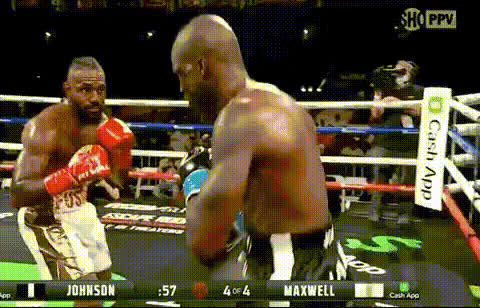
Boxing victory dance.mp4
face-swap
Any aspect ratio
Boxing Victory Dance – Face Swap Video Template
Turn Any Face Into a Boxing Champion
The Boxing Victory Dance template lets you drop any face into a high-energy post‑fight celebration. In a few minutes, you can turn yourself, a friend, a client, or a celebrity into a victorious boxer doing a showy, camera‑ready victory dance.
This template is built on Magic Hour’s Face Swap Video technology, so you can generate short, shareable, hyper-engaging clips without a full production team or motion‑capture setup.
What This Template Is Best For
- Sports & fitness creators who want reaction memes, win announcements, or fight‑night promos.
- Brands and agencies running social campaigns around boxing, UFC, fitness challenges, or competitions.
- Startups and apps adding fun “you as the champion” moments for onboarding or referral rewards.
- Streamers and esports teams announcing wins or milestones with a boxing-style celebration.
How the Boxing Victory Dance Template Works
This template combines a pre‑animated boxing celebration with AI face swapping, so you only need a face image and a few clicks to generate a finished video.
1. Professionally Animated Boxing Celebration
- The base video features a boxer celebrating in the ring with a confident, high‑energy dance.
- Camera moves, timing, and motion are pre‑designed so your final video looks polished even if you have no video editing background.
- Because the animation is consistent, you can quickly produce multiple variants (different faces, campaigns, or clients) with predictable quality.
2. AI Face Swap on the Fighter
The core of this template is Magic Hour’s AI Face Swap engine, also used in our dedicated Face Swap GIF tool.
- Upload a single face photo (yourself, a friend, a creator, a character, or a brand mascot).
- The system automatically maps that face onto the boxer in the animation, preserving head motion and expressions.
- Lighting, pose, and perspective are adjusted automatically, so you don’t need any manual masking or compositing.
You can repeat the process with unlimited faces to quickly generate multiple versions for A/B testing, client approvals, or different social channels.
3. Background & Style Variations
Many users pair this template with other Magic Hour tools to customize the aesthetic around the boxer:
- Use the AI Image Editor or AI Background Generator to design ring environments, locker rooms, neon arenas, or branded stages for your campaign.
- If you want to build variant intro/outro frames (e.g., “Champion of the Week,” “New Personal Record”), generate them with the AI Art Generator or Thumbnail Maker and then assemble everything in your usual editing workflow.
4. Add Voice, Music, and Captions
The Boxing Victory Dance clip works well as a short, loopable asset that you can enhance with audio and overlays:
- Generate a commentary-style voiceover (e.g., “And still the champion…”) using AI Voice Generator or clone your own voice with AI Voice Cloner.
- Overlay hype music in your editor or pair it with auto‑generated subtitles using the Auto Subtitle Generator for social platforms that autoplay without sound.
How to Remix This Template in Magic Hour
You don’t need to be a motion designer to build your own variant of the Boxing Victory Dance template. Here’s a practical workflow you can follow inside Magic Hour and your existing tool stack.
Step 1 – Start With a Base Animation
- Begin from Magic Hour’s Face Swap Video template library and select the Boxing Victory Dance as your base.
- Alternatively, if you have your own boxing‑themed footage, you can first clean and upscale it with the Video Upscaler and then reuse it alongside the template for a consistent style.
Step 2 – Prepare Strong Source Faces
- Use clear, front‑facing photos where the subject is well lit and not heavily obstructed (no large sunglasses, masks, or strong motion blur).
- If you don’t have a subject image yet, you can generate one with:
- AI Headshot Generator for professional or clean stylized faces.
- Avatar Generator or AI Character Generator for branded characters or fictional champions.
- AI Face Generator if you need synthetic faces with no real‑person likeness concerns.
Step 3 – Swap the Face Onto the Boxer
- Load the Boxing Victory Dance animation in the Face Swap Video creator.
- Upload your chosen face image and let Magic Hour apply it to the boxer across the entire clip.
- Preview the motion to ensure the expressions and key moments (hand raises, victory pose, any close‑ups) look natural.
Step 4 – Build Surrounding Content (Optional)
To turn the victory dance into a full campaign asset or story sequence, you can connect it with other Magic Hour tools:
- Create an intro card (“Fight Night,” “Challenge Complete,” “Campaign Winner”) using the AI Logo Generator and Album Cover Generator for bold typography styles.
- Generate follow‑up scenes (e.g., the fighter walking into the arena) with Image to Video or Text to Video, then assemble your sequence in your own editor.
- For meme‑friendly bite‑sized assets, export short loops and pair them with the AI GIF Generator or AI Meme Generator.
Step 5 – Optimize for Social & Campaigns
- Use the AI Image Upscaler or Unblur Image if you need crisp thumbnails from your video frames.
- For profile pictures or landing pages, extract stills and refine them as hero shots with the AI Selfie Generator or AI Face Editor.
Advanced Ideas for Creators & Teams
- Gamified fitness or app onboarding: Show users as the “champion” after they complete a level, signup flow, or challenge using a custom face swap version for each user.
- Influencer and UGC campaigns: Provide your audience with a simple flow: they upload their face, get a Boxing Victory Dance clip, and share it with your campaign hashtag.
- Team or league highlights: Generate unique victory clips for each player, team, or staff member and compile them in a season‑recap montage.
- Brand storytelling: Turn your mascot or product character into the boxer using Animated Characters Generator and feed that into your campaign visuals.
Tips for High‑Quality, Shareable Face Swap Boxing Videos
- Use clean face images: Simple backgrounds, no heavy motion blur, and good lighting give the AI more data to work with.
- Match expression where possible: Slight smiles or neutral expressions tend to adapt best to victory animations.
- Stay on‑brand: If you’re a company or creator, align colors and typography with your overall visual system using tools like the AI Logo Generator and Thumbnail Maker.
- Respect likeness rights: When using real people (especially celebrities or athletes), ensure you have the rights or permissions needed for your use case.
Related Magic Hour Tools for Sports & Celebration Content
To build a broader creative system around this template, many teams combine it with:
- Lip Sync – Make your boxer or commentator sing, chant, or deliver lines perfectly synced to audio.
- Video to Video – Stylize existing boxing footage into different looks (anime, comic, cinematic) while keeping motion.
- Animation Templates – Drop the same face onto different animated bodies for a whole “career mode” of characters.
- AI Outfit Generator and AI Clothes Changer – Design alternate uniforms, robes, or branded gear for promo stills.
Why Use Magic Hour for Face Swap Boxing Content?
- Speed: Go from idea to ready‑to‑post video in minutes instead of days.
- Consistency: Use the same base animation to generate entire campaign sets with different faces and messages.
- Flexibility: Combine this template with image, video, voice, and meme tools across Magic Hour for end‑to‑end content pipelines.
- Creator‑friendly: Designed for marketers, creators, and founders who need repeatable, scalable content without a full production team.
Open the Boxing Victory Dance in Face Swap Video, upload your face, and start generating champion‑level content you can reuse across campaigns, channels, and clients.