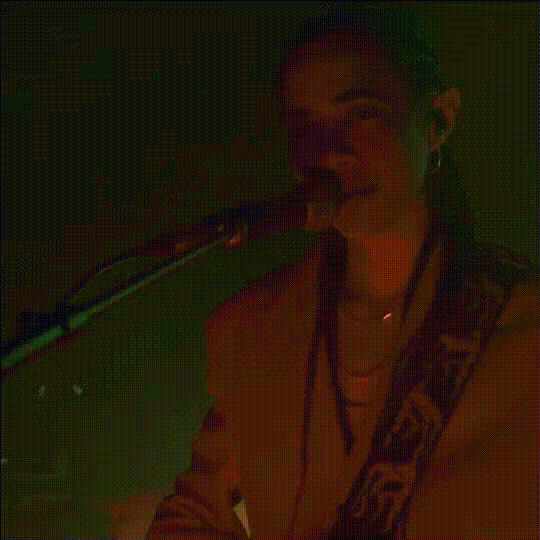
"You were the shadow to my light" - Girl Singing

face-swap

1 clip
23 uses

Any aspect ratio

“You Were the Shadow to My Light” – Girl Singing Face Swap Video Template

Overview

Turn an iconic, emotional performance into your own starring moment with this “You Were the Shadow to My Light” girl singing template. Built on Magic Hour’s advanced AI Face Swap technology, this template lets you seamlessly replace the singer’s face with yours (or any face you have rights to use) while preserving expressions, lighting, and motion.

This template is ideal for:

  • Music and cover creators who want studio-quality visual performances
  • Short-form video for TikTok, Reels, YouTube Shorts, and Stories
  • Marketers and founders creating emotional, story-driven content
  • Developers and agencies prototyping AI-powered music or storytelling concepts

Inspiration: “You Were the Shadow to My Light” & Faded

The line “You were the shadow to my light” comes from “Faded,” the global hit by Norwegian–British producer Alan Walker. Released in 2015, “Faded” quickly became one of the most-watched music videos on YouTube, crossing 3.6 billion views and ranking among the platform’s most streamed electronic tracks. Its blend of melancholic vocals and cinematic production made it a staple for edits, fan videos, and AI remixes.

The lyric captures themes of:

  • Lost connection and emotional distance
  • Light vs. shadow as a visual storytelling motif
  • Nostalgia, memory, and longing

This template is designed to let you tap into that emotional tone while putting your own face — and story — at the center of the performance.

What This Template Does

AI Face Swap for Performance Videos

This template uses Magic Hour’s Face Swap engine, optimized for singing and performance videos. It:

  • Replaces the original singer’s face with your chosen face
  • Preserves lip movement, expressions, and head motion from the source video
  • Maintains original lighting and scene composition for realism
  • Outputs a ready-to-share video that feels like a natural performance

If you want to create your own face swap performance from scratch instead of starting with this template, you can also work directly in the Face Swap Video creator.

Use Cases

  • Creators & singers: Turn your favorite emotional track into a visual performance featuring you.
  • Marketers: Build high-impact, music-backed hero clips for campaigns, landing pages, or app promos.
  • Founders: Create personal, story-driven intros or product narratives with cinematic mood.
  • Developers & AI builders: Prototype AI-powered music experiences, demo face swap capabilities, or test user-facing flows.

How to Remix This Template in Magic Hour

You can either use this template directly or remix its core idea to build your own version. A common creation flow looks like this:

  1. Start with the base video
    Use the “You Were the Shadow to My Light” girl singing template as your base, or import a similar performing-artist clip you own rights to.
  2. Upload your face (or another approved face)
    Provide a clear photo or video of the face you want to swap in. Consistent lighting and a front-facing angle improve realism.
  3. Apply Face Swap
    Run Magic Hour’s Face Swap Video tool to replace the singer’s face with your chosen identity while preserving the original performance.
  4. Refine your visual style
    If you want to move beyond the default look, you can:
  5. Sync to music or audio
    If you are using licensed audio, you can:
    • Record your own vocals externally, then sync the performance in your editor
    • Use Magic Hour’s AI Talking Photo or Lip Sync template for alternate singing-style content (e.g., turning still images into “singing” portraits)
    • Optionally clone your voice (with consent) using the AI Voice Cloner or generate narration with the AI Voice Generator for intros, outros, or spoken interludes
  6. Export and share
    Render your video and publish it to TikTok, Instagram, YouTube Shorts, or your landing pages. If you need subtitles, pass the final clip through the Auto Subtitle Generator to improve accessibility and engagement.

Advanced Remix Ideas

If you want to build more complex or differentiated variants of this template, consider:

  • AI music video narrative
    Use AI Image Generator or AI Art Generator to create abstract “light vs. shadow” scenes, then turn them into motion using Image to Video or Video to Video. Intercut those with your face-swapped performance for a full narrative.
  • Animated or stylized singer
    Design an animated version of yourself with the AI Anime Generator or Animated Characters Generator, then create motion using the Animation template or Text to Video. This works well for lyric videos or stylized edits.
  • Loopable GIF and meme formats
    Extract a short emotional moment (e.g., a close-up on the “shadow to my light” lyric) and convert it into a shareable GIF using the AI GIF Generator or remix it with captions via the AI Meme Generator.
  • Multiple identities in one video
    For brand storytelling or group projects, create several face-swapped versions (e.g., founder, creator, customer persona) and cut them together to show different “shadows” and “lights” across your narrative.

Best Practices for Realistic Face Swap Music Videos

  • Use high-quality reference images
    Clear, well-lit, front-facing photos with natural expressions result in more convincing swaps, especially during close-up singing moments.
  • Respect rights and consent
    Only use faces, footage, and audio you have rights and explicit consent to use. This is critical for ethical and legal compliance, particularly in commercial or branded content.
  • Match emotional tone
    Align your facial expression and persona with the mood of the track — “Faded” is introspective and melancholy, so subtle, sincere expressions tend to work better than exaggerated ones.
  • Keep brand consistency
    If you’re a startup or agency, define a visual identity: color palette, framing, and tone. You can maintain consistency across assets using tools like the Thumbnail Maker, Album Cover Generator, or AI Logo Generator.
  • Polish with post-processing
    If your source material is older or low resolution, use Video Upscaler, Unblur Image, or Old Photo Restoration on the underlying assets before running face swap.

Who This Template Is For

  • Creators & artists who want emotionally resonant, AI-enhanced performances without hiring crews or studios.
  • Marketers & growth teams looking to test creative concepts quickly, personalize campaigns, or localize content with different faces or voices.
  • Founders & solo builders needing fast, high-impact video for pitch decks, launch pages, or product storytelling.
  • Developers & AI researchers experimenting with face swap UX, generative video workflows, or personalization at scale.

Related Magic Hour Tools to Explore

To build a more complete creative pipeline around this template, consider combining it with:

Getting Started

To create your own “You Were the Shadow to My Light” singing video:

  1. Open the girl singing template in Magic Hour.
  2. Upload your face (or any face you have rights and consent to use).
  3. Run face swap and review the performance.
  4. Optionally extend it with tools like Lip Sync, AI Talking Photo, or AI Voice Cloner.
  5. Export, subtitle if needed via Auto Subtitle Generator, and publish.

By combining this face swap template with Magic Hour’s broader toolset, you can go from an idea inspired by a single lyric to a full, emotionally rich music video or campaign asset — in minutes, not weeks.

More Like This