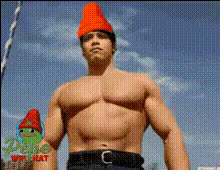
Bodybuilder Shuffle Stomping Outside

face-swap

1 clip
11 uses

Any aspect ratio

Bodybuilder Shuffle Stomping Outside – Face Swap Video Template

Create a high‑impact, funny, and highly shareable short in seconds. This “Bodybuilder Shuffle Stomping Outside” template uses Magic Hour’s Face Swap Video tool so you can drop any face onto a dancing bodybuilder and instantly generate meme‑ready content for TikTok, Reels, YouTube Shorts, and more.

What This Template Does

This template combines:

  • Bodybuilder performance – a muscular character doing shuffle, stomps, and running‑man‑style moves outside.
  • AI face swapping – powered by Magic Hour’s AI Face Swap engine to replace the original face with yours, a friend’s, a fictional character, or a brand mascot.
  • Loopable, short‑form format – optimized for social feeds, memes, reaction videos, and brand promos.

The result: a fast, energetic dance clip that’s perfect for humor, reaction content, fitness memes, or personality‑driven marketing.

Who This Template Is For

  • Creators & influencers – turn yourself into a jacked shuffle dancer for skits, green‑screen reactions, or duet content.
  • Marketers & brands – drop your founder, spokesperson, or mascot into a bold, funny dancing body to humanize a product launch or campaign.
  • Startup teams – generate quick culture content (e.g., “Our PM when a feature ships”) without filming days or motion design.
  • Developers & product folks – rapidly test meme formats and concept videos for campaigns or product waitlists.

How to Remix This Template in Magic Hour

You can clone the core idea in minutes using Magic Hour’s face swap pipeline. To remix or customize:

  1. Open Face Swap Video
    Go to Face Swap Video. This is where you’ll upload or select the dancing bodybuilder base video.
  2. Choose Your Base Video
    Use the provided bodybuilder shuffle clip or import your own dancing footage (bodybuilder, athlete, or any high‑energy performer). For best results:
    • Use a clear, front‑or angled‑facing face for most of the clip.
    • Avoid heavy motion blur or extreme lighting changes.
  3. Add Your Face
    Upload a face photo or pick an existing one you’ve already used in Magic Hour. A good source image typically:
    • Shows the face clearly, with minimal occlusion.
    • Is well lit and reasonably close up.
    Magic Hour’s AI Face Editor or Avatar Generator can help you design stylized faces or persona avatars before swapping.
  4. Generate the Face Swap
    Let the system process your video. It will track head movement, expressions, and angles, and render a consistent new face over the dancing bodybuilder throughout the clip.
  5. Enhance or Chain With Other Tools (Optional)
    Depending on your use case, you can:

Ideas for Remixing This Template

Because this is a reusable face swap scaffold, you can easily build multiple variations:

  • Character & fandom edits – generate faces with AI Character Generator or AI Anime Generator, then swap them into the bodybuilder dance for anime‑ or game‑style edits.
  • Corporate & B2B memes – drop your CEO or product lead onto the bodybuilder and caption it with product milestones (“When infra finally scales to 1M users”).
  • Fitness & wellness marketing – feature trainers, clients, or virtual avatars dancing in celebration of results or challenge milestones.
  • Music & creator collabs – pair this visual with your track, then use Text to Video or AI Voice Generator for intros, outros, or call‑to‑action overlays.
  • UGC & community contests – let your community upload selfies, auto‑swap them into the bodybuilder template, and share their version.

Why Shuffle Dancing Works So Well on Video

Shuffle dance evolved out of 1980s–1990s rave culture in the UK and Australia, particularly the Melbourne scene. It’s defined by fast, repeating footwork patterns like the T‑Step and Running Man, typically synced to electronic or high‑BPM music. For modern short‑form content, this matters because:

  • Clear, looping motion – the repeated footwork and stomps make for satisfying loops and replays.
  • Strong beat matching – high‑energy music + visible rhythm increases watch time and share rates.
  • Readable silhouette – even on a small phone screen, the exaggerated leg and arm movement read clearly.

Core Shuffle Moves in This Template

  • T‑Step – often called the “original shuffle” step, it alternates between sliding and pivoting feet to form a T‑shape, creating a gliding illusion.
  • Running Man – a stepping pattern that mimics running in place; widely recognizable from 80s/90s dance and a staple in shuffle transitions.
  • Stomping – emphatic steps with noticeable impact, ideal for punctuating musical hits and camera cuts.

If you want to study the technique behind these moves, search for “Melbourne shuffle tutorial”, “Running Man shuffle breakdown”, or “T‑Step basics” on YouTube for step‑by‑step walkthroughs from established dance instructors and community channels.

Best Practices for High‑Quality Face Swap Dance Videos

To get results that look polished enough for professional or brand use:

  • Use clean, high‑contrast footage – faces should be visible, not heavily shadowed or blocked by hair, hats, or hands.
  • Keep framing stable – rapid camera zooms or whip‑pans make face tracking harder; steady framing yields more accurate swaps.
  • Match vibe & persona – choose faces that match the tone: CEO for B2B jokes, VTuber‑style avatar for streaming, stylized anime character for fandom edits.
  • Optimize for platform – consider vertical format, short runtimes, and looping intros for TikTok, Reels, and Shorts.
  • Respect rights & likeness – only use faces and characters you have the rights or permission to use, especially for commercial campaigns.

Advanced Flows: From Single Clip to Full Campaign

For teams building more than one meme or asset, you can chain Magic Hour tools into a repeatable workflow:

  1. Design your persona
    Generate a consistent character with Avatar Generator or AI Headshot Generator.
  2. Create multiple dance bases
    Use this Bodybuilder Shuffle template plus other motion sources via Video to Video or Animation for stylized sequences built from your original footage.
  3. Swap the same face across all assets
    Keep a single “brand face” or mascot and apply it across different dances, scenes, and formats using Face Swap Video.
  4. Polish and scale distribution

Ethical & Practical Considerations

Face swapping is powerful, so teams and creators should:

  • Use consent‑based content – only swap faces of people who have agreed to be featured, especially in commercial or paid media.
  • Avoid deceptive use – clearly signal parody, satire, or fictional content to your audience; do not misrepresent endorsements or testimonials.
  • Stay on‑brand – use the humor and shock value of a bodybuilder shuffle in ways that align with your product and values.

Related Magic Hour Tools to Explore

Once you’ve built your Bodybuilder Shuffle Face Swap video, you can extend the concept with:

  • AI Meme Generator – wrap your video in on‑trend captions and static image memes.
  • AI Voice Cloner and AI Voice Changer – give your dancing bodybuilder a distinctive voice for skits and promos.
  • AI QR Code Generator – embed stylized QR codes in frames or end cards linking to your landing page.
  • Thumbnail Maker – produce optimized thumbnails for YouTube and social feeds using stills from your face‑swapped dance.

Summary

The “Bodybuilder Shuffle Stomping Outside” template is a reusable blueprint for high‑energy face swap content. By combining a memorable bodybuilder dance performance with Magic Hour’s Face Swap Video and related tools, you can quickly prototype memes, run content experiments, and ship social‑ready creative without a production crew.

Remix the template, plug in your own persona or brand face, and you have a flexible, repeatable asset for campaigns, community content, and fast iteration on new ideas.

More Like This