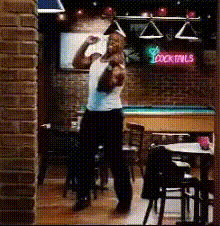
Man With Muscle Dancing

Magic Hour Profile Picture
by kpop_stan

face-swap

1 clip
24 uses

Any aspect ratio

Man With Muscle Dancing – Face Swap Video Template

Create a high-energy, muscle-focused dance video that stars you (or anyone you choose) in a few clicks. This “Man With Muscle Dancing” template is built on Magic Hour’s advanced AI Face Swap technology, letting you drop your face onto a shredded dancer’s body for eye‑catching content that works for fitness campaigns, memes, UGC ads, and more.

What This Template Does

  • AI face swap on a muscular dancer
    Instantly replace the dancer’s face with your own or any portrait you upload using Magic Hour’s Face Swap Video creator. The original body, lighting, and motion are preserved, so your final result looks natural and dynamic.
  • High-impact, short-form friendly choreography
    The template features bold, high-energy moves designed to stand out in vertical video feeds (TikTok, Reels, Shorts) and fitness or dance promos.
  • Physique‑focused visuals
    The shirtless dancer highlights upper‑body muscle definition, making this template ideal for:
    • Gym / fitness brand promotions
    • Before‑and‑after transformation content
    • Personal trainer or coaching pages
    • Humorous “this will be me in 90 days” memes
  • On‑brand customization
    Once you’ve swapped the face, you can:
    • Add your own soundtrack or voiceover
    • Overlay text (CTAs, workout names, hooks)
    • Re‑edit into multiple cuts for A/B testing

Who This Template Is For

  • Creators & influencers who want fast, shareable dance and fitness content without filming themselves.
  • Marketers & performance advertisers running UGC‑style gym, supplement, or apparel campaigns.
  • Founders & startup teams looking to prototype visual concepts for fitness apps, body recomposition products, or wellness brands.
  • Developers & builders experimenting with AI video workflows, content automation, or personalization.

How to Remix This Template in Magic Hour

You don’t need to start from scratch. Use this template as a base, then experiment and iterate. A typical remix workflow in Magic Hour looks like this:

  1. Open the Face Swap Video creator
    Go to Face Swap Video and upload the “Man With Muscle Dancing” clip or any similar dance footage you want to use as your base.
  2. Upload the face you want to use
    Add a clear, front-facing photo of yourself, a client, or an actor. Magic Hour’s AI Face Editor and AI Face Generator can help you create or refine faces if needed.
  3. Generate the face‑swapped dance video
    Let Magic Hour apply the face swap across the entire clip so expressions, angles, and motion stay coherent.
  4. Refine visuals for your use case
    Enhance and repurpose your output with:
  5. Export and test across channels
    Share to TikTok, Instagram Reels, YouTube Shorts, or use clips in paid social ads and landing pages. Iterate quickly by swapping in different faces, text hooks, or audio.

Advanced Remix Ideas

Once you have your base “muscle dancing” clip, you can chain other Magic Hour tools to create more complex experiences:

  • Turn the dancer into a talking spokesperson
    Use AI Talking Photo or Text to Video to generate scripted talking segments with the same face you used in the dance template.
  • Create multiple physiques or outfits
    Combine face swap with AI Clothes Changer or AI Outfit Generator to test different clothing styles (streetwear, gym wear, costume themes).
  • Spin off GIFs and memes
    Extract short loops and convert them into shareable reactions or meme formats with the AI GIF Generator and AI Meme Generator.
  • Create stylized or animated versions
    :
  • Localize and personalize at scale
    Combine face swap with AI Voice Generator or AI Voice Cloner to create localized or personalized versions of the same creative for different markets or audiences.

Best Practices for Performance & Engagement

  • Hook fast
    Lead with the most visually surprising part of the dance (big movement or pose) in the first second. Then introduce on‑screen text that clarifies the context (e.g., “Day 1 vs Day 90”, “POV: your 2025 fitness goal”).
  • Align concept with the physique
    Use the muscular body as a visual anchor for:
    • Transformation journeys (“future me” concept ads)
    • Workout program teasers
    • High‑protein / supplement campaigns
  • Design for sound‑off viewing
    Add subtitles with the Auto Subtitle Generator and use big, clear on‑screen text so the video still works without audio.
  • Test multiple faces and narratives
    Face swap makes rapid experimentation cheap. Try:
    • Different demographics or personas to see what resonates
    • Faces of fictional mascots generated with AI Character Generator
    • Contrasts: “past me vs future me” with two versions of the clip
  • Optimize for discoverability
    When posting, use targeted tags such as:
    • #faceswap #aivideo #fitnesscontent #gymtok
    • #dancechallenge #bodyrecomp #transformation
    • Brand or product‑specific tags for tracking and search

Use Cases & Campaign Ideas

  • UGC‑style fitness ads
    Use the clip as a “testimonial” format by pairing the dancing physique with a voiceover generated via AI Voice Generator describing results, routines, or product benefits.
  • Challenge‑based growth loops
    Launch a “Swap yourself onto the dancer” challenge. Share your template link, and let your audience remix it using Face Swap Video, then repost the best entries.
  • Brand storytelling
    Turn the muscular dancer into your brand avatar using combinations of:
  • Meme and social content calendar
    Create a series: “Monday Motivation”, “Leg Day Escape”, “Skipped Cardio Again”, each using the same template with different faces and captions. Batch‑produce variants by cycling through multiple faces and scripts.

Ethical & Practical Considerations

  • Consent & rights
    Use faces you have permission to use. For public campaigns, avoid impersonating real people without explicit consent, especially celebrities or private individuals.
  • Transparency
    Many brands now label AI‑assisted content. Consider disclosing AI use transparently in line with platform and regulatory guidance.

Related Magic Hour Tools to Explore

If you like this template, you may also want to explore:

  • AI Selfie Generator – create better source portraits for more realistic face swaps.
  • AI Headshot Generator – generate polished, consistent headshots for use across multiple templates.
  • AI Image Upscaler & Unblur Image – clean and sharpen low‑quality input photos before swapping.
  • Face Swap GIF – turn short dance loops into lightweight, shareable GIFs.
  • Lip Sync – combine the muscular dancer visuals with synced speech or lyrics for music and parody content.

Use the “Man With Muscle Dancing” template as your starting point, then iterate with Magic Hour’s broader toolset to build a full AI‑powered content system: from face‑swapped hero videos to stylized derivatives, thumbnails, GIFs, and localized variants—all generated in a fraction of traditional production time.

More Like This