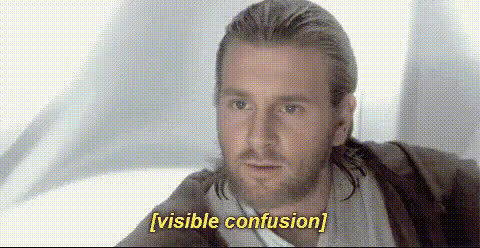
Cillian Murphy Looking Pensive

face-swap

1 clip
9 uses

Any aspect ratio

Tags

movies

Cillian Murphy Looking Pensive – Face Swap Video Template

Overview

The “Cillian Murphy Looking Pensive” template lets you drop your own face (or any face you have rights to use) into a moody, introspective shot inspired by Cillian Murphy’s on-screen presence. Built on Magic Hour’s AI Face Swap technology, it’s ideal for thoughtful monologues, dramatic cutaways, and cinematic social clips that feel like they belong in a prestige film.

You can use this page as a blueprint to remix your own version of the template inside Magic Hour using the Face Swap Video creator and other tools across the platform.

Why Cillian Murphy Works for Pensive, Cinematic Content

Cillian Murphy is known for roles in Peaky Blinders, Oppenheimer, Inception, and 28 Days Later. Across these films and series, he’s often framed in close-up, with a quiet, intense gaze and minimal dialogue. That combination of:

  • Subtle micro‑expressions
  • Stillness and controlled movement
  • High‑contrast, moody lighting

makes his “pensive” look immediately recognizable and highly effective for AI video edits. This template channels that style so you can create content that feels:

  • Reflective – inner monologues, confessions, “thinking aloud” videos
  • Cinematic – trailer moments, story beats, hooks for narrative content
  • Character‑driven – fan edits, tributes, or stylized brand personas

What This Template Does

  • Face Swap Video
    Uses Magic Hour’s Face Swap Video creator and underlying face swap engine to replace a face in a shot with your chosen identity, preserving head motion, gaze direction, and lighting.
  • Pensive Cinematic Framing
    The shot is composed like a film close‑up: soft background, strong eye focus, and muted color palette that signals introspection and seriousness.
  • Emotionally Neutral but Suggestive Expression
    The “pensive” look sits between sadness, focus, and anticipation. That ambiguity lets you overlay many narratives on top—philosophical quote, startup story, character backstory, or a product reveal.

Best Use Cases

  • Founders & Creators
    Turn a written “founder letter,” manifesto, or thought piece into a cinematic monologue. Pair the face swap with your own voice using AI Voice Generator or AI Voice Cloner.
  • Film & TV Fan Edits
    Create alternate-universe scenes, character studies, or “what if I were in this show?” clips. Combine with Video-to-Video to stylize the shot into noir, anime, or comic‑book looks.
  • Social Media Hooks
    Use a 5–15 second pensive shot as the opener for TikTok, Reels, or YouTube Shorts. Add captions with Auto Subtitle Generator for higher retention and accessibility.
  • Storytelling & Narrative Content
    Insert this shot as a “thinking moment” in short films or narrative campaigns. It works well as a cutaway before a big reveal, decision, or twist.
  • Meme & Reaction Content
    Turn the pensive look into reaction videos, ironic monologues, or meme templates using AI Meme Generator.

How to Remix This Template in Magic Hour

You don’t need to wait for a pre‑built file. You can recreate or extend this template directly in Magic Hour:

  1. Start with Face Swap Video
    Go to Face Swap Video and upload:
    • A base video with a calm, front‑facing shot and gentle head movements
    • A clear, front‑lit face image (or video frame) of the identity you want to appear in the scene
    For the same “pensive Cillian Murphy” feel, choose footage with:
    • Soft or low lighting
    • Muted colors or a simple background
    • Minimal expression changes (no big smiles or exaggerated emotions)
  2. Refine the Look with AI Image & Video Tools
    After generating your face‑swapped video, you can further tweak the look:
  3. Add Voice, Story, and Subtitles
    To make the pensive shot actually say something:
  4. Create Variants for A/B Testing
    For marketers and founders running experiments:

Advanced Ideas for Creators & Teams

Tips for Strong, Believable Results

  • Match Lighting & Angle
    Choose a base video where the face is lit similarly to the target photo (direction of light, softness, and contrast). This greatly improves realism in face swapping.
  • Keep Expressions Subtle
    For a pensive, Cillian‑style look, avoid big smiles or exaggerated eyebrows in your source footage. Small eye movements and slight jaw tension read much more cinematic.
  • Use Clean, High-Resolution Inputs
    Clear, sharp face images (no heavy filters, no extreme motion blur) help the Face Swap model preserve detail and likeness. If needed, sharpen with Unblur Image before swapping.
  • Design for Mobile First
    Most viewers will see your content on a phone. Test crops in portrait orientation and create platform‑specific cuts (e.g., 9:16 for TikTok/Reels, 1:1 or 4:5 for Instagram feed).

Related Magic Hour Tools Worth Exploring

  • AI Headshot Generator – Build professional, cinematic portraits that match the pensive tone.
  • AI Selfie Generator – Quickly create consistent identity images for recurring characters.
  • AI Face Editor – Fine‑tune facial features or age, mood, and style across shots.
  • Face Swap GIF – Turn your favorite pensive moment into a looping reaction GIF for chats and communities.

Summary

The “Cillian Murphy Looking Pensive” template is a focused example of what’s possible with Magic Hour’s Face Swap Video workflow: cinematic framing, subtle emotion, and flexible storytelling. Use it as-is for introspective, film-inspired content, or treat this page as a recipe to build your own remixed version—swapping in different faces, genres, and moods using the broader Magic Hour toolset.

More Like This

Insufficient credits