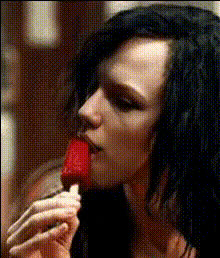
Ice Spice Eating a Wing
Overview
Step into the world of viral fun with "Ice Spice Eating a Wing." This template leverages the power of Video Face Swap to create a humorous and shareable clip. Perfect for memes and adding a lighthearted twist to your social media content.
What it Does
"Ice Spice Eating a Wing" uses advanced AI to swap the facial features of celebrities or even yourself onto a video clip. The result is a playful video that retains the body and actions of the original subject while transforming their face. It's an ideal tool for bringing your meme ideas to life or just having some creative fun.
Who it's For
This template is perfect for content creators, marketers, or anyone looking to spice up their social media presence with a twist of humor. If you're a digital artist or meme enthusiast, using the AI GIF Generator alongside this template can further enhance your creative toolkit.
Summary
With "Ice Spice Eating a Wing," bring a playful and engaging angle to your video content. This template simplifies the process of face swapping within video clips, making it accessible for all users. Whether you're crafting a meme or just experimenting with video, this tool provides a fun way to implement Face Swap in Videos.
How To
Choose the Template

Customize Your Video

Generate the Video

Use Cases
Meme Creation
- Quickly swap celebrity faces into funny clips
- Generate shareable content for social media
Social Media Fun
- Engage audiences with light-hearted content
- Increase interaction rates with entertaining videos
Creative Experiments
- Test artistic ideas with video manipulation
- Combine elements from our <a href="/products/image-to-video">Image to Video</a> tools
Best Practices
Select Clear Images
For the best results, use high-resolution images where the face is clearly visible. This ensures the swap looks seamless and realistic.Experiment with Angles
Choose videos where the face angles are similar to the face you’re swapping in for more accurate results.Leverage Related Tools
Enhance your video by using other Magic Hour tools such as the AI Image Editor to tweak images before swapping.