shocked-woman-covering-mouth
Overview
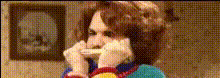
Step into a world of humorous transformations with the Shocked Woman Covering Mouth video face swap template. This tool allows you to switch faces onto a classic image of a woman covering her mouth in shock, creating a perfect setup for meme-worthy content and playful video edits. Using cutting-edge facial recognition technology, this template ensures a smooth and realistic swap every time.
What It Does
The template expertly swaps the face in the clip of a shocked woman covering her mouth with any face you choose. By matching skin tones and facial expressions, the end result is both realistic and entertaining. Whether you're generating content for fun or for more complex video transformations, this template is perfect for adding that extra layer of comedic surprise.
Who It's For
This tool is ideal for content creators, meme enthusiasts, and marketers looking to create engaging meme videos. It's particularly useful for those in the social media ads space looking to capture viewers' attention with unique and humorous visuals. It's also a great resource for individuals wanting to explore character replacement opportunities in their projects.
Summary
Use the Shocked Woman Covering Mouth template to create standout, humorous content that fits seamlessly into memes and social media strategies. This video face swap template helps you craft videos that are not only relevant but also visually engaging and fun, thanks to its robust facial morphing capabilities.
How To
Choose Template

Customize Your Input

Generate and Download

Use Cases
Meme Creation
- Leverage popular scenarios for meme development
- Enhance social media engagement
Social Media Marketing
- Boost ad click-through rates
- Improve brand awareness through playful content
Video Editing Projects
- Enhance influencer content
- Craft unique segments for entertainment shows
Best Practices
Choose Clear Input Images
Select photos with clear lighting and a neutral facial expression for best alignment results.Match Skin Tones
Use the adjustment settings to fine-tune skin tones for a more natural look in the swap.Review and Refine
After generating the video, review the swap to ensure it meets your quality standards. Make additional tweaks if necessary.