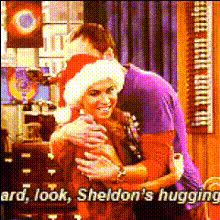
sheldon-hugs-woman-in-studio
Overview
The "Sheldon Hugs Woman in Studio" template is a whimsical take on the art of Video Face Swap, letting you infuse your likeness into iconic scenes. Whether for humor or creative experimentation, this template makes it easy to create dynamic video content that captures attention.
What It Does
This template swaps faces by embedding your own or someone else's face onto a character in a studio setting, featuring Sheldon from a beloved sitcom. With AI Video Generator technology, the results are crafted to maintain realistic expressions and seamless integration, achieving humorous and engaging video edits.
Who It's For
This is perfect for content creators, meme enthusiasts, and social media aficionados aiming to keep their audience entertained. Also, marketers looking to leverage popular culture references in their campaigns or anyone interested in adding a fun spin to their video projects will find this tool beneficial. Discover more about similar technology in the AI Image Editor.
Summary
The "Sheldon Hugs Woman in Studio" template is an excellent choice for those wanting to explore creative ways to engage viewers on various platforms. Its application is versatile, making it suitable for both casual use and professional scenarios in Image to Video conversions.
How-To
Choose the Template

Customize Your Face Swap

Generate Your Video

Use Cases
Social Media Content
- Increase engagement with humorous content
- Share across platforms for maximum reach
Marketing Campaigns
- Use familiar faces for brand recognition
- Appeal to a pop culture-savvy audience
Entertainment and Memes
- Keep content fresh and surprising
- Utilize trending formats for viral potential
Best Practices
Select High-Quality Images
Ensure the face image you're uploading is high-resolution for the best results in the face swap.Experiment with Different Faces
Try swapping different styles of faces to see varying results and choose the one that aligns with your comedic or thematic intent.Optimize Lighting
Match the lighting in the uploaded face image to the lighting in the original video scene to maintain realism.