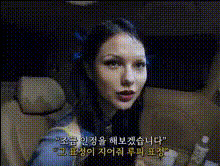
Template preview

scared-woman-in-car

Video Face Swap
1 clip
0 uses

Any aspect ratio

Tags

transformations

Overview

The "Scared Woman in Car" template allows you to create an amusing video featuring a frightened woman in a car with a face swap transformation. This template is designed for generating fun, shareable content, especially suited for Halloween and other spooky occasions.

What It Does

This Video Face Swap template swaps the face of a central character in a video, replacing it with a new one while preserving expressions and movements. Ideal for injecting humor into your projects or creating themed videos for social media engagement.

Who It's For

Perfect for content creators, marketers, and social media enthusiasts looking to create eye-catching videos with a comedic twist. Teachers can also use it to craft engaging content for various educational contexts. Discover more ways to use face swap at Video Face Swap.

Summary

Transform any video footage into a compelling and entertaining piece with the "Scared Woman in Car" face swap template. Customize the template with any image you want to swap in, and let the AI do the rest. Explore other tools like the AI Image Editor to enhance your videos further.

How-To

    01

    Choose Template

    Find the "Scared Woman in Car" template in the Face Swap Templates section to start your project.
    02

    Adjust Inputs

    Upload the image you want to use for the face swap and make necessary adjustments to the settings to achieve the desired effect. Optionally, tweak the scene settings if required.
    03

    Generate Video

    Click on the 'Generate' button to process your video. Once completed, download the face-swapped video directly to your device.

Use Cases

🎃

Halloween Social Media Content

Create themed videos to share during Halloween, drawing laughs and engagement from your audience.
😂

Comedy Skits

Use the template to produce short, funny skits for audience entertainment.
📚

Engaging Educational Content

Teachers can employ the template to make lessons more engaging and memorable for students.

Best Practices

  • Choose Clear Images

    Ensure the image used for the face swap is clear and well-lit to achieve the best results.
  • Experiment with Angles

    Try different angles and expressions to see what produces the most amusing outcomes.
  • Use Complementary Tools

    Enhance your video further with the AI GIF Generator for short animations or AI Voice Changer for adding new voices.

Frequently asked questions

Choose an image that is clear and has a front-facing view of the face to ensure the swap aligns well with the original video.

Yes, while ideal for Halloween, this template can also be used for comedy, social experiments, or educational content.

JPEG and PNG are recommended formats for image uploads in the face swap process.

The time varies depending on the video length and complexity of the face swap, but typically it is a quick process.

More Like This

Angry Woman In Car
1
Angry Woman In Car
scared-eyes-close-up
2
scared-eyes-close-up
shocked-woman-on-street
woman-in-car-looking-concerned
woman-looking-concerned
woman-looking-shocked-or-surprised
Angry Woman In Car
Angry Woman In Car
scared-man-funny-face
woman-in-a-car
woman-in-a-car
woman-in-car-with-text
woman-looking-confused-1
women-in-a-car
women-in-a-car

Face Swap Video