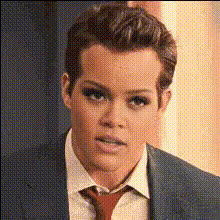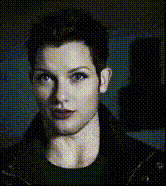
Template preview

Bald Man In Suit Reacts

face-swap

1 clip
0 uses

Any aspect ratio

Tags

transformations

Transform any video by instantly putting your face (or any face) onto it with high-quality AI face swap. This Magic Hour template is built on our production-grade Face Swap engine and is designed for creators, marketers, and product teams who need realistic, shareable results in minutes—not hours.

Use it to:

  • Turn stock footage into on-brand content featuring your own team
  • Localize or personalize promo videos for different clients or audiences
  • Create safe, controlled “deepfake-style” content for campaigns, concepts, or prototypes
  • Rapidly test creative ideas before investing in a full shoot

What this template does

This template automatically:

  • Detects faces in your source video
  • Maps your target face onto each frame while preserving:
    • Lighting and shadows
    • Head pose and angle
    • Facial expressions and timing
  • Blends skin tone and texture for a natural look

It’s powered by the same tech behind our core Face Swap and Face Swap Video products, optimized for:

  • Realistic alignment (no “floating” or misaligned faces)
  • Temporal consistency (frames look stable from start to finish)
  • Social-ready output (for TikTok, Reels, Shorts, and campaigns)

How to remix this template in Magic Hour

You can create your own version of this template directly inside Magic Hour by “remixing” it:

  1. Open Face Swap Video
    Go to the Face Swap Video template.

  2. Upload your base video

    • Use any clip with a clearly visible face: talking head, reaction, product demo, UGC, etc.
    • For best results, choose video with:
      • Good lighting
      • Minimal face obstruction (no heavy sunglasses, masks, etc.)
      • A stable face orientation
  3. Add the face you want to swap in

    • Upload a clear face photo or frame with a frontal or slight-angle view
    • Use a high-resolution image if you plan to upsample or crop later
    • Try neutral or slightly expressive faces for flexible mapping
  4. Preview and iterate

    • Export a short version first to check realism, identity match, and expression tracking
    • Re-try with a sharper or more front-facing source image if you see distortions
  5. Export for your channel

You never need to touch the underlying model or pipeline—the template handles the heavy lifting, while you stay focused on creative decisions.


Practical use cases for creators and teams

Marketing & growth

  • Swap your founder’s face onto stock presenters for fast, founder-led content
  • Personalize outreach videos with the same script but different “on-screen” faces per segment
  • Prototype “celebrity-style” or influencer concepts before committing to real partnerships

Content creators & YouTubers

Product & startup teams

  • Generate persona-based demo videos (e.g., “enterprise buyer,” “creator,” “developer”) from the same base script
  • Localize content by using region-specific on-screen faces while keeping your original narration via AI Voice Generator or AI Voice Cloner
  • A/B test which on-screen persona, age, or style drives better engagement or conversion

Design, art, and experimentation


How to get the most realistic results

To maximize quality and minimize artifacts:

Choose strong input images

  • Use a high-resolution, well-lit target face (avoid heavy filters or extreme angles)
  • Keep hairline and key facial landmarks visible
  • Ensure the base video’s subject has similar framing (head and shoulders vs full-body)

Mind lighting and style

Clean up and enhance


Combining face swap with other Magic Hour tools

For more advanced pipelines, you can chain this template with other products:

  • Face Swap + Lip Sync:
    Create a photoreal character with this template, then animate it speaking any script using Lip Sync or AI Talking Photo.

  • Face Swap + Image-to-Video:
    Start from a static portrait generated by AI Photo Generator or AI Selfie Generator, bring it to life with Image to Video, then apply face swap for controlled identity variation.

  • Face Swap + Text-to-Video:
    Use Text-to-Video to generate concept scenes, then swap in your spokesperson for fast, narrative-driven ads.

  • Face Swap + AI Clothes Changer:
    Prototype different wardrobe options or brand fits with AI Clothes Changer while keeping the face constant.

  • Face Swap for GIFs & memes:
    Use Face Swap GIF and AI GIF Generator for fast, loopable formats tailored to social sharing.


Safety, ethics, and responsible use

Face swapping is powerful and should be used thoughtfully. Industry and research guidance (including work by the Partnership on AI and academic sources such as IEEE and ACM) consistently recommend:

  • Use only faces you have the right and consent to use
  • Clearly label synthetic or altered content in any context where viewers may be misled
  • Avoid impersonation, harassment, or deceptive political or commercial use
  • Prefer synthetic or generated faces (via tools like AI Face Generator) for high-risk scenarios (e.g., sensitive topics, public figures)

Building trust with your audience and customers is more valuable than short-term clicks. This template is designed for creative, ethical, and brand-safe use cases.


Who this template is for

This template is optimized for:

  • Creators who need to ship more video content with less on-camera time
  • Marketers & growth teams who personalize campaigns at scale
  • Founders & product teams who prototype video concepts, flows, and personas
  • Studios & agencies who want fast previsualization and concept validation

If you work with video, experiments, or performance marketing, this is a reliable starting point you can remix to fit your stack and workflows.


Start remixing

  1. Open the Face Swap Video template
  2. Drop in your base video and target face
  3. Export, analyze, and iterate into your own customized template

From there, you can expand into lip-synced avatars, stylized animation, or fully synthetic spokespersons using tools like Lip Sync, Video-to-Video, Animation, and AI Voice Generator.

Use this template as your baseline, then remix it into the exact face swap workflow your team needs.

More Like This

Insufficient credits