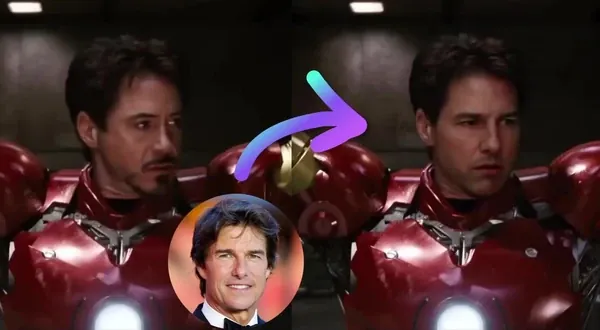
Free Virtual Try-On AI
Try on clothes in any photo in seconds — free, no sign up, no watermark.
Trusted by teams at
How Virtual Try-On AI Works
- 1

Upload person photo
Upload a clear photo of the person you want to try outfits on. - 2
Upload clothing item photo
Upload the clothing item you want to try on (product shot or flat lay works best). - 3
Generate try-on
Click "Generate Try-On." When it's ready, download your high-quality result.


Virtual Try-On Tutorial
Watch our Virtual Try-On tutorial:
Virtual Try-On AI Use Cases
See how our Virtual Try-On can be used in different scenarios.

Use virtual try-on to preview different outfits on a real photo of yourself. Compare colors and styles before you buy, pack, or post an OOTD.
Use virtual try on to generate clean on-model outfit variations from a single product photo. Use our AI photo editor for retouching and background changes. Create more listing images for Shopify, Amazon, and marketplaces without new photo shoots.
Use an outfit changer to create multiple wardrobe versions of the same ad in minutes. Combine with face swap to put different creators in the same outfit. Test hooks like "work look" vs "night out" while keeping the same framing and performance.
Use AI outfit swaps to build fast lookbooks for Instagram, TikTok, and Pinterest. Turn one shoot into many styles for reels, carousel posts, and story content.
Use a clothes swap tool to plan outfits for trips, weddings, interviews, and events. Compare options side-by-side so you decide faster and avoid last-minute outfit stress.
Use virtual try-on to preview cosplay, Halloween, and themed costumes on your own photo. Iterate on the vibe before you spend time or money on the final build.
Use virtual try-on to visualize uniforms, merch, and brand looks on real people. Helpful for teams testing consistent styling for staff photos, promos, and events.
Why Creators Love Virtual Try-On AI
Create realistic virtual try-ons from photos. Upload a person photo and a clothing item photo to preview outfits for ecommerce, lookbooks, ads, or shopping.
Skip expensive photoshoots
Preview outfit variations for catalog images or lookbooks before booking a new photoshoot.
Compare outfits before buying
Compare outfit ideas on your photo before checking size charts and trying clothes on.
No manual cutouts or layering
Avoid Photoshop masking and compositing. The AI handles clothing transfer and blending automatically.
Iterate product creatives faster
Create 10+ variations in minutes to A/B test PDP images, ads, and UGC-style assets.
Commercial-ready outputs, fast
Get realistic results in seconds - plus an API when you need to scale try-ons across a catalog.
Testimonials
Hear what our users have to say
"We're building an apparel platform that lets people see how they look in different shirts using Magic Hour's Virtual Try-On API. They handled that scale easily and was fast and easy to integrate. Image quality is solid for mobile (1024px), and the team has been great about feedback. Pricing is fair for high-volume use, which offsets the model work for us."

Ryan Caruso
Ecommerce Founder
"Virtual try-on is really useful for trying clothes before purchasing them. I normally hate buying clothes online, but this makes it feel less like a gamble."

David Schneider
Student
"Magic Hour has one of the best AI clothes-changing tools that lets you swap outfits in photos in seconds. You can try on everything from business suits to wedding gowns, with each swap looks realistic and natural. It also handles accessories like shoes or jewelry, so you can adjust the full look without starting over."

Neil
Picsman Author
Virtual Try-On AI Features
Preview outfits in photos with AI-powered virtual try-on

Visual outfit previews
Preview how an outfit could look in your photo. Results do not guarantee fit, sizing, fabric behavior, or color accuracy.

Fast previews
Fast previews keep shoppers engaged and moving to checkout

Commercial use + API
Generate try-ons at scale with commercial use and API access.

Compare looks before buying
Compare outfit ideas visually, then check size charts and physical fit before deciding.
Virtual Try-On AI FAQ
Yes! Magic Hour's virtual try-on is free online. You get 3 free try-ons daily with no signup. Sign up for more credits and daily rewards. Subscribe to a plan or purchase a credit pack for more try-ons.
No watermark on virtual try-on photo results for all users, including free users with no sign up.
You get 3 free try-ons daily with no signup. Sign up for more credits and daily rewards - each try-on uses 25 credits. Subscribe to a plan or purchase credit packs for more.
Yes, with a paid subscription, a credit-pack purchase, or a separately agreed paid usage-based billing arrangement, as long as you own the rights to the model and outfit photos or use public domain images. Users without one of these paid arrangements are limited to personal, non-commercial use.
Virtual try-on uses AI to place clothing onto a photo of a person, letting you preview outfits or styles digitally. It's great for shopping, social media, and professional photo needs.
It helps businesses, especially small ones, quickly update product images and videos for online stores, saving time and cost compared to traditional photoshoots.
Yes. You can try on clothes in photos online free with no signup - 3 try-ons per day. Create an account for more free credits and daily rewards. Works in your browser, no app download required.
Yes! It supports shirts, pants, dresses, and more. Select Upper Body, Lower Body, or Dress based on the clothing item you're trying on.
For best results, use: Outfit photos with a white background, flat, single clothing item fully visible. Model photos with one person, front-facing, natural pose, no obstructions.
We Value Your Privacy & Data Security, Always
Commercial use, no AI training, deletion controls, and feature-specific retention. Trust & privacy
Commercial use
Subscriptions and credit packs permit commercial use of outputs. Users without either purchase are limited to personal, non-commercial use.
No training
We do not use customer prompts, uploads, or outputs to train AI models. This covers free, paid, and API use.
Delete anytime
Delete saved projects or request account deletion. Retention varies by feature; account deletion has a separate 14-day restoration period.
Security
Encrypted in transit and at rest. Access is restricted for operations and support.