woman-dancing-in-hallway
Overview
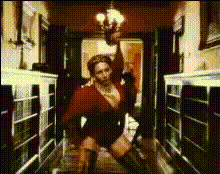
Transform your videos with the Woman Dancing in Hallway template, a type of Video Face Swap tool. This template allows you to create fun, engaging videos by overlaying your face onto a dancing woman's body in a lively hallway setting.
What It Does
The Video Face Swap feature utilizes advanced facial recognition to map your features onto another person's face in video format. With the Woman Dancing in Hallway template, you can create unique videos for personal use or to share at events. The template supports output in popular file formats such as MP4 and AVI, allowing easy sharing and playback across devices.
Who It's For
This template is perfect for anyone looking to add a personalized twist to their videos. Whether you're an event planner looking to create unique party favors, a content creator seeking fresh material, or just someone who wants to surprise friends with a fun video, the Woman Dancing in Hallway template provides the ideal solution.
Summary
Create memorable videos that capture the spirit of fun and innovation. The Woman Dancing in Hallway template offers a simple and effective way to utilize the power of face swapping technology in your video projects. Explore this template along with other creative tools such as the AI GIF Generator and the AI Video Generator to expand your multimedia repertoire.
How To
Choose Your Template

Customize Your Face Input

Generate Your Video

Use Cases
Party Favor Videos
- Personalized video cards
- Event highlights featuring guests
- Interactive slideshow presentations
Social Media Content
- Customized challenge videos
- Entertaining memes
- Influencer collaboration content
Marketing Campaigns
- Dynamic video ads
- Engaging storytelling for brands
- User-generated content campaigns
Best Practices
Choose High-Quality Images
For the best results, upload high-resolution images that clearly show your face for accurate mapping.Experiment with Settings
Use the customization options to adjust facial blending and tones for a natural look.Check for Permissions
Ensure you have the rights to use the images for face swapping, especially if making videos for public distribution.