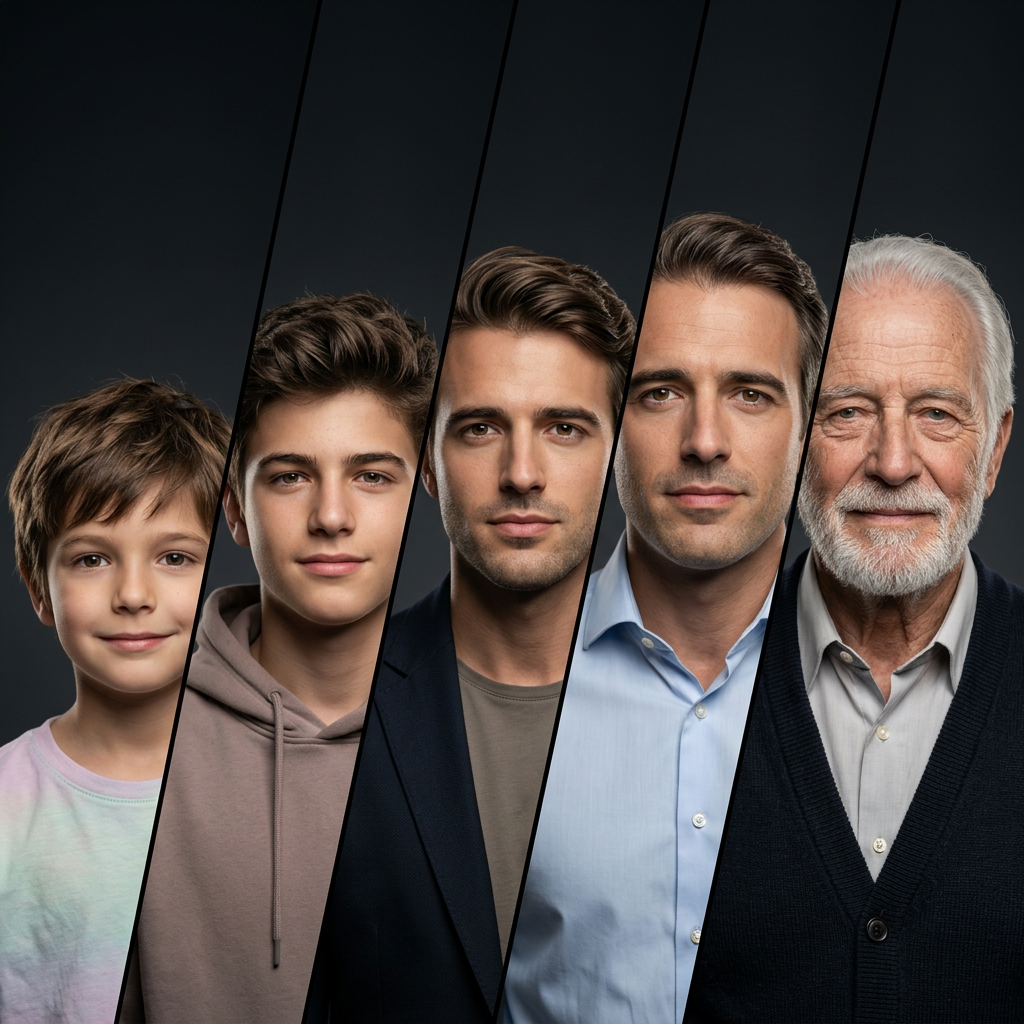
The Stages of Life
Any aspect ratio
Create an ultra photorealistic, cinematic 8K portrait (1:1 Square) showing a single male identity evolving across five life stages in a precise diagonal panel composition. Core Composition & Crucial Alignment: Divide the image into five clean, parallel diagonal panels (lines slanting upwards from bottom-left to top-right: / / / / /). Ascending "Staircase" Placement (CRITICAL): The subjects' heads must NOT be on the same horizontal line. They must be vertically staggered in an ascending order. The child in the first panel (far left) must be placed lowest in the frame. Moving left to right, each subsequent older stage must be positioned progressively higher in the frame, ending with the elderly man in the final panel (far right) positioned the highest. Use sharp, crisp edges (no blur or gradient transitions) for the panel dividers. The layout must feel geometrically precise with consistent spacing and angles. Use the uploaded image as the ONLY reference. Maintain identical facial structure, proportions, and features across all ages. Only natural ageing changes (skin texture, wrinkles, hair) are allowed. No identity drift. Life Stages (Left to Right, Lowest to Highest positioning): Child (6–8): soft smile, pastel t-shirt, short tousled hair, smooth skin (Positioned lowest in the frame) Teen (14–17): confident, hoodie (muted tones), thicker hair, youthful texture (Positioned slightly higher) Young Adult (22–28): composed, blazer + plain shirt, well-groomed hair (Positioned in the middle) Middle Age (38–45): calm, formal shirt, slight hair recession, light wrinkles (Positioned higher) Elderly (70+): gentle smile, knit/formal wear, grey hair, detailed wrinkles (Positioned highest in the frame) Environment & Lighting: Dark charcoal studio background with subtle vignette. Cinematic lighting: soft frontal key light, strong rim light for separation, minimal fill. Lighting direction must stay consistent across all panels. Camera & Quality: Eye-level shot, 85mm lens, shallow depth of field, eyes in sharp focus. Extreme photorealism with visible pores, natural imperfections, detailed hair strands, and realistic fabric textures. Post & Constraints: Cinematic color grading (warm highlights, cool shadows), minimal retouching. No stylization, no distortion, no identity drift, no background clutter — clean studio only.
Tags
stylesOverview
The "Stages of Life" template in the AI Image Editor uses the nano-banana-2 model to craft a stunningly realistic portrayal of a person's journey through life. This template excels at creating a cohesive and captivating portrait that is both detailed and emotionally resonant.
What It Does
The template generates a high-resolution portrait that visually narrates the progression of a male individual through five distinct life stages: child, teen, young adult, middle-aged, and elderly. Using a diagonally staggered panel layout, this template offers a unique visual composition with meticulous attention to facial consistency across ages, achieved through precise aging indicators like wrinkles and hair changes.
Who It's For
This template is ideal for artists, photographers, and digital creators who need a dynamic, multilayered image to represent the passage of time. It is also beneficial for educators and historians illustrating life stages or for those in advertising needing powerful imagery for narrative campaigns. For more creative tools, explore our AI GIF Generator or AI Video Generator.
Summary
With "Stages of Life," users can create a vivid portrayal of aging that is both photorealistic and artistically arranged. The template's commitment to high-quality rendering and cohesive storytelling across the life span makes it a powerful tool for diverse visual projects. Explore other similar templates in our AI Image Editor category.
How To
Select the Template

Input Reference Image

Generate Image

Use Cases
Educational Materials
- Anatomy textbooks
- Aging studies
- Generational comparisons
Marketing Campaigns
- Healthcare ads
- Insurance campaigns
- Retirement planning visuals
Artistic Projects
- Gallery displays
- Animated transformations
- Art prints
Best Practices
Maintain Consistent Lighting
To ensure realism, keep the lighting direction consistent across all five stages.Focus on Natural Aging
Emphasize only organic aging elements like wrinkles and grey hair to prevent identity loss.Precision in Panel Alignment
Adhere strictly to the diagonal panel layout to preserve the template's narrative coherence.