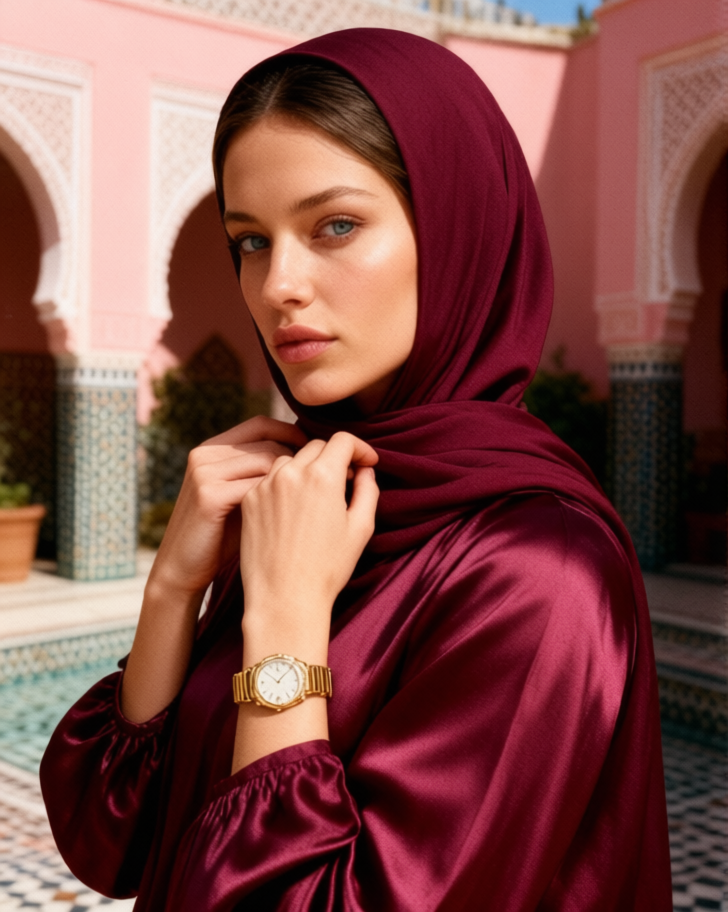
Hijab
Any aspect ratio
Use face and body strictly from image 1. Preserve the character’s identity exactly as in the uploaded photo, with no interpretation or alteration. Keep the same face, body proportions, expression, face angle, eyes, skin tone, and all distinctive features. Luxurious intimate beauty portrait in a pink Moroccan riad courtyard. Woman in a deep burgundy hijab with hair максимально concealed, wearing a voluminous high-neck silk top. Hands adjusting the fabric near her neck, with Cartier Panthère jewelry and a gold Rolex. Stunning side-profile, harsh summer sunlight, sharp shadows, eyes slightly toward the camera, magnetic confident expression. Raw vintage 35mm film aesthetic, heavy grain, cinematic lighting, glossy editorial fashion style.
Overview
The Hijab template leverages the power of AI Image Editing using the qwen-edit model. It's designed for those looking to create captivating fashion editorials with a focus on authenticity and richness in detail. Capture a luxurious aesthetic that maintains the integrity of the subject’s features in a Moroccan-inspired setting.
What It Does
The AI Image Editor brings your creative vision to life by preserving every detail of the subject's identity from the reference image. It accurately reconstructs the look in a detailed setting, specifically within the context of a pink Moroccan riad courtyard. The model ensures that the expression, angles, and distinctive features are kept intact while donning a deep burgundy hijab and fashionable accessories.
Who It's For
This template is ideal for fashion photographers, editorial designers, and brands who want to create striking visual narratives without compromising the subject's original appearance. It's particularly useful for creating content that mandates cultural accuracy and a luxurious, cinematic feel. This could include projects for ecommerce ads and product videos with upscale brands and cultural themes.
Summary
The Hijab template provides an advanced solution for fashion imagery, ensuring a balance of creativity and authenticity. This tool is pivotal for projects requiring detailed image adjustments while maintaining the cultural and personal identity of the subject.
How-To
Choose Template

Customize Inputs

Generate Image

Use Cases
Fashion Editorials
- High-fashion shoots
- Cultural heritage features
Marketing Campaigns
- Jewelry brand shoots
- High-end product launches
Social Media Content
- Influencer collaborations
- Brand storytelling
Best Practices
High-Quality Inputs
Utilize a high-resolution image for the best editing fidelity, ensuring details like skin tone and facial features are visible.Consistent Style
Match the lighting and angle settings in the studio with the natural lighting described in the prompt for consistency.Detail Attention
Ensure accessories such as the Cartier Panthère jewelry and gold Rolex are properly visible to enhance the fashion narrative.