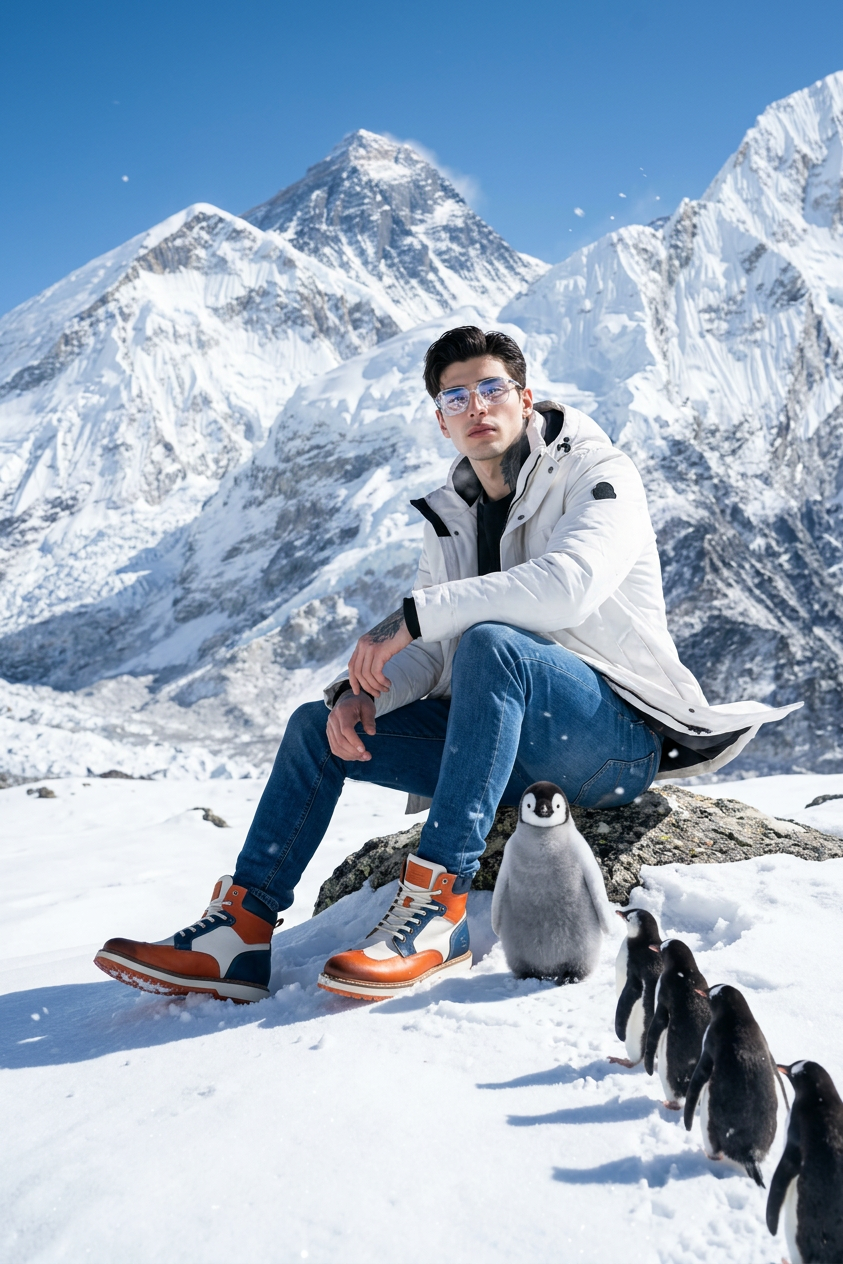
Penguins on the Peak
Any aspect ratio
A man(face match correctly from reference photo) sitting confidently on a rugged snow-covered rock at a high Himalayan peak. The camera captures him from a low angle, making him appear powerful and present against the vast open sky. His posture is natural and relaxed — one knee slightly raised, hands resting casually. He is wearing a clean white winter jacket with visible stitching texture and light snow dust on the shoulders. His deep blue jeans have natural cold-weather folds and slight frost marks.His footwear is a pair of premium leather winter boots with a unique design: black base with orange, white, and blue accents, high-detail textures, visible stitching, rugged grip sole, and light snow packed around the bottom edges. The boots look real, durable, and purpose-made for extreme cold. He wears clear eyeglasses, and in the lenses, a sharp reflection of the surrounding Himalayan landscape is visible. The reflection is detailed but natural — not exaggerated. Next to him stands a baby penguin, close to his leg, wings slightly open as if greeting him. Its feathers are soft and fluffy with tiny snowflakes attached. Behind it, a line of penguins walks toward him, leaving clear footprints in the snow — forming a leading line that visually connects subject and wildlife. Lighting: Bright, clean high-altitude daylight, no golden hour, no warm tones — just pure natural cold mountain lighting with .soft realistic shadows. Sky: Crystal clear deep blue sky, no clouds, making the scene feel open, high, and cinematic in scale — but still natural. Environment background: Massive sharp Himalayan peaks covered in thick snow and ice. Valleys, steep ridges, rock textures, and subtle moving mountain fog add depth. Some faint windblown snow gives realism. Camera style: Low-angle medium-wide portrait shot Slight atmospheric haze in distance Natural depth of field — subject sharp, background softly detailed 24–35mm realistic photography lens look Slight visible breath mist from cold air Color tone: Pure natural environmental tones — whites, cold blues, blacks, and soft grays. No cinematic teal-orange tint. Atmosphere extras: Snow particles drifting, jacket edges moving gently with wind, marks in snow from boots and penguins. Mood: Majestic, peaceful, powerful — a rare moment between human and nature at the top of the world
Tags
stylesOverview
Penguins on the Peak is an AI Image Editor template leveraging the Nano-Banana-2 model, meticulously designed to craft breathtaking portraits of human and nature in perfect harmony. Intended for those who wish to create a majestic scene featuring a man and penguins at the Himalayan heights, this template provides opportunities for creative expression with its sophisticated editing capabilities.
What It Does
This template enables users to create detailed and atmospheric images by matching the face from a reference photo onto a rugged, high-altitude scene. It allows customization of clothing, accessories such as eyeglasses, and the addition of wildlife elements like a baby penguin. With features that handle lighting, shadows, and environmental textures, users can produce realistic and engaging images that defy the limits of traditional photography.
Who It's For
This tool is perfect for photographers, graphic designers, and content creators seeking to combine human subjects with stunning natural landscapes. It's also suitable for those focused on wildlife photography composites and creators who utilize tools like the AI-Image Editor or the AI Profile Picture Generator to enhance their digital art projects.
Summary
The Penguins on the Peak template offers a unique and artistic approach to visual storytelling, capturing the essence of high-altitude majesty combined with peaceful interactions between humans and wildlife. By utilizing the precision of the Nano-Banana-2 model, creators can produce exceptional and lifelike images perfect for marketing, art exhibits, or personal projects.
How To
Choose Your Template

Customize Your Scene

Generate Your Image

Use Cases
Wildlife Photography
- Enhance photography portfolios with unique composite images.
- Showcase creative outdoor apparel design in extreme conditions.
Advertising Campaigns
- Design engaging advertisements for winter sports gear.
- Promote travel and adventure tourism to Himalayan locations.
Graphic Design Projects
- Create compelling cover art for books or magazines.
- Develop inspirational posters for environmental awareness.
Best Practices
Reference Accuracy
Ensure the reference photo for face matching is clear and well-lit for optimal accuracy in the final image.Detail Enhancement
Pay close attention to the textures and details in clothing and accessories to maintain realism.Lighting Considerations
Adjust the lighting settings to complement the natural cold lighting of the scene, preserving the atmosphere.