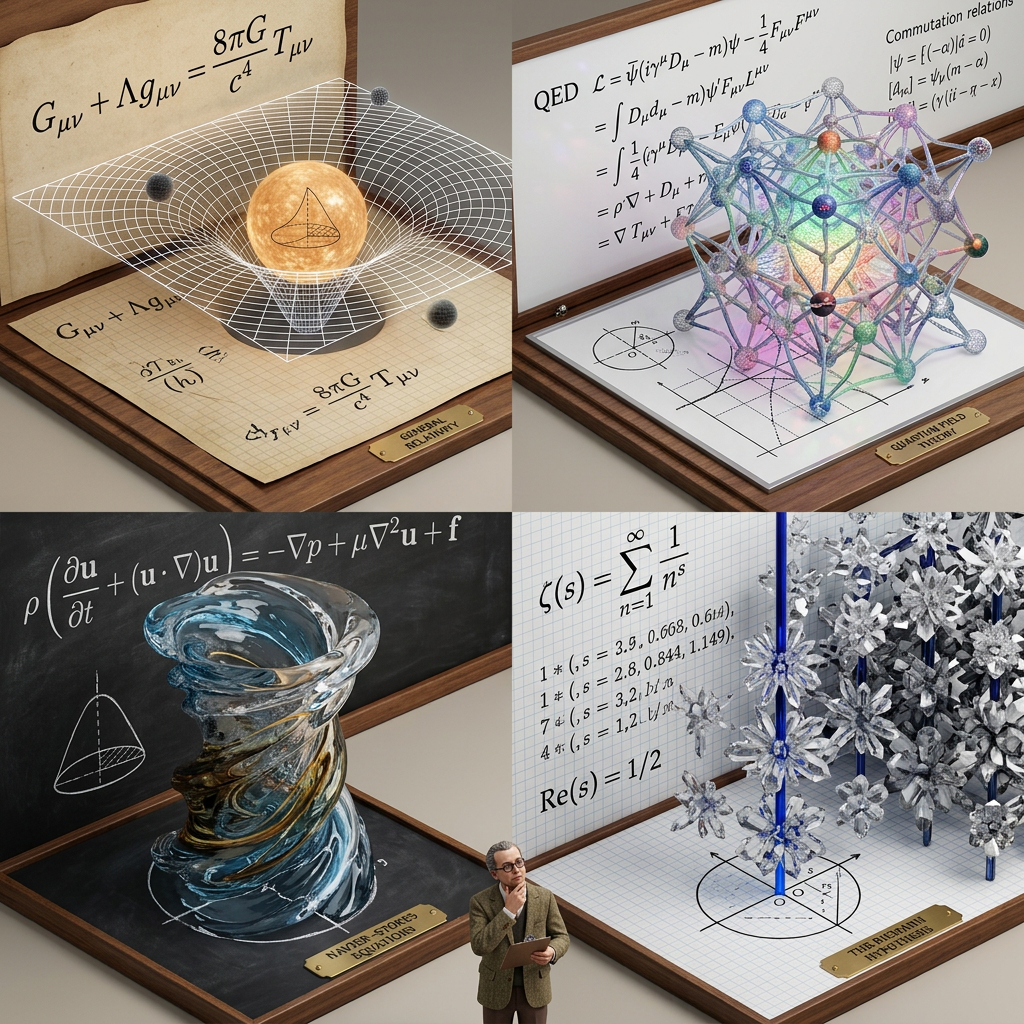
Theoretical Structures Grid
ai-image-editor
Any aspect ratio
Subject transforms into a 2x2 grid of advanced PhD-level concepts, each panel visualizing a different theorem or formula through dimensional transformation. Each panel begins with a flat surface of equations in its native notation style (chalkboard, parchment, graph paper), where symbols lift into white wireframes and evolve into fully solid, photorealistic structures representing the theory. A tiny scientist figure stands below, observing the transformation. Concepts: — General Relativity → warped spacetime architecture (curved grid manifold) — Quantum Field Theory → fluctuating energy lattice with particle nodes — Navier–Stokes Equations → fluid vortex tower with dynamic flow forms — Riemann Hypothesis → infinite crystalline prime lattice structure High-angle isometric view, “3D model designer toy” style, strong contrast between sketch lines and solid forms, ultra-detailed, clean scientific aesthetic.
AI Image Editor Template: Edit, Enhance, and Transform Any Image in Seconds
Use this template to turn any static image into a polished, on-brand visual—directly in your browser. It’s powered by the AI Image Editor, so you can remove objects, change backgrounds, fix faces, and re-style your image without manual Photoshop-style work.
This page explains what the template does, how you can remix it in Magic Hour, and how it fits into a broader AI-first creative workflow.
What This Template Is For
This template is ideal if you want to:
- Clean up a photo (remove distractions, fix lighting, sharpen details)
- Replace or blur sensitive/background elements for privacy
- Turn simple photos into branded marketing creatives
- Edit product photos for e‑commerce listings and ads
- Generate variants for A/B testing thumbnails, ads, and social posts
- Prepare images for downstream video or animation workflows
Because it runs on the AI Image Editor, you can:
- Edit locally (keep your existing composition)
- Use AI to add, remove, or modify specific regions
- Combine multiple edits in one pass
How to Use and Remix This Template in Magic Hour
You can treat this template as a starting point and adapt it for your own pipeline. A typical workflow in Magic Hour looks like:
Open the template
Load the template from your Magic Hour dashboard. It will already be wired to use the AI Image Editor as the core step.Upload or connect your source image
- Upload a photo, product shot, illustration, or screenshot.
- For higher-quality output on older or low-res images, consider pairing this with the AI Image Upscaler.
Define your edit goal
This template works best when the intent is explicit. Common patterns:- “Remove the background and replace with a solid color or gradient”
- “Clean up clutter and make the subject pop”
- “Turn this photo into a clean, minimal product shot”
- “Restyle this image in a consistent brand or illustration style”
Run the edit and iterate
- Generate an edited version, review visually, and re-run with a refined prompt or different reference image.
- Save multiple versions for comparison and A/B tests.
Remix into a custom workflow
Inside Magic Hour, you can duplicate this template and add steps around it:- Upstream: generate original imagery with AI Image Generator or AI Photo Generator.
- Core: apply the AI Image Editor to refine, clean, or restyle.
- Downstream:
- Turn your edited images into video using Image to Video or Text to Video.
- Create animated GIFs with the AI GIF Generator.
- Generate talking avatars with AI Talking Photo.
Because all Magic Hour tools are API-friendly and composable, you can treat this template as a node in a larger, automated content pipeline.
Practical Use Cases for Creators, Marketers, and Builders
1. Marketing & Growth Teams
Use the template to rapidly produce campaign-ready assets:
Ad creatives & social posts
- Generate base visuals with the AI Art Generator or AI Illustration Generator.
- Clean and brand them with the AI Image Editor template.
- Resize or refine for channel-specific assets using the Thumbnail Maker or Album Cover Generator.
Landing page & product imagery
- Start with quick captures or mockups, then:
- Remove distracting elements via Remove Object From Photo or the AI Remover.
- Replace backgrounds using the Image Background Remover and then refine with the template.
- Sharpen and upscale for retina displays with AI Image Upscaler.
- Start with quick captures or mockups, then:
Content velocity & experimentation
- Duplicate the template to create variations for different audiences, channels, or brand lines.
- Pair with AI Meme Generator for fast social-native tests.
2. Product Teams and Founders
Use this template to accelerate product visuals and UX work:
Mockups & product shots
- Turn rough feature screenshots into polished, marketing-ready images with the AI Image Editor.
- Create consistent iconography or UI motifs using the AI Icon Generator, then refine or recolor with this template.
Brand experimentation
- Explore style directions (minimalist, 3D, illustration, manga, etc.) by combining:
- Use this template to normalize backgrounds, color palettes, or detail levels.
Docs, decks, and investor material
- Upgrade rough diagrams or screenshots with the AI Image Editor to improve clarity and visual quality.
- For covers and hero graphics, pair with the Book Cover Generator or Album Cover Generator.
3. Creators, Designers, and Solo Builders
For content creators and designers, the template acts as a fast post-production layer:
Portraits and profile images
- Generate or refine headshots with the AI Headshot Generator or Avatar Generator, then make subtle edits (background, lighting, minor cleanup) with the AI Image Editor.
- Refresh selfies with the AI Selfie Generator and tighten the final look in this template.
Stylized personal branding
- Create consistent stylized looks (superhero, comic, optical illusion, etc.) by using:
- Then normalize details (logos, text, color accents) with the AI Image Editor template.
Art, worldbuilding, and creative IP
- Generate base art using tools like:
- Refine consistency and cleanliness using the AI Image Editor: unify lighting, remove artifacts, and prepare assets for print, games, or web.
Advanced Workflows: Turning Edited Images Into Video and Interactive Media
Once you’ve cleaned and enhanced images using this template, you can plug them into richer media workflows across Magic Hour:
From edited image to video
- Use Image to Video to animate a single edited frame into a short clip.
- Combine with Text to Video to build scenes or explainer content around your visuals.
- Upscale output with the Video Upscaler for higher-res delivery.
Talking avatars and lip sync
- Generate or edit a portrait with this template.
- Animate it using AI Talking Photo, or use:
- Lip Sync template to sync mouth movements to audio.
- Face Swap Video template to swap the face into a different clip.
- Generate or clone voices with AI Voice Generator and AI Voice Cloner, then adjust with the AI Voice Changer.
Advanced animation and character pipelines
- Turn edited character art into motion using:
- Prepare character sheets with the Full Body Generator and refine them in the AI Image Editor.
GIFs and social-native content
- Take your polished images and use the AI GIF Generator for looping animations.
- Automatically caption any resulting videos with the Auto Subtitle Generator for social platforms.
Image Cleanup, Restoration, and Quality Enhancement
The AI Image Editor template is also effective for repair and cleanup workflows:
Object removal & cleanup
- Use specialized tools like Remove Object From Photo or Watermark Remover for targeted tasks.
- Then refine edges, textures, and fill artifacts through this template.
Old photo and low-quality image rescue
- Restore damaged or aged images with Old Photo Restoration.
- Colorize black-and-white photos with Photo Colorizer.
- Sharpen and deblur with Unblur Image and AI Image Upscaler.
- Use this template as a final pass to standardize look and remove any residual noise.
Sketches, drafts, and concept art
- Convert rough sketches using Photo to Sketch or generate base art via AI Art Generator.
- Clean up lines, tweak contrast, and unify style via the AI Image Editor.
Branding, Fashion, and Visual Identity Workflows
For teams working on visual identity, fashion concepts, or merchandising:
Outfits, fashion, and styling
- Explore clothing concepts using:
- Use this template to standardize backgrounds, lighting, or add branding details to the final look.
Logos and brand marks
- Create draft logos with the AI Logo Generator.
- Use the AI Image Editor template for subtle refinements: spacing, color balance, background variations for different applications.
Tattoos and body art
- Generate tattoo concepts using the AI Tattoo Generator.
- Clean up placements or mockups on model photos in this template to present realistic previews.
Identity Play, Fun Generators, and Social Content
Not all workflows are purely commercial—many teams use fun and social-native features to drive engagement:
Face and identity transformations
- Experiment with faces using:
- Use the AI Image Editor template to clean, stylize, or refine the final outputs before publishing.
Memes, emojis, and playful IP
- Generate custom emojis with the Emoji Generator.
- Turn your edited faces or mascots into memes using AI Meme Generator.
- Explore IP-style content via:
Posters, covers, and thumbnails
- Combine this template with:
- The AI Image Editor step lets you align everything to your visual system before exporting.
Design, Interiors, and Environment Concepts
For architecture, interior design, and environmental visuals:
Interior concepts and moodboards
- Generate room designs or layout ideas via the AI Interior Design Generator.
- Apply this template to adjust materials, remove unwanted props, or standardize lighting for pitch decks and client presentations.
Architecture and exteriors
- Experiment with building concepts using the Architecture Generator.
- Use the AI Image Editor to clean up noise, add signage, or tweak context (e.g., greenery, sky replacement).
Backgrounds and worlds
- Create reusable backdrops with the AI Background Generator.
- Use this template to align them to your brand’s color system or adjust for specific products/characters.
Data, Compliance, and Practical Considerations
While this page is focused on creative workflows, many users also care about governance and consistency:
Consistency across assets
By using this AI Image Editor template as a required step in your image pipelines, you can:- Enforce visual standards (backgrounds, color ranges, framing).
- Reduce manual Photoshop overhead for your design team.
- Create reproducible, template-based workflows that can be run by non-designers.
Preparing assets for automation
- Once your pipeline is stable, it can be triggered programmatically via other Magic Hour tools.
- Combine with QR-based or generated entry points using the AI QR Code Generator to connect printed or physical experiences to your edited visuals.
Accessibility and clarity
- Clean, high-contrast images not only look better but support accessibility and legibility in UI and marketing contexts.
- Use this template alongside Auto Subtitle Generator to create accessible multimedia content (clear visuals + text overlays).
How to Build Your Own Version of This Template
To create a customized version of this AI Image Editor template in Magic Hour:
Duplicate the existing template
- In Magic Hour, copy this template to your workspace so changes won’t affect the original.
Decide what’s fixed vs. variable
- Fixed: your target output style (e.g., “clean product on light background,” “comic-style character card”).
- Variable: source image, text overlays, brand elements.
Chain relevant tools around the editor
Examples:- Generate → Edit → Animate:
- AI Art Generator → AI Image Editor template → Image to Video.
- Photograph → Clean → Upscale → Use in ads:
- Raw photo → AI Image Editor template → AI Image Upscaler → Thumbnail Maker.
- Character → Style → Talk:
- AI Character Generator → AI Image Editor template → AI Talking Photo.
- Generate → Edit → Animate:
Standardize across your team
- Share the remixed template with collaborators so everyone uses the same process for editing images.
- This reduces drift in style and quality across campaigns and product surfaces.
When to Use the AI Image Editor Template vs. Other Tools
Use this AI Image Editor template when:
- You already have an image (photo, render, artwork) and want to improve or adapt it.
- You need local, targeted changes: remove, replace, or enhance elements.
- You want a predictable, repeatable editing step in your pipeline.
Consider starting with other tools when:
- You’re generating images from scratch: AI Image Generator, AI Photo Generator, AI Art Generator.
- You’re primarily working in video: Text to Video, Image to Video, Video to Video template.
- You’re focused on faces and identity: AI Headshot Generator, AI Face Generator, AI Face Editor.
In most professional workflows, you’ll mix these tools: generate or capture → edit with this template → publish or animate.
By using this AI Image Editor template as a central step in your Magic Hour workflows, you can standardize image quality, reduce manual editing, and scale visual production across marketing, product, and content teams—all while keeping full control over style and brand.