Fictional Parody War

Fictional Parody War

ai-image-editor

1 clip
3 uses

Any aspect ratio

Prompt

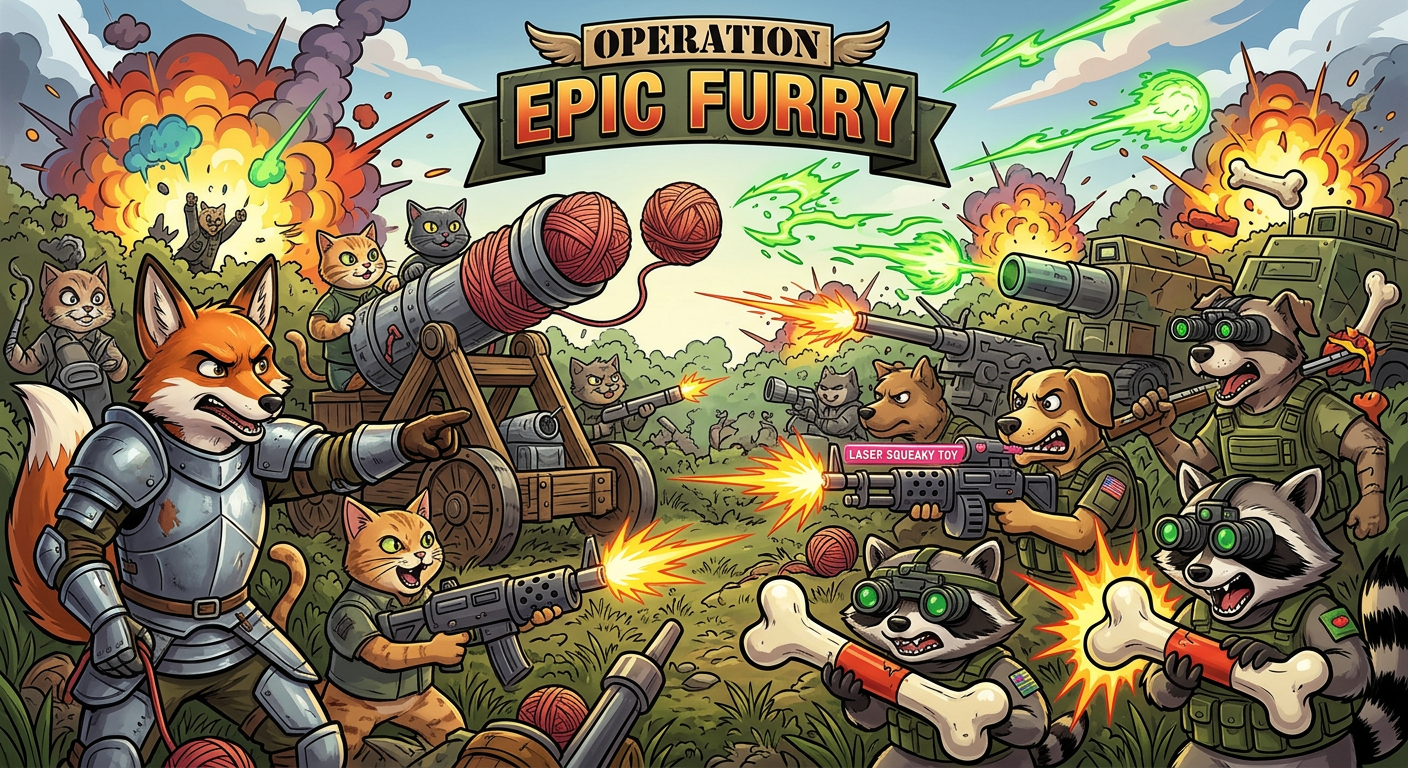
Illustration of a chaotic, over-the-top fictional war titled “Operation Epic Furry,” set in a stylized alternate universe. Anthropomorphic animal factions (cats, dogs, foxes, etc.) in exaggerated military gear clash in a dramatic battlefield filled with absurd weapons (yarn cannons, laser squeaky toys, oversized armor). Tone blends epic cinematic war composition with humorous, absurd “furry” aesthetics. Explosions are colorful and stylized, not realistic. Characters show intense but cartoonish determination. Highly detailed environment, dramatic lighting, cinematic composition, but clearly fictional and satirical.

Transform Portraits with AI Image Editor: Precise, Realistic Face Editing in Minutes

Use this template as a starting point to quickly create high-quality, natural-looking portrait edits with the AI Image Editor. Whether you are a creator, marketer, founder, or designer, this workflow is optimized for fast iteration, clean outputs, and easy remixing inside Magic Hour.


What This Template Is Best For

This template is designed for realistic, detail-preserving portrait edits, including:

  • Subtle facial retouching (skin cleanup, lighting, minor reshaping)
  • Changing hair color, style, or length
  • Adjusting facial expressions (more smile, more serious, etc.)
  • Makeup, beauty, and style variations
  • Swapping backgrounds while preserving the original subject
  • Creating multiple brand-consistent looks from one base headshot

If you need to generate a completely new face or character from scratch, pair this template with the AI Face Generator or AI Headshot Generator. For full-body fashion or outfit changes, combine it with the AI Clothes Changer, AI Fashion Generator, or AI Outfit Generator.


How to Use and Remix This Template in Magic Hour

You can treat this template as a reusable “editing pipeline” inside Magic Hour. To create your own version:

  1. Open the template in Magic Hour

    • Start from this template using the AI Image Editor.
    • Upload a portrait (selfie, professional headshot, or client image).
  2. Define your edit goal

    • Examples of clear edit goals:
      • “Make this headshot look more cinematic and professional while keeping the person’s identity.”
      • “Convert this selfie into a studio-style LinkedIn photo.”
      • “Change hair color to platinum blonde and add light natural makeup.”
      • “Turn this real photo into a subtle comic-book style while preserving facial features.”
    • The more specific your instruction, the more controllable the result.
  3. Apply targeted edits

    • Use the AI Image Editor to:
      • Clean up skin and lighting without over-smoothing
      • Refine jawline, eyes, or smile in a realistic way
      • Adjust background to a clean studio, office, or branded backdrop
      • Test multiple looks (hair, makeup, glasses, facial hair) from the same base image
    • For more stylized outputs (anime, comic, or illustrated portraits), you can take the edited image into:
  4. Iterate and compare versions

    • Duplicate the template and tweak your instructions for A/B testing:
      • Version A: Corporate, neutral expression, grey background
      • Version B: Warmer, friendly expression, soft-gradient background
    • Keep the best variants as your “brand presets” for future headshots or campaigns.
  5. Export and reuse across Magic Hour


Example Remix Workflows Using This Template

You can combine this AI Image Editor template with other Magic Hour tools to build end-to-end workflows:

1. Professional Headshot Pipeline

  • Start with a casual photo.
  • Use this AI Image Editor template for:
    • Background cleanup (from messy room → clean studio)
    • Light retouching and expression optimization
  • Enhance resolution with AI Image Upscaler.
  • Use final headshots in pitch decks, LinkedIn, landing pages, and team pages.

2. Character Creation and Animation

3. Marketing & Content Variants

  • Start from a single founder or brand ambassador photo.
  • Use this template to:
    • Generate multiple moods (serious, friendly, energetic)
    • Localize visuals for different markets by changing background environments
  • Reuse the same base identity with:

Related Tools You May Want to Combine with This Template

Depending on your use case, you can chain this AI Image Editor template with other Magic Hour tools:

These tools layer well on top of a strong base portrait created with this AI Image Editor template.


Why Use an AI Image Editor Template Instead of Editing from Scratch?

For creators and teams who iterate often, working from a template has several advantages:

  • Consistency across assets
    A stable editing pipeline helps maintain a coherent “visual identity” across campaigns, thumbnails, landing pages, and social content.

  • Speed and repeatability
    Instead of starting from a blank canvas each time, you begin with a proven workflow for portrait improvement and style control.

  • Lower cognitive load
    You can focus on creative direction (“make this more premium / more playful / more cinematic”) rather than micromanaging every step.

  • Easier collaboration
    Non-technical teammates can reuse the same template to produce on-brand visuals without needing design or retouching expertise.


Tips for Better Results with AI Image Editing

  • Use higher-quality source images when possible
    Clear, well-lit photos produce more reliable edits. If needed, pre-process with Unblur Image or AI Image Upscaler.

  • Be explicit but concise in your instructions
    “Soft studio lighting, natural skin texture, subtle smile, neutral background” tends to work better than vague prompts like “make it look better.”

  • Iterate in small steps
    Large, extreme changes often look less realistic. Start with subtle adjustments, then push stylization or expression further in later passes.

  • Respect likeness and consent
    When editing real people (especially in professional or commercial contexts), ensure you have permission and stay aligned with your brand, legal, and ethical standards.


Turning Edited Images into Video and Interactive Content

Once you’ve created a polished portrait using this template, you can extend it across richer media:

This makes it possible to go from a single static headshot → animated character → speaking avatar → fully produced short-form video, all within the Magic Hour ecosystem.


How to Adapt This Template for Your Use Case

You can quickly remix this AI Image Editor template for different verticals:

  • Founders & startups
    Create consistent founder photos for pitch decks, landing pages, PR, and investor updates. Use variants tailored to different audiences (formal vs. product-focused vs. community-facing).

  • Agencies & marketers
    Standardize influencer or ambassador portraits across campaigns. Generate ad-specific variants (different expressions, backgrounds, or moods) without booking new shoots.

  • Educators & content creators
    Turn your headshot into thumbnails, talking-head intros, and stylized avatars that still feel recognizably “you” across platforms.

  • Product teams & UX
    Quickly generate realistic or stylized persona images for user research, documentation, onboarding flows, or product marketing.

Start from this template, duplicate it inside Magic Hour, and iteratively refine your instructions until it matches your brand’s visual language. Once dialed in, your template can serve as a reusable, AI-powered “visual identity system” for portraits and faces across your entire content stack.

More Like This