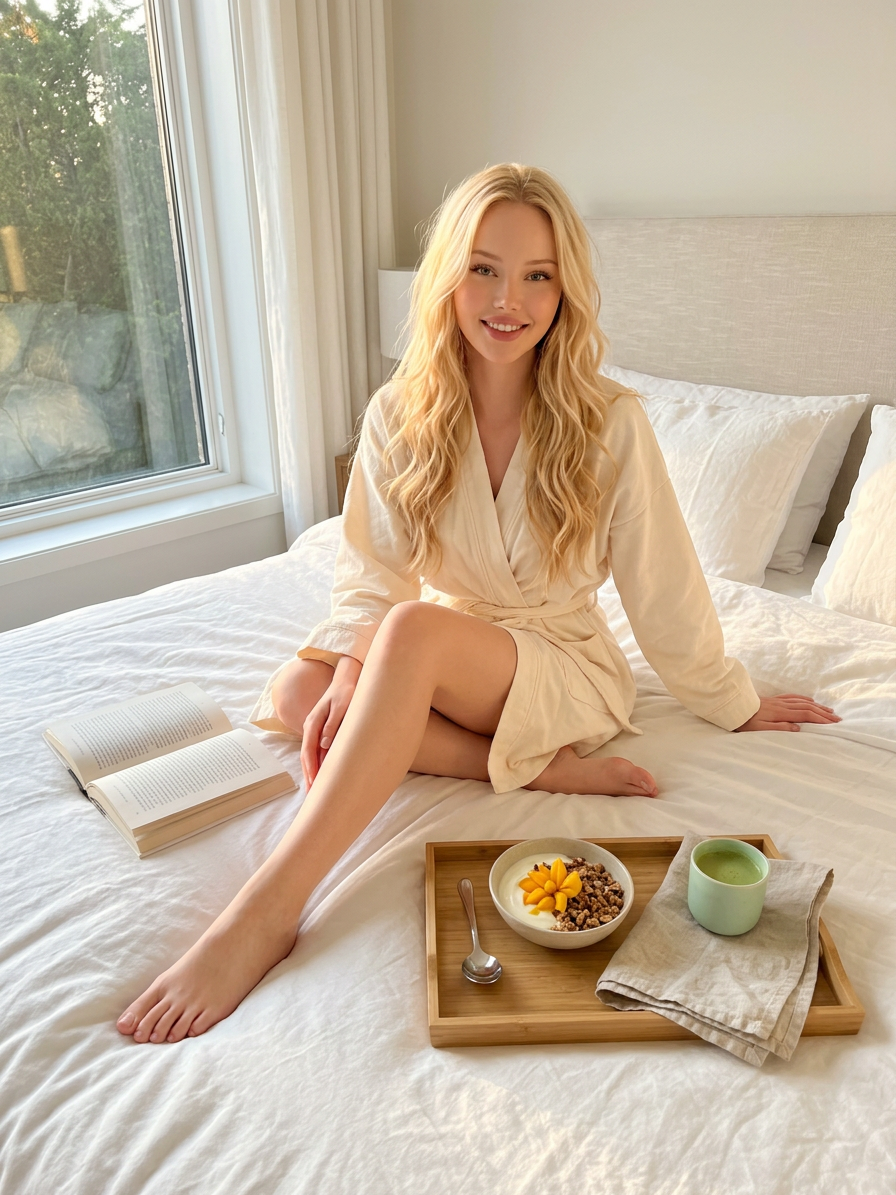
Golden Hour Wellness Bed Scene
ai-image-editor
Any aspect ratio
Generate a bright, airy iPhone-style photograph captured during golden hour, showing a subject with loose wavy hair seated diagonally on a bed in a relaxed cotton robe, with an open book placed beside them; on the duvet rests a neatly arranged wooden tray containing a petite bowl of yogurt with granola and sliced mango arranged decoratively like a flower, alongside a folded linen towel, a mint-colored matcha cup, and a silver spoon; the subject is barefoot with one leg gently bent, conveying natural ease and comfort; the composition is balanced and minimal, with soft warm lighting, no harsh shadows, and an overall clean wellness aesthetic; the scene feels like a candid moment from a high-end lifestyle or wellness magazine spread, emphasizing calm, softness, and everyday luxury.
AI Image Editor Template – Remixable Workflow for Fast, High‑Quality Image Edits
Use this template as a starting point to create polished, on‑brand visuals in minutes with the AI Image Editor. It’s designed for creators, marketers, founders, and designers who want production‑ready assets without wrestling with complex tools.
What This Template Does
This AI Image Editor–based template is built for:
Fixing and enhancing photos
Clean up images, adjust composition, and refine details using AI instead of manual retouching.Creative transformations
Turn a rough concept into a polished visual: swap backgrounds, change environments, add or remove objects, and restyle images.Brand‑ready marketing assets
Quickly generate variants for ads, landing pages, pitch decks, social posts, and emails with consistent look and feel.Content repurposing
Take one strong image and adapt it into multiple formats: thumbnails, hero images, social graphics, and more.
Under the hood, the workflow uses generative vision models to interpret your existing image, understand your edit request in natural language, and render a coherent, high‑resolution result.
How to Remix This Template in Magic Hour
You can treat this template as a remixable workflow. To build your own version in Magic Hour:
Start from the AI Image Editor
- Open the AI Image Editor.
- Upload any photo, design mock, product shot, or illustration you want to improve or transform.
Describe the edit in natural language
- Use clear, direct instructions like:
- “Remove the background and replace it with a clean white studio backdrop.”
- “Turn this office photo into a cinematic night scene with neon reflections.”
- “Change the outfit to a dark blazer and white shirt, keep the same pose and lighting.”
- The stronger your description, the more predictable the result.
- Use clear, direct instructions like:
Iterate fast with variations
- Generate multiple versions, then refine what works:
- Sharpen details with the AI Image Upscaler.
- Remove unwanted elements with the AI Remover or Remove Object from Photo.
- Swap backgrounds with the Image Background Remover.
- Generate multiple versions, then refine what works:
Save your steps as a repeatable pattern
- Once you find an edit flow you like (e.g., “clean product photo → white background → subtle shadow → upscale”), repeat the same sequence on new images.
- This becomes your personalized version of the template that you can reuse for campaigns, clients, or product lines.
Connect with other Magic Hour tools (optional)
- Turn your edited image into:
- A short video using Image to Video or Text to Video.
- A GIF for social posts via the AI GIF Generator.
- A talking avatar using AI Talking Photo.
- This template is a hub — start with a strong edited image, then branch into video, GIFs, or avatars as needed.
- Turn your edited image into:
Practical Use Cases
This AI Image Editor template is especially valuable for:
1. Marketing & Growth Teams
- Turn rough screenshots into clean product visuals.
- Create A/B test image variants for ads without a designer on call.
- Align visuals across decks, landing pages, and email campaigns.
Combine with:
- Thumbnail Maker for YouTube, course, or webinar covers.
- Album Cover Generator or Book Cover Generator for campaigns or content launches.
2. Founders & Startup Builders
- Rapidly prototype brand directions with edited logos, hero images, and product scenes.
- Clean up investor deck visuals without learning heavy design software.
- Generate professional profile and team images with:
Use the AI Image Editor to refine and standardize the final look.
3. Content Creators & Educators
- Polish course slides, cover images, and thumbnails.
- Remove distracting objects or backgrounds from educational visuals.
- Turn simple sketches into refined illustrations with:
Then finish and correct details in the AI Image Editor.
4. Ecommerce & Product Photos
- Standardize backgrounds and lighting for product listings.
- Remove props, stands, or imperfections in product shots.
- Generate lifestyle variants or on‑model views using:
Finalize color, shadows, and composition in the AI Image Editor.
How to Design Your Own “Pro” Template Flow
To turn this base template into your own repeatable workflow inside Magic Hour:
Define your target output
- Example: “Clean, bright product image with soft shadow on white background, 1:1 crop.”
- Or: “Founder portrait, neutral background, natural colors, minimal retouching.”
Create a consistent editing checklist For each image, follow the same sequence. For instance:
- Remove or replace background →
- Clean up distractions →
- Adjust scene (props, environment, mood) →
- Enhance detail and resolution with AI Image Upscaler →
- Export for the channel you care about (social, web, decks).
Standardize style with supporting tools
- Use AI Logo Generator to get a clean logo, then integrate it into your edited images.
- Use AI Background Generator to create reusable background sets, then apply them via the AI Image Editor.
- Use AI Icon Generator or AI Photo Generator as building blocks, and refine everything in a single AI Image Editor flow.
Build a “visual system” instead of one‑off edits
- Maintain a small library of:
- Backgrounds
- Color palettes
- Character styles (from Avatar Generator, AI Character Generator, or Animated Characters Generator)
- Then use the AI Image Editor to apply, adjust, and align these elements so all output looks intentional and cohesive.
- Maintain a small library of:
Advanced Creative Workflows
If you’re building more complex or experimental visuals, you can combine this AI Image Editor template with other Magic Hour capabilities:
From concept art to motion
- Generate base art via:
- Clean and refine the image in AI Image Editor.
- Animate it via:
Faces, avatars, and identity
- Generate or adjust faces with:
- Enhance, correct, or restyle them using the AI Image Editor.
- Then bring them to life with:
World‑building and environments
- Create maps and scenes with:
- Edit details, characters, or props in the AI Image Editor.
- Turn stills into animated scenes with:
Quality, Restoration, and Cleanup
If your source images are low‑quality, old, or noisy, pair this template with:
- Unblur Image to recover sharpness.
- Old Photo Restoration for damaged or faded images.
- Photo Colorizer to bring black‑and‑white images into color.
- Watermark Remover when you have rights to a file but want a clean version.
- Image Background Remover to isolate subjects before editing.
Run these first, then finalize composition, style, and small fixes in the AI Image Editor.
Turning Edited Images Into Complete Media Assets
Once your images look the way you want, you can:
Add voice, motion, and narrative
- AI Voice Generator or AI Voice Cloner for audio.
- AI Voice Changer to adapt voices for content or characters.
- AI Meme Generator for social‑ready humor and virality.
Build richer videos and social content
- Video Upscaler to clean up exported videos.
- Auto Subtitle Generator for accessibility and engagement.
- AI QR Code Generator to embed scannable links into your edited designs.
Your AI Image Editor template becomes the visual foundation for an entire content layer: static images → animated assets → fully produced video + audio.
Tips for Reliable, Repeatable Results
Be explicit, not poetic
“Remove the clutter on the desk and keep only the laptop and coffee cup” performs better than “Make it cleaner.”Reference style and mood when needed
You can describe lighting and tone: “soft daylight, minimal shadows, neutral color grading,” or “high contrast, dark background, cinematic.”Work from the best source you have
If possible, enhance first with AI Image Upscaler or Unblur Image, then apply creative edits.Standardize across a project
Save example images internally as “visual anchors” so all team members know what your final output should resemble.
Start Remixing This AI Image Editor Template
- Open the AI Image Editor.
- Upload an image that matches your real workflow: product, team photo, UI screenshot, illustration, or avatar.
- Describe the exact outcome you want, using the patterns and checklists above.
- Iterate a few times, then lock in a repeatable sequence of steps.
From there, this template becomes your reusable editing system inside Magic Hour—fast to apply, easy to scale, and ready to connect with any of Magic Hour’s image, video, and voice tools as your needs grow.