Long wavy milk-brown hair

Long wavy milk-brown hair

ai-image-editor

1 clip
75 uses

Any aspect ratio

Prompt

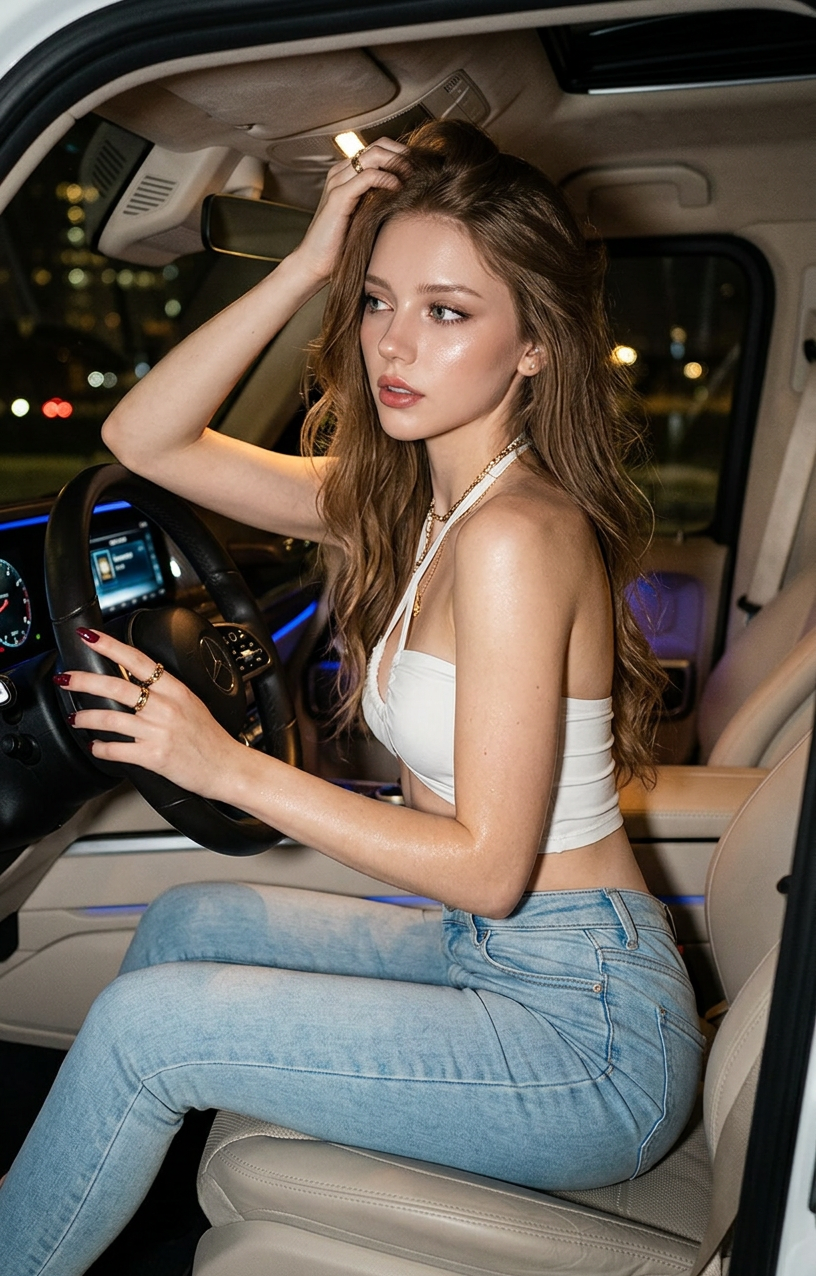
A photorealistic subject (100% face match) with long wavy milk-brown hair, dewy skin, and wine-red nails, wearing a white crisscross tube top and fitted light blue jeans with gold accessories. Sitting sideways in a luxury SUV at night, right hand on the wheel, left hand lifting hair, looking back with a confident, seductive gaze. Shot low-angle from behind (3/4 view). Lighting mixes direct flash, warm interior tones, cool blue dashboard light, and city bokeh outside. Y2K digital camera aesthetic, high contrast, cinematic, slight grain, 8K detail.

Tags

popular

AI Image Editing Template – Remixable Workflow in Magic Hour

This template is built with the AI Image Editor and is designed as a reusable workflow you can quickly remix for your own projects. It’s ideal for creators, marketers, and product teams who need fast, consistent, on‑brand visuals without manually editing every asset.


What this template does

This template gives you a repeatable pipeline for:

  • Transforming existing photos into new styles or formats
  • Cleaning up images (removing objects, distractions, and backgrounds)
  • Reframing assets for social, ads, pitch decks, or product pages
  • Generating variants from a single base image for A/B tests or personalization

It’s especially useful for:

  • Marketing & growth teams – ad creatives, social content, landing page hero shots
  • Product & startup teams – product mockups, UI shots, investor decks
  • Creators & agencies – client deliverables, content packs, brand refreshes
  • Developers – programmatic asset generation for apps, tools, and campaigns

All steps in this template can be remixed, swapped, or combined with other Magic Hour tools to create your own “house workflow.”


How to remix this template in Magic Hour

You can recreate a version of this template in a few minutes:

  1. Start from this template

    • Open the template in Magic Hour and duplicate it into your workspace.
    • Replace the sample images with your own brand, product, or client images.
  2. Edit images with AI Image Editor

    • Use AI Image Editor as the core step.
    • Apply edits such as:
      • Object removal and cleanup
      • Background replacement or simplification
      • Style shifts (e.g., “studio lighting”, “flat lay”, “3D render style”)
      • Composition tweaks (more whitespace for text, tighter focus on product, etc.)
  3. Extend or chain steps with related tools
    For more advanced workflows, connect AI Image Editor with:

  4. Standardize for reuse

    • Decide on naming patterns for prompts (e.g., “Hero – Product + Gradient Background”, “UGC-style Ad Variant”).
    • Save a few “house prompts” and flows that your team can reuse across campaigns and clients.

Once set up, this becomes a reusable system: drop in a new image, run the flow, export consistent assets.


Example workflows you can build from this template

Use the AI Image Editor template as a base and combine it with other tools to build domain‑specific workflows:

1. Product shot to multi‑channel campaign kit

Use cases: ecommerce product pages, marketplace listings, DTC landers.


2. Founder / team headshots for decks and websites

Use cases: investor decks, “Our Team” sections, press kits.


3. UGC‑style creatives for performance marketing

Use cases: meta ads, TikTok creatives, landing page social proof.


4. Visual branding concepts for new products or startups

Use cases: branding sprints, pitch visuals, pre‑launch campaigns.


Going beyond static images: connect to video and animation

Once you have strong, edited images from this template, you can extend them into motion and interactive assets:

For character or persona-based content, pair this template with:

You can then use Video to Video to stylize live-action footage with your edited visual language.


Specialized templates and generators to combine with AI Image Editor

If you’re building niche or campaign‑specific flows, consider integrating:

All of these can feed assets into AI Image Editor or receive edited outputs downstream.


Best practices for high‑quality AI image editing

To get consistent, production‑ready results from this template:

  • Use clear, specific prompts

    • Describe subject, style, lighting, composition, and mood.
    • Example: “Minimalist ecommerce product photo, soft daylight, white seamless background, centered composition, room for text on top.”
  • Keep brand consistency in mind

    • Reuse phrasing that describes your brand’s colors, tone, and style across prompts.
    • Save a small library of “brand descriptors” inside your workspace.
  • Work non‑destructively

    • Duplicate key steps before major changes.
    • Keep both “source” and “final” versions for each asset so you can iterate quickly.
  • Optimize for target channels

    • Design with final use in mind: hero image, feed post, story, thumbnail, or ad creative.
    • Pair with Thumbnail Maker for YouTube or content-platform specific designs.
  • Preserve quality

For a deeper background on AI image editing workflows and diffusion-based image generation, you can consult resources like the “High-Resolution Image Synthesis with Latent Diffusion Models” paper from Rombach et al. (CVPR 2022) and the Stable Diffusion documentation, which broadly describe the underlying methods many modern tools build on.


Where this template fits in a broader AI content stack

This AI Image Editor template is one building block in a full-stack content pipeline on Magic Hour:

You can use this template as the default “image editing layer” inside any of these broader flows.


How to adapt this template to your team

For busy teams, the most valuable approach is to turn this into a standard operating workflow:

  • Create role-specific variants

    • A version for designers (fine control, visual polish)
    • A version for marketers (fast campaign variants)
    • A version for founders / PMs (pitch decks, quick visuals)
  • Document naming and steps

    • Add short notes to each step so teammates know what it’s for.
    • Maintain a shortlist of “approved flows” so new team members can start immediately.
  • Connect to your content calendar

    • Use this template whenever you need new visuals for launches, experiments, and updates.
    • Combine with avatar and persona tools like Avatar Generator or AI Selfie Generator for campaigns involving faces or influencers.

By starting with this AI Image Editor template and remixing it for your own workflows, you get a reusable, team‑friendly system for high‑quality visual production that scales with your roadmap and campaign schedule.

More Like This

Insufficient credits