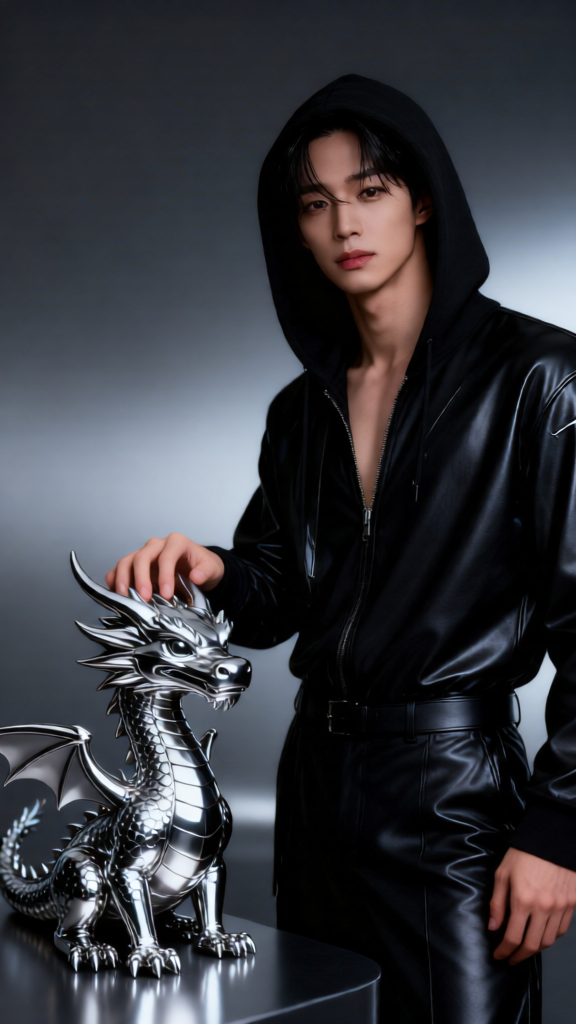
Chrome Dragon Fashion Editorial
Any aspect ratio
A stylish subject with the exact same face as the reference photo (100% face match), standing beside and lightly touching a sleek 3D chrome mini dragon character. The subject wears an edgy, high-fashion outfit in black or metallic tones, with a strong, confident gaze. The background is a seamless dark gray or metallic gradient studio. Lighting is dramatic yet controlled, with reflective highlights emphasizing both the subject and the chrome dragon. Style is cinematic, futuristic, and editorial, with ultra-detailed textures and premium fashion photography aesthetics.
Overview
The Chrome Dragon Fashion Editorial template transforms ordinary images into strikingly stylish, editorial-grade visuals. Leveraging the AI Image Editor and powered by the qwen-edit model, this template is perfect for creators looking to add a futuristic and cinematic touch to their projects.
What It Does
This template allows you to generate high-fashion visuals by integrating the latest in AI technology. It produces an image of your selected subject in an edgy, metallic-themed outfit alongside a sleek 3D chrome mini dragon. The composition features dramatic and polished lighting, enhancing the subject's features while creating reflective highlights that emphasize both the fashion and the chrome dragon.
Who It's For
The Chrome Dragon Fashion Editorial is ideal for fashion designers, magazine editors, and marketing professionals who aim to establish a futuristic and bold visual narrative. It's also perfect for social media influencers and product launch videos seeking eye-catching content that stands out.
Summary
With this template, you can easily achieve a high-fashion publication aesthetic. By merging your subject's likeness into a cinematic and editorial setting, the template enhances your content's allure and sophistication. Embed a layer of futuristic intrigue in your projects with Image to Video transformations to further diversify your content output.
How-To
Choose Your Template

Customize the Inputs

Generate Your Image

Use Cases
Fashion Magazine Covers
- Edgy, metallic designs
- Seamless face integration
Social Media Campaigns
- Instant eye-catcher
- Boosts engagement metrics
Brand Launch Campaigns
- Memorable brand storytelling
- Dynamic fashion photography
Best Practices
Select High-Quality Reference Images
Ensure your reference image is clear and has good resolution to optimize the facial match and overall output quality.Experiment with Lighting Conditions
Adjust lighting to complement the reflective surfaces of both the subject and the chrome dragon, maximizing the dramatic effect.Focus on Texture Details
Use high-resolution textures for both the outfit and the dragon to ensure a premium look to the final image.