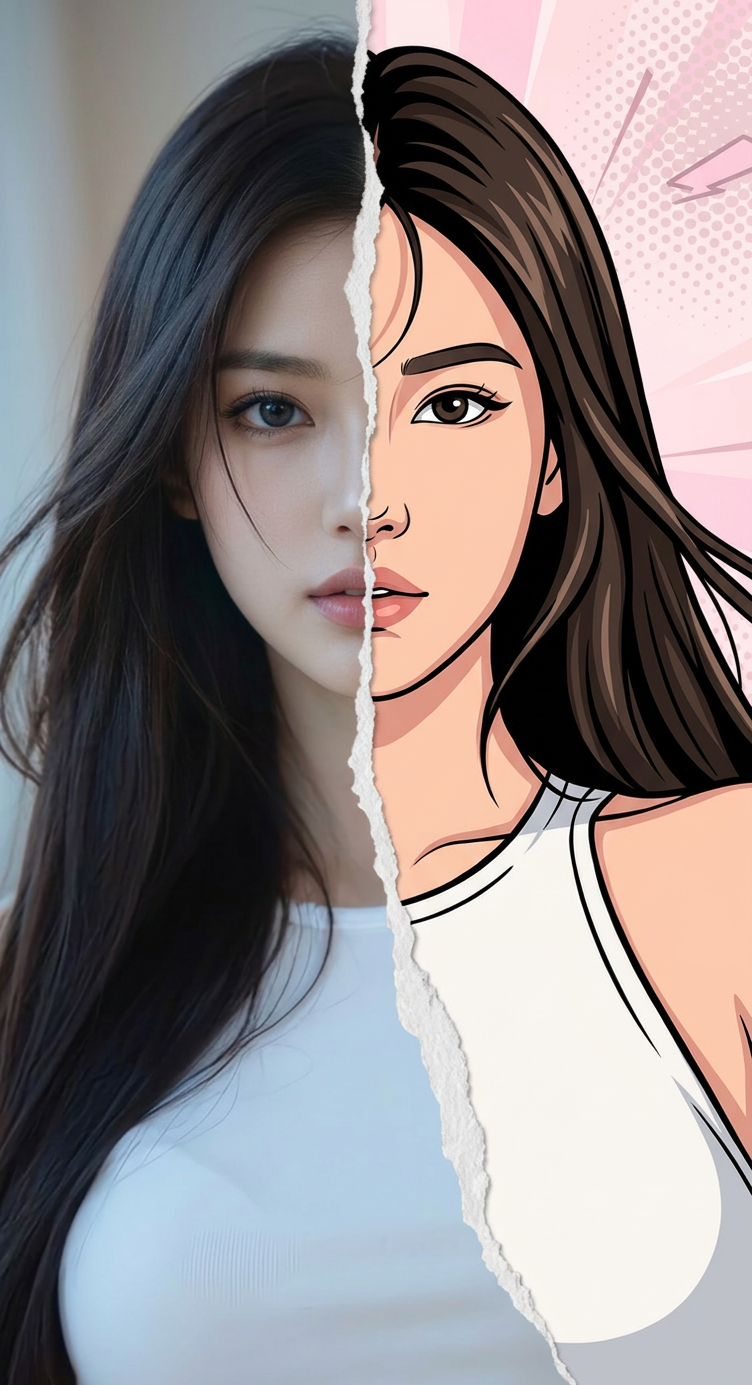
Split Reality – Soft Pop Portrait
ai-image-editor
Any aspect ratio
Chest-up portrait of a subject, facing forward with a slight tilt to the right (from the viewer’s perspective), matching the reference exactly in face, hairstyle, and identity. The subject has a neutral, slightly thoughtful expression. The image features a split composition, appearing torn down the middle, blending hyper-realistic detail on one side with a bold cartoon digital illustration on the other, with a smooth, natural transition between styles. Soft, diffused indoor lighting from the front and slightly left creates gentle shadows on the face and neck. Background is soft, neutral with a slight bluish tint, combined with subtle vibrant light pink pop-art tones, creating a dreamy, lightly vintage atmosphere.
Tags
stylesAI Image Editor Template: Turn Any Image Into High-Impact Creative in Minutes
Use this template to quickly transform, clean up, and enhance your images with the AI Image Editor. It’s built for creators, marketers, designers, and builders who need production-ready visuals fast—without opening Photoshop or writing code.
What This Template Is For
This template is ideal when you need to:
- Remove or replace unwanted objects, people, or backgrounds
- Clean up product shots, social media visuals, ads, and thumbnails
- Add or modify details (logos, UI screens, clothing, props, text elements)
- Refine AI-generated art or stock photos so they fit your brand
- Prep assets for video tools like Image to Video or Text to Video
It’s powered by the same kinds of diffusion and inpainting models described in recent image-editing research (for example, “Editing Implicit Neural Representations” and diffusion inpainting methods from OpenAI and Stability AI), but packaged into a simple, browser-based workflow.
How to Remix This Template in Magic Hour
You can either use this template directly or create your own version by remixing it in the AI Image Editor:
Open AI Image Editor
Go to the AI Image Editor.Import a base image
- Upload a photo (product, portrait, logo, screenshot, illustration).
- Or generate one first using the AI Image Generator or AI Photo Generator, then bring it into the editor.
Define your edit regions
- Mark the area you want to change (for example, remove a person, swap clothing, add a laptop screen, clean up the background).
- Keep the region focused—smaller, well-defined edits usually look more realistic.
Describe the change you want
- Use clear, outcome-focused prompts such as:
- “Remove the person on the left and fill with a neutral studio backdrop.”
- “Replace the t-shirt with a black hoodie, minimal streetwear style.”
- “Turn this plain wall into a cozy bookshelf background.”
- Treat this like a spec: mention subject, style, lighting, and mood when relevant.
- Use clear, outcome-focused prompts such as:
Iterate and version
- Save multiple variations and compare.
- Create on-brand, platform-specific versions (for example, website hero vs. social ad vs. pitch deck slide) from the same base image.
Export and reuse across Magic Hour
- Use edited images as inputs for:
- Image to Video for cinematic motion
- AI Talking Photo for talking-head explainers
- Face Swap or AI Face Editor to generate additional variants
- AI Meme Generator or Thumbnail Maker for content amplification
- Use edited images as inputs for:
High-Value Use Cases (With Practical Patterns)
1. Product & e‑commerce images
Improve or localize product visuals without a photo reshoot:
- Start with a product shot, then use the AI Image Editor to:
- Remove distracting objects and reflections
- Swap or clean backgrounds, or generate multiple themed scenes
- Add or revise packaging details, accessories, or props
Pair with:
- AI Image Upscaler for higher resolution
- Image Background Remover or Remove Object from Photo for precise cut-outs
- AI QR Code Generator to embed scannable codes into your packaging concepts
2. Founder, team, and profile visuals
Create consistent, professional visuals without a full studio shoot:
- Clean up headshots (background, blemishes, distractions)
- Align style across your team with the AI Headshot Generator, then refine details in the AI Image Editor
- Generate social avatars using the Avatar Generator or AI Face Generator, then tweak clothing, lighting, or backgrounds
Also useful with:
- Gender Swap for exploration or creative campaigns
- AI Selfie Generator for casual but on-brand founder content
3. Marketing creatives and social assets
Ship polished, on-message visuals quickly:
- Use AI Art Generator or AI Illustration Generator to generate a base concept
- Refine details, remove artifacts, or integrate your brand elements in AI Image Editor
- Adapt a single concept into multiple channels:
- Ad creative (product in context)
- Social carousel covers
- Blog hero images
- Deck and one-pager visuals
Pair with:
- Thumbnail Maker for YouTube and course thumbnails
- Album Cover Generator or Book Cover Generator for content packaging
- AI Meme Generator for fast, contextual distribution
4. UGC, explainers, and talking visuals
Turn static images into talking or animated content:
- Use AI Image Editor to clean and stylize a portrait or character
- Bring it into:
- AI Talking Photo for commentary, intros, or FAQs
- Image to Video to add motion and camera moves
- Animation Templates for character animation
- Optional: clone your voice with AI Voice Cloner or generate a new one with AI Voice Generator, then sync with Lip Sync
This stack is particularly useful for: product walkthroughs, landing page explainers, and low-lift social video.
5. Concept art, IP, and world-building
For game designers, authors, and transmedia teams:
- Generate environments and characters with:
- Use AI Image Editor to enforce continuity: outfits, colors, symbols, props, UI elements
- Prepare keyframes for Video to Video or Text to Video for teasers, trailers, or pitch materials
Tips for Better Results (Based on Common Production Workflows)
- Start with the highest-quality base you have. If your image is low-res, run it through the AI Image Upscaler or Unblur Image first.
- Be specific in your prompts. Mention object, style, color, lighting, and context (“studio lighting”, “soft daylight”, “minimalist background”, “streetwear style”, “flat illustration”).
- Work in passes. For complex changes (for example, outfit + background + props), edit one aspect at a time and save intermediate versions.
- Respect faces and hands. If realism matters, consider combining AI Image Editor with AI Face Editor and AI Face Generator for more control over facial details.
- Align brand style. Use AI Image Editor to standardize backgrounds, colors, and composition across your asset library, so ads, site, and product UI feel cohesive.
For additional context on best practices, you can look at public documentation and research around diffusion-based inpainting (for example, work by Stability AI, OpenAI, and academic surveys on image editing with generative models), which is conceptually similar to how many modern AI editors—including this one—operate.
Connect This Template With Other Magic Hour Workflows
This AI Image Editor template is often the first or middle step in a bigger workflow. Common chains include:
Idea → Image → Video
- Draft with AI Art Generator
- Refine with AI Image Editor
- Animate via Image to Video or Text to Video
Raw Photo → Brand Asset
- Clean/remove objects with AI Remover or Remove Object from Photo
- Edit style and details in AI Image Editor
- Scale and optimize with AI Image Upscaler and Image Background Remover
Static Image → Speaking Character
- Prepare portrait in AI Image Editor
- Turn into a talking asset with AI Talking Photo
- Add voice via AI Voice Generator and sync with Lip Sync
Who This Template Is Designed For
- Founders and marketers who need on-brand visuals for experiments, ads, landing pages, and pitch decks without blocking on design teams.
- Designers and content teams who want to prototype faster, iterate on concepts, and keep manual tools for final polish.
- Developers and product teams who need quick visuals for demos, documentation, or in-product education.
- Indie creators and studios building IP, characters, and visual worlds that must stay consistent across formats (comics, animation, games, social).
Use this template as a starting point, then remix it in the AI Image Editor to fit your own workflow—whether you’re cleaning one image for a landing page or building a full content system that connects image editing, generation, and video across Magic Hour.