Frozen Watchpoint
Any aspect ratio
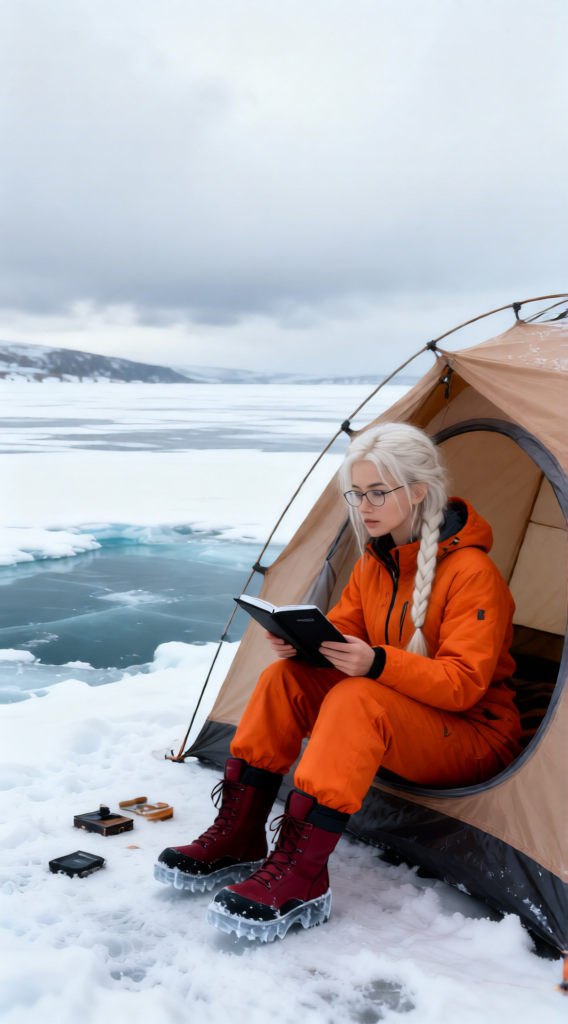
Subject: Positioned slightly right of center, wearing orange winter clothing, dark red and black ice boots, and glasses, seated outside a light brown tent that opens toward a frozen ice pond. The subject is checking a black front cover, occasionally surveying the ice pond and observing small items nearby. The environment emphasizes a vast icy landscape—frozen pond, pale white sky, and cloudy, heavy atmosphere with extreme cold. Composition highlights ice and white tones enclosing the scene, muting blue hues. Style: high-resolution realism, natural diffused lighting due to cloud cover, clean structured composition, cinematic yet grounded, sharp details with a cold, minimal aesthetic.
Overview
The Frozen Watchpoint template in our AI Image Editor collection is perfect for creators looking to depict icy, wintry landscapes with cinematic realism. Using the Qwen Edit model, this template allows you to create high-quality images that emphasize a cold, minimal aesthetic. Ideal for projects that require a detailed and realistic winter setting.
What It Does
This template lets you craft realistic high-resolution scenes set in extreme cold environments. It positions your chosen subject in winter clothing, featuring elements like a light brown tent and frozen ice pond, all within a heavy, cloudy atmosphere. The composition sharpens details while maintaining a natural and diffused lighting effect from cloud cover.
Who It's For
Designed for filmmakers, game developers, and graphic designers, the Frozen Watchpoint template is ideal for those focusing on adventure or gaming themes. It's also useful for marketers creating ads that emphasize winter sports or chilly outdoor experiences. Discover how it fits into your broader strategy with our AI Multi-Angle Generator.
Summary
The Frozen Watchpoint offers a structured composition that highlights the stark beauty of ice and white tones. It's engineered to remove the complexities of manually editing such environments by providing a concise prompt that covers every detail, from subject attire to environmental setting. Streamline your project workflow with the Storyboarding and Text-to-Video tools we offer.
How To

Customize

Generate

Use Cases
Gaming and Adventure Projects
- Create realistic snowy landscapes for video games.
- Develop cinematic scenes in ice-based environments.
Marketing Campaigns
- Enhance promotional material for winter gear.
- Capture attention with unique, icy compositions.
Best Practices
Leverage Contrast
Use contrasting colors in clothing or props to make them stand out against the white icy background.Highlight Details
Focus on details by ensuring that minor elements, like the ice boots or tent texture, are visible and proportional to your subject.Consistency in Environment
Ensure all visual elements match in style and lighting to maintain the realism in your scene.