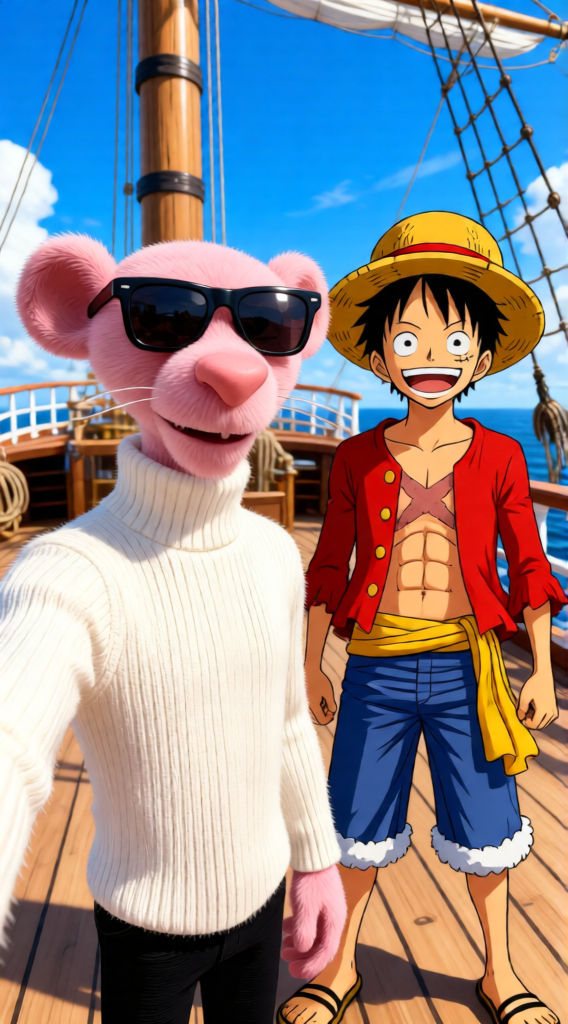
Sunny Deck Selfie
Any aspect ratio
Subject in a selfie composition, joined by Monkey D. Luffy standing beside him, smiling widely with his straw hat tilted. Keep the original selfie framing and perspective intact, integrating both naturally. Background set on the Thousand Sunny deck under a bright blue sky. Vibrant anime–realistic blend, cheerful mood, clean lighting, seamless character interaction.
Overview
The Sunny Deck Selfie is an AI Image Editor template designed to create vibrant and memorable selfies. Set against the backdrop of the Thousand Sunny deck, your selfie will gain a fun twist with the introduction of Monkey D. Luffy into the scene. The template ensures an anime–realistic fusion, perfect for a cheerful mood and vibrant compositions.
What It Does
This template takes your original selfie and expertly integrates it with an anime character, adding Monkey D. Luffy to your photo. It maintains the selfie’s framing while transforming the background to the iconic Thousand Sunny deck. The blend of anime realism creates an engaging and lively image.
For those interested in tweaking images further, explore the AI Image Editor or even the AI Image Generator for more creative possibilities.
Who It's For
This template is ideal for One Piece fans, social media influencers, and anyone looking to inject some creativity into their vacation photos. It's also suited for those who enjoy experimenting with anime-style edits in their personal projects. Enhance your content with tools like the AI GIF Generator for animated storytelling.
Summary
Capture the essence of adventure and fun with the Sunny Deck Selfie template. Combining realistic selfie techniques with an anime touch makes this an exciting addition to any photo collection. This template is powered by the Qwen Edit model, ensuring precise integration and high-quality results.
How to Use
Choose Your Template

Customize Your Selfie

Generate Your Image

Use Cases
Social Media Content
- Instagram stories
- Facebook posts
- Profile pictures
Event Invitations
- Digital invites
- Printed invitations
Personalized Gifts
- Custom posters
- Merchandising
Best Practices
Maintain High-Resolution Images
Start with a clear, high-quality selfie to ensure the best results upon processing.Experiment with Lighting
Adjust the lighting in your selfie to harmonize with the template's bright setting.Play with Angles
Ensure your input photo has a compatible angle to enhance the integration with Luffy.