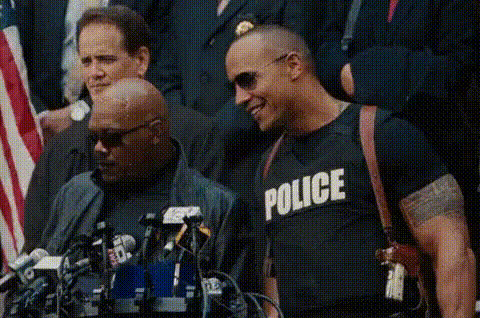
Sexy cop

image-to-video

1 clip
6 uses

Any aspect ratio

Prompt

A police walking and transforming to

Tags

transformationspopular

Bring Still Images to Life with Image-to-Video Animation

Transform any static image into a dynamic, cinematic clip with this Image-to-Video Magic Hour template. Whether you’re a creator, marketer, or founder, this template gives you a fast, repeatable way to prototype motion, test concepts, and ship polished visuals without a production team.


What This Template Does

This template uses Magic Hour’s Image-to-Video engine to:

  • Take a single image (photo, illustration, mockup, concept art, product shot, etc.)
  • Generate a short video that adds natural motion, camera movement, and depth
  • Preserve the core look and style of your original image

It’s ideal for:

  • Product motion previews and promo clips
  • Storyboards and concept tests for campaigns
  • Animated hero images and landing-page visuals
  • Social content, reels, and ad creatives
  • Stylized character and environment animations

You can remix this template instead of starting from scratch, then swap in your own images, styles, and use case.


How to Remix This Template in Magic Hour

You can build your own version of this template directly in Magic Hour by:

  1. Starting from the template

    • Click “Remix” on the template page in Magic Hour.
    • This loads the full Image-to-Video flow with the same structure used for the sample.
  2. Uploading or generating your image

  3. Describing the motion and style you want

    • Use a clear, declarative prompt: what should move, how, and in what visual style.
    • Example directions: “subtle parallax camera push,” “smooth cinematic pan,” “loopable motion for social,” “dynamic product spin.”
  4. Generating and iterating quickly

    • Run multiple versions to explore different motions or creative directions.
    • Keep the versions you like, and remix them again for variations (e.g., alternate angles, pacing, or mood).
  5. Exporting for your channel

    • Once you’re happy with the result, export for use in landing pages, ads, decks, or social.

You never need to manage technical video settings; focus on the creative direction and the story you’re telling.


Practical Use Cases for Creators & Teams

1. Product & Startup Marketing

  • Turn static product screenshots into dynamic UI walkthroughs
  • Animate hardware or physical products from a single hero shot
  • Build quick motion tests for landing pages and paywall experiences
  • Combine with AI GIF Generator to create lightweight, loopable assets for email and social

Consider pairing Image-to-Video with:


2. Character, Avatar, and Face-Based Content

You can turn character art or portraits into subtle, high-impact motion:

  • Animate avatars for profile videos and team pages
  • Turn portraits into expressive motion clips
  • Build short sequences for intros, outros, or explainer videos

For more advanced character workflows, combine Image-to-Video with:


3. Concept Art, Storyboards, and Design Exploration

Developers, designers, and storytellers can use this template to:

  • Prototype motion for game environments, UX flows, and product concepts
  • Add subtle camera movement to UI mockups and dashboard screens
  • Turn static concept art into animated mood pieces

Useful supporting tools:


4. Social Media & Content Creators

If you publish short-form content, this template helps you:

  • Turn a single thumbnail, meme, or cover image into animated posts
  • Quickly prototype motion-based hooks for TikTok, Instagram, YouTube Shorts, or LinkedIn
  • Animate cover art for podcasts, playlists, or series intros

You can chain this with:


How to Design Strong Input Images for Image-to-Video

Your base image heavily influences output quality. For best results:

  • Use clean, high-resolution images

  • Emphasize a clear subject

    • Center or clearly frame the subject you want to animate (product, character, UI, etc.).
    • Avoid clutter; strong focal points lead to more coherent motion.
  • Think in layers and depth

    • Choose images where there is an obvious foreground, mid-ground, and background.
    • This makes parallax and camera movement feel more realistic.
  • Clean up distractions before animation


Advanced Workflows and Combinations

For more sophisticated pipelines, you can chain this template with other Magic Hour capabilities:


Best Practices for Teams, Marketers, and Builders

To get reliable, repeatable output:

  • Standardize your base-image pipeline

  • Document prompt patterns that work

    • Keep a short internal library of effective motion prompts for your use cases (e.g., “product detail zoom,” “UI scroll-through,” “hero shot slow pan”).
    • When you find prompts that consistently work, save them as variants of this template in Magic Hour.
  • Prototype fast, then refine

    • Use fast exploratory runs to align on direction with stakeholders.
    • Once a direction is approved, duplicate/remix this template to generate final versions for different channels or languages.
  • Combine with brand and performance testing

    • Test versions of the same visual with different motion patterns or framing.
    • Pair with A/B testing on your landing pages or ad platforms to see which motion variant performs best.

Related Magic Hour Tools Worth Exploring

Depending on your project, these tools pair well with Image-to-Video:

By remixing this Image-to-Video template and combining it with adjacent Magic Hour tools, you can build a complete, fast, and flexible motion-asset pipeline—from raw idea to finished, on-brand video—without leaving your browser.

More Like This

Insufficient credits