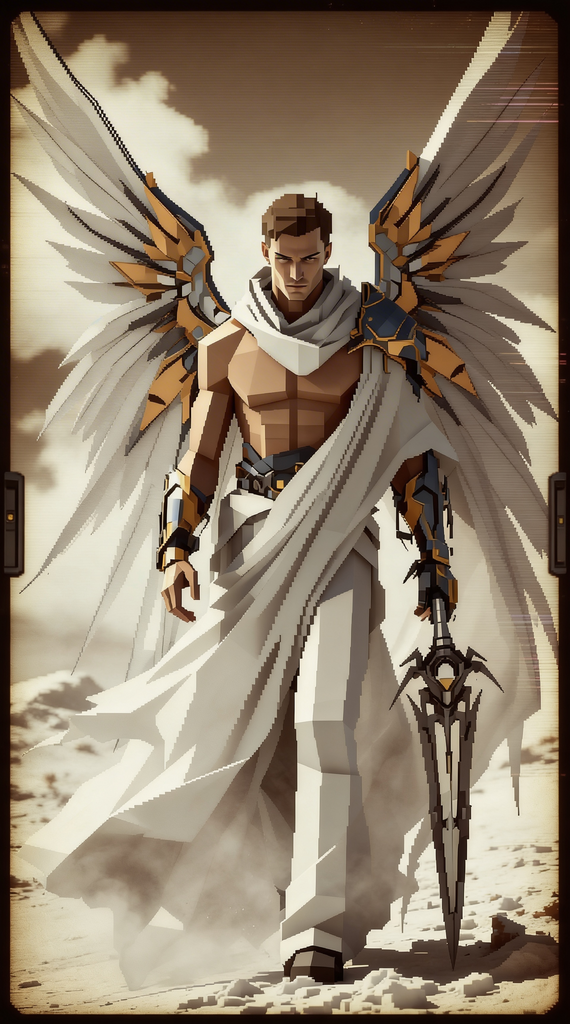
PS2 game styles
Any aspect ratio
"""{ """"title"""": """"PS2-Era Game Scene Transformation (Sony Style)"""", """"core philosophy"""": { """"goal"""": """"Re-render the input image as if it were a cinematic in-game screenshot from a flagship PlayStation 2 title (circa 1999-2006)."""", """"aesthetic"""": """"A distinct blend of gritty realism, moody atmosphere, and visible technological constraints. The final image should feel cinematic, slightly uncanny, and authentically retro."""", """"era emulation"""": """"The prompt must simulate the entire graphics pipeline of the era: low-poly modeling, compressed textures, primitive lighting, and CRT display output."""" }, """"input analysis"""": { """"instruction"""": """"Transpose the composition and core subjects of the input image into the target hardware and artistic style. Simplify all forms and textures accordingly."""" }, """"level 1 directives - geometry and structure"""": { """"comment"""": """"The foundational 'bones' of the scene. This simulates the PS2's 'Emotion Engine' processor limitations."""", """"polygon budget"""": """"Strictly low-polygon. All models must be visibly faceted, with hard edges and angular silhouettes. Avoid smooth curves; they should be approximated by a series of flat planes."""", """"level of detail (LOD)"""": """"Simulate aggressive LOD scaling. Objects in the mid-ground and background should be radically simplified into near-prismatic shapes."""", """"character models"""": """"Humanoid forms should have a slightly stiff, 'doll-like' quality. Facial features are simple, often textured on rather than fully sculpted."""" }, """"level 2 directives - texturing and surface detail"""": { """"comment"""": """"This simulates the limited video RAM (4MB VRAM) and texture compression of the era."""", """"texture resolution"""": """"Aggressively low-resolution and compressed. Textures must look blurry, slightly pixelated, and smeared when viewed up close."""", """"uv mapping artifacts"""": """"Introduce subtle but visible texture warping and seams on curved surfaces. The mapping of textures onto models should not be perfect."""", """"surface properties"""": """"No complex shaders. Surfaces are defined by a simple diffuse texture map and a basic specular highlight map. No normal maps, roughness maps, or PBR materials."""" }, """"level 3 directives - lighting and atmosphere"""": { """"comment"""": """"This defines the moody, cinematic look of iconic PS2 titles."""", """"lighting engine"""": """"Emulate a primitive, per-vertex lighting model. Lighting should feel harsh and direct, with sharp-edged specular highlights on wet or metallic surfaces."""", """"shadows"""": """"Deep, dark, and simple. Render shadows as low-resolution, hard-edged projections or even just as dark, transparent blobs beneath characters. No soft, diffused shadows."""", """"volumetric fog"""": """"CRITICAL: Introduce a thick, distance-based volumetric fog. This was a signature technique used to limit draw distance and create atmosphere (e.g., Silent Hill, Ico). The fog should have a distinct color (grey, brown, blue)."""", """"effects"""": """"Incorporate period-appropriate lens flare (anamorphic, circular) from bright light sources."""" }, """"level 4 directives - post-processing and display emulation"""": { """"comment"""": """"The final filter that simulates outputting to a 2000s-era CRT television."""", """"color grading"""": """"Desaturate the overall color palette. Crush the blacks and lean into a moody palette of browns, greys, dark greens, and muted blues. Introduce slight color banding in gradients."""", """"display artifacts"""": """"Overlay subtle but distinct CRT scanlines and a slight screen-door effect (visible pixel grid)."""", """"analog imperfection"""": """"Introduce very slight chromatic aberration (color fringing) at the edges of the frame and a faint dithering pattern in the shadows."""", """"aspect ratio"""": """"Render the final image in a 4:3 aspect ratio."""" }, """"negative constraints"""": [ """"High-polygon models"""", """"High-resolution textures"""", """"Physically Based Rendering (PBR)"""", """"Ray tracing or global illumination"""", """"Soft, realistic shadows"""", """"Perfect texture mapping"""", """"Wide color gamut"""" ] }"""
Tags
stylesOverview
The "PS2 Game Styles" template in AI Image Editor offers a unique transformation, converting modern images into scenes reminiscent of iconic PlayStation 2 titles. Whether you're crafting content for nostalgic audiences or enhancing visuals for retro-themed projects, this template provides a distinct look emblematic of early 2000s gaming aesthetics.
What It Does
This template leverages the seedream-v4.5 model to reinterpret your images with the classic traits of PS2-era graphics. It applies era-specific stylistic elements like low-poly modeling, compressed textures, and the unmistakable fog of the era to create retro game visuals that capture the essence of those vintage games.
Who It's For
This tool is perfect for game developers, digital artists, and content creators who desire to invoke a retro gaming vibe. It's particularly beneficial for those working on projects that require a nostalgic or cinematic game scene, such as gaming cinematics or themed social media promotions.
Summary
By using this template, you can transform any image into a scene reminiscent of PS2 games. With a focus on aesthetic accuracy, including low-polygon models and retro lighting techniques, this tool offers a broad array of applications for creating captivating visuals reminiscent of the early 2000s. Explore the possibilities with this and other AI Image Generator tools.
How To
Choose Your Template

Customize Your Inputs

Generate Your Image

Use Cases
Gaming Cinematics
- Create promotional material
- Develop early 2000s style intros
Social Media Content
- Transform influencer photos
- Update social media campaigns with vintage flair
Digital Art Projects
- Retro-themed art exhibitions
- Online art community postings
Best Practices
Consider the Lighting
Use lighting settings that emphasize the moody and dramatic tone characteristic of PS2 era games. Harsh lighting effects with defined shadows are recommended.Texturing Details
Stick with low-resolution, compressed textures for a genuine retro look. This will enhance the appearance of gritty realism.Polygons and Geometry
Make sure your models are simplified with visible polygons. This aligns with the processing limitations of the PS2 and ensures authenticity.