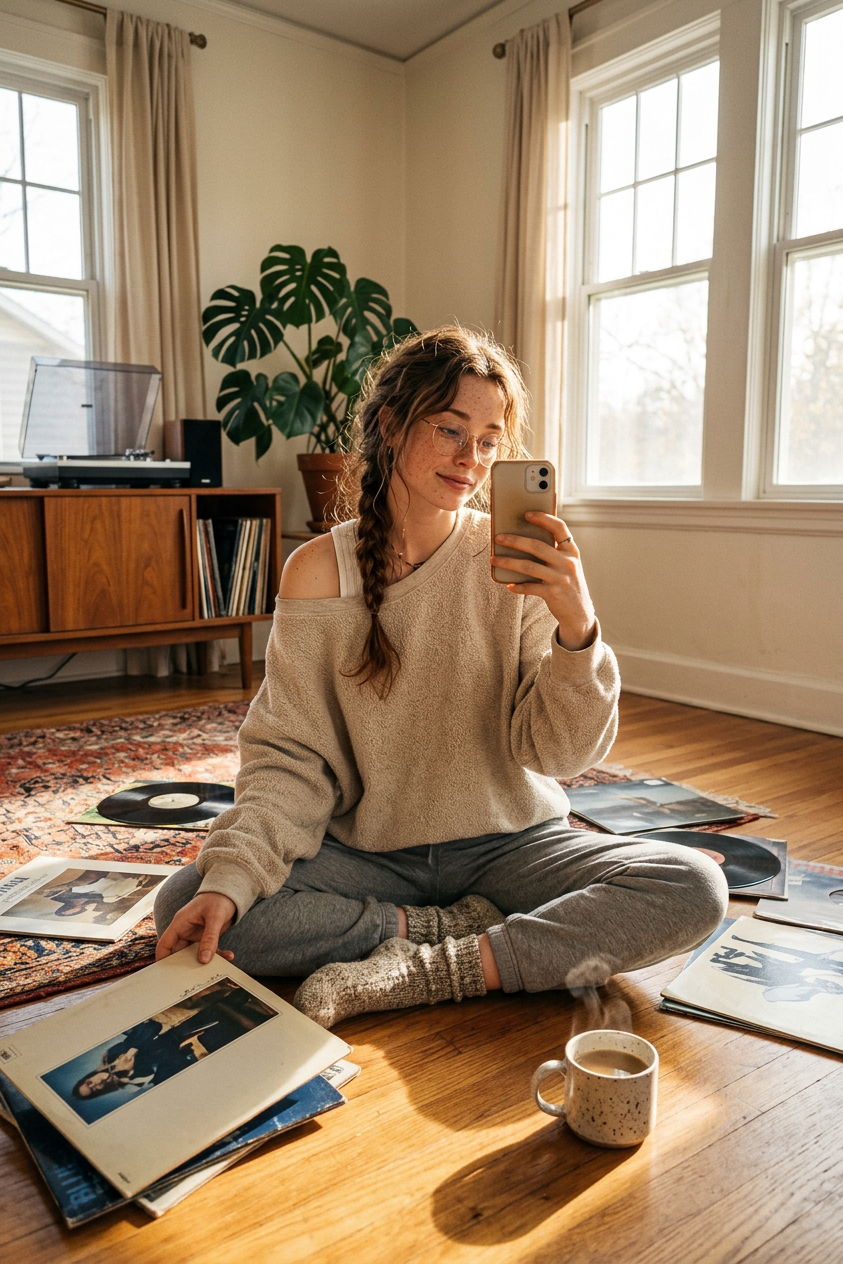
Sunday morning vinyl
ai-image-editor
Any aspect ratio
Subject taking a candid selfie while sitting on the floor of a sunlit living room, surrounded by scattered vinyl records. Wearing an oversized oatmeal sweatshirt slipping off one shoulder over a white ribbed tank, grey joggers, and thick wool socks. Holding a record sleeve in one hand, phone in the other at arm’s length. Nearby sits a ceramic mug of coffee on the hardwood floor. Background includes a mid-century credenza with a turntable, a monstera plant, and a worn Persian rug. Warm morning light streams through tall curtained windows, casting long shadows. Wide-angle feel, cozy relaxed lazy morning vibe.
AI Image Editor Template – Instantly Transform and Refine Any Image
Use this template to turn raw images into polished, on‑brand visuals in seconds with the AI Image Editor. Whether you’re a marketer cleaning up product shots, a founder iterating on a landing page hero, or a designer mocking up campaign concepts, this template gives you a fast, repeatable workflow you can remix for your own needs.
What You Can Do With This Template
This AI image editing template is optimized for:
Object removal & cleanup
Remove distractions, logos, watermarks, or entire objects while preserving realistic textures and lighting. For heavy‑duty cleanup, you can also try the dedicated AI remover and watermark remover.Background editing & replacements
Swap cluttered or off‑brand backgrounds for clean, studio‑style, lifestyle, or thematic scenes. For more complex background generation, pair this template with the AI background generator or image background remover.Branding & visual consistency
Quickly generate multiple variants of the same visual concept for A/B testing, social campaigns, or product pages. Use consistent prompts to keep colors, style, and composition aligned with your brand.Concept exploration & mockups
Turn sketches, rough photos, or placeholder images into more refined concept art. For character‑heavy work, consider combining this with tools like the AI character generator, full‑body generator, or AI art generator.Face & portrait refinement
Clean up headshots, improve lighting, or tweak facial details while staying photorealistic. If you’re focused specifically on portraits, see also the AI headshot generator, AI face editor, and AI selfie generator.Creative transformations
Turn a single image into manga, comic, or stylized art for campaigns, decks, or social content by pairing this template with tools like the AI manga generator, comic book generator, or AI illustration generator.
How to Remix This Template in Magic Hour
You can adapt this template to your own workflow in a few minutes:
Open AI Image Editor
Go to the AI Image Editor.Upload or select your base image
Use:- Product photos
- Team headshots
- UGC / social content
- Design mockups or sketches
- Stock photos you want to customize
Describe the transformation you want
Use concise, concrete language. Examples:- “Remove the background and replace it with a light grey studio backdrop.”
- “Remove the person in the background and fill in the wall realistically.”
- “Change the outfit to a dark blue business suit, keep lighting natural.”
- “Turn this photo into flat illustration style, suitable for a SaaS landing page hero.”
Guide style, brand, or usage context
Add where and how the image will be used:- “For a B2B SaaS homepage hero”
- “For a DTC Instagram ad in a minimal, premium style”
- “For an investor pitch deck cover”
This helps keep composition, contrast, and overall style aligned with your use case.
Iterate with small adjustments
Remix the template by:- Slightly adjusting your text instructions and re‑running edits
- Uploading a different base image but using the same prompt for consistency
- Creating multiple variants for testing (e.g., different backgrounds, crops, or styles)
Export for your channel
Once you’re satisfied:- Download for web, social, or print use
- Run the output through AI image upscaler or unblur image if you need higher resolution
- For video workflows, use the edited image as input to image‑to‑video, AI talking photo, or text‑to‑video
Practical Use Cases for Creators, Marketers, and Builders
Marketing & Growth
Ad creative variations
Start with one product photo, then use this template to:- Remove or simplify backgrounds for cleaner performance ads
- Create lifestyle variants tailored to different audiences
- Localize imagery for different markets
Combine with:
- AI GIF generator for short, looping ad creatives
- AI meme generator for social engagement
- Thumbnail maker for YouTube or course content
Landing pages & hero visuals
Use the AI Image Editor to:- Convert generic stock photos into more brand‑specific imagery
- Test multiple visual directions quickly before committing design time
- Align illustration and photography styles across sections
For covers and key visuals, see also the book cover generator and album cover generator.
Product, Content, and Brand
Product imagery & catalogs
- Clean up backgrounds, remove props, and standardize lighting across a catalog
- Generate platform‑specific versions (e.g., marketplace, Shopify, Amazon)
- Use the AI outfit generator or AI fashion generator for apparel visuals and lookbooks
Brand assets & iconography
- Derive icon styles or illustration motifs from your existing imagery
- Use the AI logo generator and AI icon generator alongside this template to keep everything visually coherent
Founders, Agencies, and Studios
Rapid client mockups
- Create multiple visual concepts per brief without heavy manual editing
- Show “before / after” transformations for pitch decks and proposals
- Use domain‑specific tools (e.g., AI interior design generator, architecture generator, or fantasy map generator) to complement your AI Image Editor flows.
Content IP and world‑building
- Establish a visual language for characters, locations, and artifacts
- Use with the AI anime generator, animated characters generator, or dark fantasy AI to explore different styles while keeping core compositions consistent.
Advanced Workflows: Connecting Image Editing to Video & Voice
This template is designed around the AI Image Editor, but it becomes much more powerful when you connect it with other Magic Hour tools:
1. From Edited Image to Video
Turn a final edited image into motion with:
- Image‑to‑video for cinematic camera moves or animated scenes
- Text‑to‑video if you want to generate footage that matches your edited image’s style
Remix with template‑based video tools:
- Face Swap Video – place a face from your edited portrait into existing footage for campaigns or UGC‑style ads
- Lip Sync – animate your edited headshot or character to speak any script
- Video to Video – restyle footage to match the look and feel of your edited images
- Animation – bring static characters or scenes created via the AI Image Editor into animated sequences
2. Add Voice and Narrative
Once you have visuals from this template:
- Use AI voice generator or AI voice cloner for narration, explainer videos, and character voices
- Combine with AI talking photo to create avatar‑style presenters or character‑driven content
- Use auto subtitle generator to make your final video assets accessible and social‑ready
How to Build Your Own Version of This Template
To create a custom, reusable editing “system” inside Magic Hour:
Pick a small set of input examples
- Choose 3–10 representative images (e.g., typical product photos, portraits, or scene shots).
- Run them all through the AI Image Editor with similar instructions.
Standardize your prompts
- Write a short, reusable text description that encodes your brand style, e.g.:
- “Minimal, high‑contrast B2B SaaS style, with clean backgrounds and subtle shadows.”
- “Bright, colorful DTC aesthetic, soft lighting, lifestyle backgrounds.”
- Reuse this description for future edits so outputs stay consistent.
- Write a short, reusable text description that encodes your brand style, e.g.:
Create a variation library
- Keep multiple stable “recipes”:
- Clean catalog edit
- Lifestyle / social edit
- Deck / presentation edit
- Experimental / stylized edit
- Store your favorite prompt patterns in a doc or internal wiki so your team can replicate results.
- Keep multiple stable “recipes”:
Document your workflow for your team
- Outline which base photos to start from (angles, lighting, framing)
- Note which tools you chain (e.g., AI Image Editor → AI image upscaler → image‑to‑video)
- Share example outputs side‑by‑side so others can match quality and style.
Related Magic Hour Tools Worth Exploring
If you find this template useful, you’ll likely want to connect it with:
- AI photo generator and AI image generator – create base images from text, then refine them with the AI Image Editor
- Photo to sketch – convert edited photos into sketch‑style assets for storyboards, pitch decks, or product concepts
- Old photo restoration and photo colorizer – restore archive imagery before or after editing
- Remove object from photo – complement the AI Image Editor when your main task is surgical object removal
- AI QR code generator – generate visually rich QR codes that match the style of your edited imagery
Use this template as a base, then keep iterating. The more you standardize your prompts and connect the AI Image Editor to adjacent tools in the Magic Hour ecosystem, the faster you can move from rough idea to production‑ready visuals.