Google Flow pricing (2026): plans, credits & video costs


Quick answer
Google’s credit guide lists 50 daily Flow credits; account eligibility and availability still matter. Paid plans add monthly allowances. Budget for generations, retries, editing and upscaling. Ultra has a zero-credit, lower-priority Veo Lite option for eligible accounts. Google’s getting-started page lists a subscription requirement, while its credit guide describes a non-subscriber trial. Check your intended account before buying.
Flow is Google's AI creative studio for images and video. It combines Veo 3.1, Nano Banana, Gemini Omni and project tools in one workspace. Prices, eligibility, taxes and model access vary by country and account, so confirm the live plan and credit estimate before generating.
Magic Hour publishes this guide and offers separate image and video generation tools. Flow product, model, plan, and credit claims are based on the linked official Google sources; this is a documentation review rather than a controlled comparison with Magic Hour.
What is Google Flow?
Flow is an application, not a single video model. Veo generates video; Nano Banana handles image generation and editing; Gemini Omni supports multimodal video creation and editing. Flow adds project assets, scene assembly and tools around those capabilities.
Google introduced Flow on May 20, 2025. Later updates expanded the creative studio. The original launch should not be confused with a 2026 feature release. Google’s May 2026 announcement also describes Flow Music, a related music creation tool.
Google Flow pricing at a glance
The table retains the US Flow plan display checked September 13, 2026. The credit guide was rechecked October 23, alongside the getting-started guide. Treat the older dollar amounts as a dated reference, not a current personalized quote; regional eligibility, promotions and taxes can differ. Google One’s plan page and the offer displayed in your intended account are the places to recheck the current price. The dated table is not a promise of today’s price or eligibility.
Plan shown | US price reference, Sep. 13 | Flow credits | Useful distinction |
|---|---|---|---|
Free | 50 daily | Video generation can be unavailable during peak hours | |
$4.99/month | 50 daily + 200 monthly | Adds Flow Tools creation, 1080p upscaling and higher access | |
$19.99/month | 50 daily + 1,000 monthly | More monthly generations and access to credit purchases in supported regions | |
About $100/month | 50 daily + 10,000 monthly | Lower Veo Lite and Fast credit charges plus Ultra features | |
About $200/month | 50 daily + 25,000 monthly | Largest listed monthly Flow allowance |

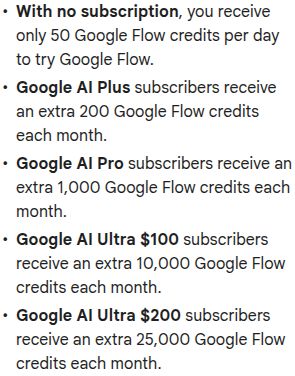
Source: Google Flow Help, captured October 19, 2026. This is Google’s published allowance list, not a checkout quote. Monthly subscription credits are additional to the daily allowance; consult Google’s live credit guide for changes.
How many Flow credits does one video cost?
Google charges per generation, not per request. One request can create more than one video, so inspect the generation count before approving it. The current credit guide lists:
- Veo 3.1 Lite: 10 credits per 4-, 6-, or 8-second generation for non-Ultra subscribers and 5 for Ultra subscribers.
- Veo 3.1 Fast: 20 credits per 4-, 6-, or 8-second generation for non-Ultra subscribers and 10 for Ultra subscribers.
- Veo 3.1 Quality: 100 credits per 8-second generation for every plan.
- Gemini Omni Flash at 720p: 7 credits for 4 seconds, 10 for 6, 12 for 8, and 15 for 10 seconds.
- Gemini Omni Flash video editing: 40 credits per generation; 1080p upscaling is included for subscribers, while 4K upscaling costs Ultra users 50 credits.
At the listed rates, a balance of only 50 daily credits covers at most five non-Ultra Veo 3.1 Lite generations or two Fast generations with 10 credits left. It cannot cover a 100-credit Quality generation. Unused daily credits cannot be banked for that later. These are allowance calculations, not promises of usable clips; retries, multiple outputs, edits and upscaling consume more credits.
Unused daily credits do not roll over. Monthly subscription credits refresh at the start of the billing cycle, and unused monthly credits do not roll over either. For example (illustrative), 200 unused Pro subscription credits do not become 1,200 subscription credits when the next 1,000-credit monthly allowance arrives; keep daily and purchased credits separate. Confirm the estimate shown before generating. Model, duration, resolution, output count, extensions, editing and upscaling all affect the real cost per usable video.
Does Ultra offer free Flow generations?
Google now lists lower-priority Veo 3.1 Lite at zero credits for Ultra subscribers and family plan managers; Ultra family members and non-Ultra accounts are excluded. This is a specific mode, not a promise that every Ultra generation is free. Google’s getting-started guide says zero-credit models can have rate limits. A deadline-sensitive job should include an alternative route if the mode is slow or unavailable.
Worked example: budget a four-shot video
This is a planning example, not a measured test or an expected acceptance rate. Suppose the edit needs four approved shots and you budget three candidates for each shot: 4 × 3 = 12 generations. Decide in advance what makes a shot acceptable—subject consistency, required action, usable framing and any text or audio—and count every candidate, not only the ones you keep.
Generation-only budget: at the rates above, 12 non-Ultra Fast generations use 240 credits; 12 Ultra Fast generations use 120; 12 Quality generations use 1,200. The creative acceptance assumption is identical in all three cases, so this arithmetic does not imply that one mode produces better results.
Now suppose two clips need Omni video edits: 2 × 40 = 80 additional credits. If an Ultra job also needs four 4K upscales, add 4 × 50 = 200. That produces a 400-credit Ultra Fast budget, or 1,480 credits using Quality, for the same hypothetical deliverable. A non-Ultra Fast version with the two edits uses 320 credits, without assuming access to 4K upscaling.
Use those totals to check available balance and required features, then replace the assumed three candidates with your own pilot results. A shorter or cleaner project can cost less; difficult shots can require more attempts. Keep contingency separate from your production estimate so a client revision does not unexpectedly consume the rest of the allowance.
When is the 360p draft option useful?
The Flow credit guide lists Gemini Omni Flash at 360p as 4, 5, 6 and 7 credits for 4-, 6-, 8- and 10-second generations. These are generation prices; the 40-credit video-editing operation is separate.
For the four-shot planning example, 12 eight-second 360p candidates use 72 credits; the same generation count at Omni 720p uses 144. This compares the displayed resolution charges, not visual quality or acceptance. A low-resolution draft can help review timing and framing before committing to the final version.
Google’s model guide says Pro and Ultra subscribers can upscale Omni 360p generations to 720p for zero credits. Check account eligibility and inspect the finished detail; an upscale is not a guarantee that a draft meets the final delivery requirements.
Daily credits are a schedule constraint, not a saved monthly bank
Do not add tomorrow’s allowance to today’s available balance. A multi-day draft schedule may use future refreshes, but a same-day delivery cannot spend credits that have not arrived. Write the generation date next to each shot and compare the planned burn with the balance shown in the account. Preserve enough capacity for final corrections before committing to the delivery date.
Can you buy extra Flow credits?
Google One’s purchase instructions explicitly allow Pro and Ultra purchases, exclude Plus and Japan, and restrict purchases to the family plan manager. The Flow credit guide uses broader wording that includes Plus. Do not rely on a Plus top-up until the account actually offers it. Purchased-credit expiry is set at purchase; auto-reload can create additional charges.
Before buying, compare three choices against the same project budget: spread drafts across available refreshes, upgrade for a required feature or allowance, or purchase an eligible top-up. A larger subscription is useful only if the extra access or usable capacity solves the job. Check both the checkout total and the expiry conditions, and distinguish a one-time purchase from automatic replenishment.
Record the cost of the accepted result
Keep a small production sheet with shot name, model and mode, duration, output count, charged credits, correction work and accepted status. If one request produces two candidates, enter two candidates. After editing, divide total charged credits by the number of approved shots, then record time spent assembling and correcting them separately. This gives your next budget a defensible basis without pretending that a public allowance predicts output quality.
If free export matters more than Flow's model set, compare the current free AI video generators without watermarks.
Create a video from your own prompt
Start with your own prompt in Magic Hour Text-to-Video. Make a short draft, then review movement, text, and audio before producing the final export.
Try Text-to-VideoFlow subscription credits are different from API billing
A Flow subscription pays for usage inside the consumer application. It is not a general-purpose Gemini or Vertex AI API credit balance. Developers should compare the exact model identifier, resolution and audio setting on the Gemini API pricing page. Do not apply a Flow credit conversion to an API quote.
Check account eligibility before buying a plan
Google’s current getting-started guide requires verified age of at least 18, a supported region, and a Google AI Plus, Pro or Ultra subscription, with qualifying Workspace access listed separately. That subscription prerequisite differs from the credit guide’s explicit 50-credit daily trial for non-subscribers. The documents do not reconcile that difference. Check access in the intended account before purchasing; a VPN does not enable access in an unsupported region.
The same guide lists qualifying Workspace Business, Enterprise and Education plans with Flow access at no extra charge and 50 daily credits. Check your work account’s entitlement before buying a separate personal subscription. Use the account that will own the project; verify its displayed allowance, model access and administrator restrictions first.
For a client deadline, establish access before promising a delivery date: open Flow with the intended account, check the supported region and the model you need, then confirm the settings offered to that account. A subscription advertised in your country does not by itself prove the full Flow workflow is available there.
How to make your first video in Flow
- Open Google Flow and sign in with an eligible Google Account.
- Start a project and choose the input mode available to your account: text, frames or other references.
- Describe one shot, including the subject, action, setting and camera movement.
- Check the selected model and credit estimate, then generate a short draft.
- Review movement, faces, text and audio before extending the shot or assembling a sequence.
Example prompt to adapt: “A red ceramic mug on a wooden desk beside a window. Steam rises slowly. The camera makes a gentle push-in. Soft morning light, no text.” This is a suggested prompt, not a benchmark result.
A red ceramic mug on a wooden desk beside a window. Steam rises slowly. The camera makes a gentle push-in. Soft morning light, no text.
Using Veo specifically? Follow the Veo 3.1 first-clip workflow for model selection, an example prompt and a concrete credit budget.
Which Flow workflow should you use?
Starting material | Workflow to look for | What to check |
|---|---|---|
A written idea | Text-to-video | Prompt adherence and unwanted scene changes |
A still image | Frames-to-video | Subject identity and motion near image boundaries |
Character or scene references | Ingredients or another supported reference mode | Whether the selected model accepts those references |
An existing video | Video editing or extension | Changes to the original footage and continuity at the join |
Several generated clips | Scenebuilder | Shot order, transitions and consistency between clips |
A model’s availability does not mean every feature works with it. Use the modes shown for the selected model instead of assuming that all references, aspect ratios and durations are interchangeable.
Check the feature as well as the model
The supported-feature guide lists Ingredients/References for Veo 3.1 Lite and Fast at eight seconds, but not for Quality. An expensive mode is therefore not automatically the right mode for a character or product-reference job.
For extension, the guide directs you to Veo 3.1 Lite for eight-second Veo 3.1 clips, including clips created with Fast or Quality. Veo video-to-video editing is listed as unsupported; Gemini Omni provides the editing workflow. Confirm the active model and credit quote after changing the operation, because Flow can switch to a compatible model.
Google’s model guide lists Omni edits up to ten seconds, but the credit guide says all lengths. Confirm the editor’s accepted duration before purchasing credits for a long clip.
When is an alternative useful?
Choose Flow when you want its available Google models and project workspace. For a direct browser workflow, compare Magic Hour Image-to-Video or Text-to-Video. For existing footage, use the specific operation you need, such as face swap or lip sync. Our image-to-video guide compares the generation workflows and their limits.
Compare a permitted sample using the same brief and intended output format. Include retries, export restrictions and commercial terms in the decision. A larger credit balance alone does not establish lower cost or better output.
Frequently asked questions
Google’s credit guide describes a 50-credit daily trial without a subscription. It warns that free video generation may be unavailable during peak hours, roughly 14:00–17:00 UTC; images and Flow Agent remain available. Unused daily credits do not roll over. Google’s getting-started guide separately lists a Plus, Pro or Ultra subscription prerequisite. Because those pages differ, check the intended account’s actual access and balance before buying a plan or promising a delivery time.
No. Flow is the creative application; Veo is a video model available within it and through other Google products. Those access routes have different billing and feature limits.
Single-generation length depends on the selected model and mode. To build a longer finished video, assemble or extend shots where supported. Do not assume that a model’s maximum clip length is a limit on an edited sequence.
No. Inspect generated details and continuity before using a result. References and explicit prompts help direct an output, but they do not guarantee an exact reproduction.
Google’s getting-started FAQ says failed generations are not charged. A completed clip you decide not to use is different from a failed generation. Check credit activity and contact Google One support if a failed request appears to have been charged.
Google’s watermark FAQ distinguishes invisible SynthID from a visible watermark. Veo, Omni and Nano Banana outputs retain SynthID. A profile-menu toggle controls visible watermarking, but Google says users in India, South Korea and Vietnam receive a visible mark automatically unless they are on the Google One AI Ultra 20x Plan. Check the exported file and regional rules before promising a clean client delivery.
Google Flow or Magic Hour: the fastest decision
Choose Google Flow when Veo access, Scenebuilder, or Google’s filmmaking workspace is the main requirement. Choose Magic Hour when you want one browser workspace for generation plus follow-on tasks such as face swap, lip sync, talking photos, and other image, video, and audio tools.
The fair comparison is one finished shot, not one generation. Write a brief with subject, action, setting, camera movement, duration, orientation, and audio requirement. Generate the same shot, then record candidates used, credits or billed seconds, wait time, export resolution, watermark, and manual correction time.
Reject outputs that miss a required product detail, change the subject, break continuity, or create unusable audio. Divide total generation cost by accepted shots. This prevents a low per-run price from looking cheap when the workflow needs many retries.
If your starting point is a real image, test Magic Hour Image-to-Video. If the shot begins as text, test Text-to-Video. Keep Flow subscription credits separate from Gemini API billing.
Test the same shot outside Flow
Use the same brief and acceptance criteria. Compare accepted output cost, not only the first generation.
Try Image-to-VideoContinue Reading

9 best AI image and video APIs: costs and integration

10 best AI video generators in 2026: models, features, and costs

Best AI tools by task: a practical shortlist for 2026

-900x506.avif)
